We have 2 servers that allow users to get GNOME desktops from our thin clients. I wrote a little script to display usage stats just for my information. Now that we have been live for a while, the data is probably settled to a plateau. Just north of 50% of users have continued using Compiz/3D effects. Around 1/4 of those that enable 3D effects also turn on Avant Window Navigator. I would be happy to share all of my observations at a Largo Hackfest (cough, cough), once the dates are scheduled! :)
The first server (A):
=====================
Total Users: 162
=====================
3D Users : 78
NX Users : 32
AWN Users : 19
=====================
Total On 3D Capable Hardware : 130
Percent Running 3D : 60 %
The second server (B):
=====================
Total Users: 118
=====================
3D Users : 41
NX Users : 32
AWN Users : 14
=====================
Total On 3D Capable Hardware : 86
Percent Running 3D : 47 %
Tuesday, September 08, 2009

Wednesday, September 02, 2009
Thin Client Laptop Making Progress
I continue to work on staging a common functionality build for the HP 5725, 5735 and 4410 thin clients. I'm making good progress, and have alpha testers on all of the hardware configurations and pushing them updates every few days. Xinerama is working well on 3 screens, and the people love having the real estate. We received a second 4410 laptop thin client for testing, so I have moved one to my desktop for fulltime usage. I'm tinkering with some battery notification ideas. The GNOME "desktop" is on the server, and your battery status is not known at all to the server. I think I am going to just cron a job to check for status on the command line and then pass them a simple zenity dialog when it gets low. Looks like these devices are going to run about 3 hours on battery, which should work great for us.
I downloaded the latest xorg intel packages for Sid and they are working well. No more Vesa, and I can put it into the native 1366x768 wide screen mode. Nice crisp clean fonts. The device detects if you are on the wired network and then makes use of XDM and provides 3D (shot below). Otherwise NX is used.
Up next for me is a cleaned up chooser GUI, notification dialog when network cord is not plugged into the desktop thin clients, pulseaudio cleanups, ftpd configuration for remote access to USB sticks. This update will offer the users a fresh set of features, and build on the success of our current deployment.

I downloaded the latest xorg intel packages for Sid and they are working well. No more Vesa, and I can put it into the native 1366x768 wide screen mode. Nice crisp clean fonts. The device detects if you are on the wired network and then makes use of XDM and provides 3D (shot below). Otherwise NX is used.
Up next for me is a cleaned up chooser GUI, notification dialog when network cord is not plugged into the desktop thin clients, pulseaudio cleanups, ftpd configuration for remote access to USB sticks. This update will offer the users a fresh set of features, and build on the success of our current deployment.

Friday, August 28, 2009
Thin Client Upgrade R&D Continues
I haven't blogged in a while, but have certainly been busy. I did take off a week for vacation and had a nice time with friends and family and visited Cedar Point in Ohio to ride some roller coasters.
My current R&D project continues- I'm getting a new Linux operating system upgrade ready for our 550 thin clients. There were a few features we wanted to add, and we also wanted to be able to support the new 5735 thin client that replaced our model. I took the HP released Debian Etch flash build, and have been adding in our customizations. Both old and new thin clients are running the same build, and have identical features. I have Xinerama working for 2 or 3 monitors in both NX and XDMCP. 1 monitor continues to support Compiz/3D desktops.
A few ideas that I had for the new 5735 model will have to wait for the next upgrade. The ATI X1200 on board cards are not supported in Etch, and seems to need the radeon-hd package. The 5735s ship with both PCI and a PCIE/x1 expansion slots. So we bought an ATI 2250/x1 for testing. This card too requires radeon-hd. So some back burner ideas for the future. :)
The latest news is that HP released some thin client laptops and we got a loaner for testing. I had to install Debian Squeeze/SID in order to light up all of the hardware including an Intel/4500 video card. I then wrote all of the custom scripts and code to support this hardware as well. All 3 thin clients now work identically from a common code base and it's just awesome. We are kicking around the idea of allowing some employees to use the laptop footprint instead of the desk model, which would allow them to carry it around the building and use it anywhere. I also have experimentally installed local copies of OpenOffice and Acrobat Reader to allow a (very) minimal amount of off-network work. If someone needs to do a presentation off-network, it will work fine. The details are still being kicked around, but it's looking promising. The thin client specs. With a price tag just over $500, they are pretty attractive.
All 3 devices boot to the same system chooser menu (below). The laptop is especially fast and gets here in about 10 seconds after pressing the power button.

I have scripts to automatically figure out if you are on the hard wired network in which case XCMCP login is started. I haven't gotten 3D working on this Intel driver yet, but that's my goal. If they are not plugged into the city network, or on the wireless card it automatically starts NX and they can get the same desktop. I have been walking around the City Hall building and it's all working really well.

My current R&D project continues- I'm getting a new Linux operating system upgrade ready for our 550 thin clients. There were a few features we wanted to add, and we also wanted to be able to support the new 5735 thin client that replaced our model. I took the HP released Debian Etch flash build, and have been adding in our customizations. Both old and new thin clients are running the same build, and have identical features. I have Xinerama working for 2 or 3 monitors in both NX and XDMCP. 1 monitor continues to support Compiz/3D desktops.
A few ideas that I had for the new 5735 model will have to wait for the next upgrade. The ATI X1200 on board cards are not supported in Etch, and seems to need the radeon-hd package. The 5735s ship with both PCI and a PCIE/x1 expansion slots. So we bought an ATI 2250/x1 for testing. This card too requires radeon-hd. So some back burner ideas for the future. :)
The latest news is that HP released some thin client laptops and we got a loaner for testing. I had to install Debian Squeeze/SID in order to light up all of the hardware including an Intel/4500 video card. I then wrote all of the custom scripts and code to support this hardware as well. All 3 thin clients now work identically from a common code base and it's just awesome. We are kicking around the idea of allowing some employees to use the laptop footprint instead of the desk model, which would allow them to carry it around the building and use it anywhere. I also have experimentally installed local copies of OpenOffice and Acrobat Reader to allow a (very) minimal amount of off-network work. If someone needs to do a presentation off-network, it will work fine. The details are still being kicked around, but it's looking promising. The thin client specs. With a price tag just over $500, they are pretty attractive.
All 3 devices boot to the same system chooser menu (below). The laptop is especially fast and gets here in about 10 seconds after pressing the power button.

I have scripts to automatically figure out if you are on the hard wired network in which case XCMCP login is started. I haven't gotten 3D working on this Intel driver yet, but that's my goal. If they are not plugged into the city network, or on the wireless card it automatically starts NX and they can get the same desktop. I have been walking around the City Hall building and it's all working really well.

Thursday, July 23, 2009
Largo Hack Fest Wiki Page
Stormy has been so kind as to drop me a few lines concerning having a Largo Hack Fest. There are issues related to enterprise and thin client use of GNOME and Linux that I think would be interesting to all of you developers. I'm envisioning that we set up a network, and let you connect your laptops and software and then test them over remote display to thin clients and see how they work. Lot's of cool things happening with gnome-shell, but unfortunately I haven't had a free second to try and build it and test it remotely. I was also thinking that we could converse with neighboring City and County governments and have them directly describe issues they are having in thinking about moving to open source software. Lastly, we have around 800 'regular users' that can be used for focus group testing and bouncing ideas. Things that make sense only to technical people assure us of a nice 1% desktop share. :) We have to take strides to go after regular users, and enterprise usage. That's where the numbers will increase.
I know the Boston Summit is coming up soon, so we have to think about a time to hold the event. I have created a very basic Wiki page with my current ideas. You are very welcome to begin adding your own notes and ideas and let's try and get some dates locked in. It would be my pleasure to meet more of you face to face!
I know the Boston Summit is coming up soon, so we have to think about a time to hold the event. I have created a very basic Wiki page with my current ideas. You are very welcome to begin adding your own notes and ideas and let's try and get some dates locked in. It would be my pleasure to meet more of you face to face!
Tuesday, July 07, 2009
Starting To Prep HP 5735 and 5725 Upgrade
Now that the Firefox upgrade process is nearly complete and going live tomorrow, I have begun working on another long term R&D project. A few years ago we ordered 600, 5725 thin clients from HP and they have worked very well for us. That model was discontinued in favor of the 5735. We need to be able to deploy 5735s into our mix as new workstations are added around the City. The 5725's still are barely into their 10 year duty cycle and will work fine for many years to come.
The 5735 has a few nice options not found on the 5725:
- Slightly faster CPU
- Analog and Digital on-board video ports vs Analog port
- 1Gb network interface vs 100Mb
- X1250 integrated video card vs SiS
As anyone knows that has supported an enterprise, uniqueness of client devices increases support levels. Thankfully HP has released a build of Debian Etch that runs on both devices! I will be able to make on upgrade and push it live on this mixture of hardware. Very very cool. I'm tuning Etch to run in the manner that we want, and being mindful of my goal of making it run on both devices. My current functionality wish list includes the following changes:
- QA all upgraded packages, including new X drivers and pulse audio
- Experimental cron job to init 0 devices not being used for a few hours. This goes beyond any normal power save modes and completely turns them off. We have users that leave them on for weeks and months at a time.
- Bug fixes for some issues discovered after the first deployment.
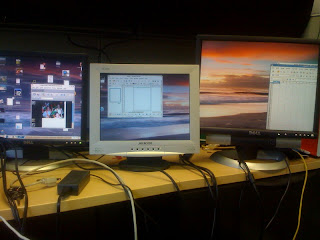
- Support for 2, 3 and 4 concurrent monitors in 2D, along with continued 3D support with one monitor.
In the case of multi-head monitors, X documentation is limited and you kind of have to figure out things on your own. At this point, I have gotten 3 monitors running from a single thin client. I should have the 4th working soon (picture below).
I'm also going to take a peek at the X1250 on-board video card and see how it works. On the older thin clients, we upgraded to 9250s because of their limited capabilities. It will be interesting to see how they work.
The 5735 has a few nice options not found on the 5725:
- Slightly faster CPU
- Analog and Digital on-board video ports vs Analog port
- 1Gb network interface vs 100Mb
- X1250 integrated video card vs SiS
As anyone knows that has supported an enterprise, uniqueness of client devices increases support levels. Thankfully HP has released a build of Debian Etch that runs on both devices! I will be able to make on upgrade and push it live on this mixture of hardware. Very very cool. I'm tuning Etch to run in the manner that we want, and being mindful of my goal of making it run on both devices. My current functionality wish list includes the following changes:
- QA all upgraded packages, including new X drivers and pulse audio
- Experimental cron job to init 0 devices not being used for a few hours. This goes beyond any normal power save modes and completely turns them off. We have users that leave them on for weeks and months at a time.
- Bug fixes for some issues discovered after the first deployment.
- Support for 2, 3 and 4 concurrent monitors in 2D, along with continued 3D support with one monitor.
In the case of multi-head monitors, X documentation is limited and you kind of have to figure out things on your own. At this point, I have gotten 3 monitors running from a single thin client. I should have the 4th working soon (picture below).
I'm also going to take a peek at the X1250 on-board video card and see how it works. On the older thin clients, we upgraded to 9250s because of their limited capabilities. It will be interesting to see how they work.

Wednesday, June 10, 2009
Mesa To The Rescue
My thanks to the people that clarified for me where Qt and GL (Mesa) are used in Google Earth. The earth canvas itself is coming from GL. The first thing I did was try and install an updated version of Mesa built on OS 11. That made things even worse. I then installed the version that shipped with OS 11.1 and it's rock solid. No blinking, no font problems, no areas of the screen turning white.
That Mesa update, along with using newer Qt libraries has produced a very nice looking UI with anti-aliased fonts. Now all I need to do is QA the ability to launch Firefox and Evolution from within the software, and it's ready for deployment.

Update: Interestingly, using the trick to soft link in the new Qt libraries for anti-aliased fonts breaks printing and the edit >> copy image feature. I suspect that users will kind of need that. :) I have reverted back to the shipped Qt libraries and things are running well. I have not been able to figure out exactly what GE does when you click on the email button. It's supposed to pass the mailto: tag to Firefox, which it seems not to do. $BROWSER pointing to Firefox doesn't seem to help either. The File >> View In Google Maps option works fine and calls Firefox. Time to strace and see what it's doing.
[ Shot of GE with stock Qt libraries, sorry to see anti-aliasing gone]

That Mesa update, along with using newer Qt libraries has produced a very nice looking UI with anti-aliased fonts. Now all I need to do is QA the ability to launch Firefox and Evolution from within the software, and it's ready for deployment.

Update: Interestingly, using the trick to soft link in the new Qt libraries for anti-aliased fonts breaks printing and the edit >> copy image feature. I suspect that users will kind of need that. :) I have reverted back to the shipped Qt libraries and things are running well. I have not been able to figure out exactly what GE does when you click on the email button. It's supposed to pass the mailto: tag to Firefox, which it seems not to do. $BROWSER pointing to Firefox doesn't seem to help either. The File >> View In Google Maps option works fine and calls Firefox. Time to strace and see what it's doing.
[ Shot of GE with stock Qt libraries, sorry to see anti-aliasing gone]

Monday, June 08, 2009
Anti-Aliased Images In OpenOffice 3.1 Over NX
We just got a support call from a user at a remote site running NX at 20Mb. He reported that ever since OpenOffice 3.1 was installed, images are moving very slowing in Draw. 3.1 introduced anti-aliased images, so that was my first thought. I had him disable this new setting, and he said it immediately got faster. I just tested at 100mb, and it's doing the same thing. Slow scrolling and movement.

Thanks for all of the comments and ideas on the Qt/Google Earth 5 font rendering problems. Over the next few days, I'll be tinkering with libraries to see if I can make it work better.

Thanks for all of the comments and ideas on the Qt/Google Earth 5 font rendering problems. Over the next few days, I'll be tinkering with libraries to see if I can make it work better.
Friday, June 05, 2009
Calling QT Gurus
I'm prepping Google Earth 5 for deployment, and found an issue that appears to be a bug/peculiarity in the QT libraries. When you first launch it, everything is working and nicely anti-aliased. But as you start navigating through the maps the fonts all blink and then turn into white blocks (shot below). If you go into preferences and pick another font, then it seems to repaint and fix itself. I haven't tinkered with QT stuff since we moved from KDE to GNOME, so if anyone has some ideas...drop a comment!


Firefox 3.0 Stable, Moving Live
Normally when I am staging an upgrade, I will use the latest release -- even if it's only in beta. I spent time off and on testing Firefox 3.1/3.5 and was never able to get it stable enough to deploy. It was crashing way too much, and the core problem seemed to be the interaction with the Flash 10 plugin. I know, I know....3.1/3.5 is still a beta release. But one hates to move out a version into production that is nearly obsolete.
Anyway, I have installed 3.0.10 and all of the plugins including Flash are extremely stable and working well. I'm getting fairly decent frame rates to the thin clients, and the pulse audio streams are working well. I also had good luck with the FoxTab 3D plugin and that too will be pushed live as part of the upgrade too.
I also have been spending time on Evolution 2.24/SLED 11. We have about 30 fulltime users on it, and it's slowly inching to the finish line. We have one more major feature to include (resend of a meeting from the Sent folder). Then comes bug hunting, crash reductions and then some valgrind/leak hunting.
Anyway, I have installed 3.0.10 and all of the plugins including Flash are extremely stable and working well. I'm getting fairly decent frame rates to the thin clients, and the pulse audio streams are working well. I also had good luck with the FoxTab 3D plugin and that too will be pushed live as part of the upgrade too.
I also have been spending time on Evolution 2.24/SLED 11. We have about 30 fulltime users on it, and it's slowly inching to the finish line. We have one more major feature to include (resend of a meeting from the Sent folder). Then comes bug hunting, crash reductions and then some valgrind/leak hunting.
Saturday, May 30, 2009
Evolution Picture Gallery Under Development
During the 2008 UI Summit, one of the things that I mentioned is that once people get a file manager in software, you lose them. They don't understand navigation and files and directories (right Sebastian Faubel?). The two most popular features in OpenOffice believe it or not are the email button which automatically attaches the current document to Evolution, and also the picture gallery. When you click on the picture gallery button, clipart and photos are displayed and they can drop and drag them right into OOo Writer.
Pepp and Mbarnes have hacked on a patch to integrate that feature into Evolution. The beauty of the patch is that it consumes no real estate for those that don't want to use it. We currently have an icon on the desktop that opens Nautilus with emoticons and city logos; once this patch is merged I'll be able to move all of those pictures directly into Evolution.
OpenOffice allows you to add your own Galleries, so in theory the two could be synced for consistency.

Pepp and Mbarnes have hacked on a patch to integrate that feature into Evolution. The beauty of the patch is that it consumes no real estate for those that don't want to use it. We currently have an icon on the desktop that opens Nautilus with emoticons and city logos; once this patch is merged I'll be able to move all of those pictures directly into Evolution.
OpenOffice allows you to add your own Galleries, so in theory the two could be synced for consistency.

Thursday, May 28, 2009
New Impress Layouts Landed In Milestone 49
Our bountied OpenOffice change to add two new layout types landed in milestone 49. My thanks for Sun for accepting the patch and getting it merged so quickly. This will be a big help for our users.

Our other bounty, adding sentence case, is currently going through review and will require an OASIS file specification change. But it's getting attention, and moving.
Thanks Pepp!

Our other bounty, adding sentence case, is currently going through review and will require an OASIS file specification change. But it's getting attention, and moving.
Thanks Pepp!
Wednesday, May 20, 2009
Tuning For Evolution 2.24
Now that SLED 11 has been released and our server has arrived, I am in the process of prepping Evolution 2.24 for citywide deployment. The server has been built and configured, and today for the first time I started load testing. I am tuning for 300 concurrent, which Evo 2.6 on SLED 10 easily handles. With a user load of 21 people, I was getting the results below. Not good. Notification-daemon + dbus were chewing up tons of CPU.

With some tips in #evolution and poking around I made the following changes to the Evolution launch script:
/usr/bin/gconftool-2 --type Boolean --set /apps/evolution/eplugin/mail-notification/dbus-enabled False
/usr/bin/gconftool-2 --type Boolean --set /apps/evolution/eplugin/mail-notification/status-blink-icon False
/usr/bin/gconftool-2 --type Boolean --set /apps/evolution/eplugin/mail-notification/status-enabled False
/usr/bin/gconftool-2 --type list --list-type string --set /apps/evolution/eplugin/disabled "[org.gnome.evolution.sa_junk_plugin,org.gnome.evolution.mail_notification]"
This turns off all things blinking, dbus and calling the notification-daemon and now it's running much better. We already have a mail-notification popup applet running, and the alarms daemon will provide notification of meetings.
I will continue to tune over the coming weeks.
This is making me ponder how well newer versions of the GNOME desktop are going to scale on multi-user servers. Just a friendly reminder to people working on this code; keep those of us running hundreds of people in mind! :)
Update: Here is the same user load after the changes.


With some tips in #evolution and poking around I made the following changes to the Evolution launch script:
/usr/bin/gconftool-2 --type Boolean --set /apps/evolution/eplugin/mail-notification/dbus-enabled False
/usr/bin/gconftool-2 --type Boolean --set /apps/evolution/eplugin/mail-notification/status-blink-icon False
/usr/bin/gconftool-2 --type Boolean --set /apps/evolution/eplugin/mail-notification/status-enabled False
/usr/bin/gconftool-2 --type list --list-type string --set /apps/evolution/eplugin/disabled "[org.gnome.evolution.sa_junk_plugin,org.gnome.evolution.mail_notification]"
This turns off all things blinking, dbus and calling the notification-daemon and now it's running much better. We already have a mail-notification popup applet running, and the alarms daemon will provide notification of meetings.
I will continue to tune over the coming weeks.
This is making me ponder how well newer versions of the GNOME desktop are going to scale on multi-user servers. Just a friendly reminder to people working on this code; keep those of us running hundreds of people in mind! :)
Update: Here is the same user load after the changes.

Tuesday, May 19, 2009
Hero Of The Week: Chen
No offense to my other heros, but the award this week goes to Chen. :) He just merged into Evolution the first set of patches to allow users to retract/resend meetings with the Groupwise backend. This is a HUGE thing for us, and we are very thankful.


Friday, May 15, 2009
PDFShuffler Is Wonderful
My thanks for the comment that pointed me to PDF Shuffler. What an awesome piece of software, and a big help for us. When I first tested it, it only supported 24 bit color. I submitted a bug report and within a few days it was already fixed to work in 16 bit as well.
You drop and drag PDF pages right into the UI, and all of the pages load as thumbnails. You can then shuffle them into any order you want, and you can delete individual pages with a right mouse click.
I have already taken some initial steps to possibly bounty out a few more features:
- Drop and drag of photos which insert as a PDF page
- Drop and drag of OpenDocument files which convert to PDF pages.
- Running total at the bottom to show total number of pages, and total file size of the resulting PDF.

You drop and drag PDF pages right into the UI, and all of the pages load as thumbnails. You can then shuffle them into any order you want, and you can delete individual pages with a right mouse click.
I have already taken some initial steps to possibly bounty out a few more features:
- Drop and drag of photos which insert as a PDF page
- Drop and drag of OpenDocument files which convert to PDF pages.
- Running total at the bottom to show total number of pages, and total file size of the resulting PDF.

Wednesday, May 13, 2009
OpenOffice 3.1 Stable, Thank You
On Monday night I installed and configured OpenOffice 3.1 for the whole City. Once again it was painless and I just had to make the change once. We didn't get ONE call about the upgrade and no bugs have been reported. I know that means that un-named people are QAing this behind the scenes. So my thanks to all of you.

The server is running as expected and user load rarely is going over 10%. The shot below is how it looks with 125 concurrent OpenOffice sessions running. I guess having a 4 CPU, Quad Core kind of helps. :)


The server is running as expected and user load rarely is going over 10%. The shot below is how it looks with 125 concurrent OpenOffice sessions running. I guess having a 4 CPU, Quad Core kind of helps. :)


Wednesday, May 06, 2009
Experimental GUI For Users
As a very "back burner" project I have been experimenting with some ideas to assist our users. It has not been successful to explain file types (pdf, odt, jpg), or concepts like megapixels to most of them.
Here is what they struggle with from their perspective:
1) Sending pictures to other people via email and not getting it rejected because their email system won't accept the file size. 10 megapixel? What's that? What is 2MB?
2) Having dissimilar files and wanting to put them together into one PDF. OpenOffice reads odt's great; but PDFs only kind of load into Draw, how do I merge that together? Ok, now I inserted my 10 megapixel picture into Openoffice and used the corner handles and have made it 1 inch by 1 inch. That makes it smaller right? Why after a photo resize is the document still so big?
3) I want to use licensed software like Adobe Acrobat Pro because it lets me merge pieces together, I don't care that it's expensive and I only want to use 1% of the features.
4) Our vendor shipped us a PDF and now I need to merge it with my own odt and create a new PDF.
I have been tinkering with an idea to create a simple GUI to let them just drop and drag files (OpenDocument, Pictures and PDFs) into 12 positions and then it makes certain sizing decisions automatically. It then allows them to build a merged PDF with one click. No file managers would be found, everything is drop and drag. Maybe this is an early prototype for a module that should be in OpenOffice? A document sorter screen for putting pieces together?
I don't get to hack all that often anymore and don't know python and GTK in the manner I wish I did. I built the screen in Glade-2, and am stuck at how to activate the Buttons to accept a drop and drag from Nautilus. I know this is super simple for someone that does this all the time. If you want to throw me a bit of code in the comments, it's appreciated. I want to detect the release of the file into the button area, and then load the file path that it sends into a field that I can use for processing. I'm going to then have it build a thumbnail of the first page of that piece, and then update the Total Pages and Total Size fields so they can see how big it is as they go.
I'll blog about this GUI further when I get it actually working and have tried it with users to see how it works.
PS: No GUI Nazis please :)

Here is what they struggle with from their perspective:
1) Sending pictures to other people via email and not getting it rejected because their email system won't accept the file size. 10 megapixel? What's that? What is 2MB?
2) Having dissimilar files and wanting to put them together into one PDF. OpenOffice reads odt's great; but PDFs only kind of load into Draw, how do I merge that together? Ok, now I inserted my 10 megapixel picture into Openoffice and used the corner handles and have made it 1 inch by 1 inch. That makes it smaller right? Why after a photo resize is the document still so big?
3) I want to use licensed software like Adobe Acrobat Pro because it lets me merge pieces together, I don't care that it's expensive and I only want to use 1% of the features.
4) Our vendor shipped us a PDF and now I need to merge it with my own odt and create a new PDF.
I have been tinkering with an idea to create a simple GUI to let them just drop and drag files (OpenDocument, Pictures and PDFs) into 12 positions and then it makes certain sizing decisions automatically. It then allows them to build a merged PDF with one click. No file managers would be found, everything is drop and drag. Maybe this is an early prototype for a module that should be in OpenOffice? A document sorter screen for putting pieces together?
I don't get to hack all that often anymore and don't know python and GTK in the manner I wish I did. I built the screen in Glade-2, and am stuck at how to activate the Buttons to accept a drop and drag from Nautilus. I know this is super simple for someone that does this all the time. If you want to throw me a bit of code in the comments, it's appreciated. I want to detect the release of the file into the button area, and then load the file path that it sends into a field that I can use for processing. I'm going to then have it build a thumbnail of the first page of that piece, and then update the Total Pages and Total Size fields so they can see how big it is as they go.
I'll blog about this GUI further when I get it actually working and have tried it with users to see how it works.
PS: No GUI Nazis please :)

Thursday, April 30, 2009
Google Earth Look Bad?
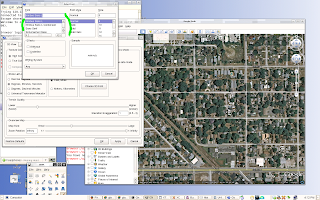
While waiting for our Fedora ISO to download, I have been tinkering with some small-ish projects. There have been some calls about the font rendering in Google Earth 4. I brought down version 5 for testing and found the fonts were still not anti-aliased and looked terrible on our GNOME desktop. This post explains that Google seems to ship static QT libraries that do not render well. The post explains how to move the shipped libraries out of the way and then softlink into the QT libraries which exist in /usr/lib. Google Earth now looks wonderful. I'm going to come up with settings that work well with remote display and Compiz and push this all out to users in the coming weeks.

Prepping For OpenOffice 3.1
There are always multiple projects moving ahead concurrently. OpenOffice 3.1 is almost done, so this afternoon I have been prepping the dialog the users will see the first time they launch the newest release. Users won't navigate to web pages, won't read the release notes, and won't read a long message describing everything that has changed. This GUI just gives them a short overview, and hopefully a few people will scroll down and see the new features. It only runs once, and then puts a dot file in $HOME.
We also encourage users to run OpenOffice at home, so we give them a checkbox to request media for the latest version. We will then burn them a copy of the software for Windows and Mac and interoffice it to them. A shot of the dialog is below.

On another note, this blog concerning OpenDocument support in SP2 of Microsoft Office 2007 is a huge win for all of us. As organizations begin to upgrade, we will not longer have to train users to store in .odt here, and then always email as .doc to outside vendors and contacts. My thanks to everyone that worked hard to pressure Microsoft to add this feature. This issue seems to have been driven mostly outside the United States; so my thanks to everyone around the world.
We also encourage users to run OpenOffice at home, so we give them a checkbox to request media for the latest version. We will then burn them a copy of the software for Windows and Mac and interoffice it to them. A shot of the dialog is below.

On another note, this blog concerning OpenDocument support in SP2 of Microsoft Office 2007 is a huge win for all of us. As organizations begin to upgrade, we will not longer have to train users to store in .odt here, and then always email as .doc to outside vendors and contacts. My thanks to everyone that worked hard to pressure Microsoft to add this feature. This issue seems to have been driven mostly outside the United States; so my thanks to everyone around the world.
Wednesday, April 29, 2009
Dear Adobe, Please Stabilize Flash
I continue to test Firefox 3.1 with Flash 10 and have found it to *extremely* unstable:
Program received signal SIGSEGV, Segmentation fault.
0xae6b610d in ?? () from /u/firefox_3100b3/firefox/plugins/libflashplayer.so
(gdb)
Frame rates and sound both seem better than 9, but it crashes constantly during testing. Right now there is no way I could deploy the most recent release.
Adobe: It's great that flash is so widely used, people must like using it for content development. But with this much content on the web, you always need to provide a quality player too. I understand that many companies have made cuts in staff, and I would be happy to help debug it for you. Please think about deploying bugzilla for Acrobat Reader and the Flash Player. Please, help us help you!
PS: Already tested swfdec, it's no where near ready for enterprise deployment.
Update: Having some better luck with FF 3.5B4, not crashing as much as B3; but still crashing more than it should.
Update2: Lots of ideas and things to try from the comments. I'm now testing older builds of Flash 10 to see if they provide better stability (current is r22, I have r15 here too). I'm also going to try using Firefox 3.0.X builds and see if that works better too. I had been using the 3.1/3.5 builds with the anticipation that it would be released the same time as this new server goes live. The video card we have is ATI 9250. I'll test over other video cards, and also test with a new version of pulseD.
Update3: OpenSuse 11.1 seems to have some GTK issues that are making the testing process difficult for me. Current plan is to blow the server and load with Fedora Core 10 and see if that works better. OpenSuse/Stable seems to still have some file manager bugs, with the GUI constantly bouncing around the screen and resizing.
Program received signal SIGSEGV, Segmentation fault.
0xae6b610d in ?? () from /u/firefox_3100b3/firefox/plugins/libflashplayer.so
(gdb)
Frame rates and sound both seem better than 9, but it crashes constantly during testing. Right now there is no way I could deploy the most recent release.
Adobe: It's great that flash is so widely used, people must like using it for content development. But with this much content on the web, you always need to provide a quality player too. I understand that many companies have made cuts in staff, and I would be happy to help debug it for you. Please think about deploying bugzilla for Acrobat Reader and the Flash Player. Please, help us help you!
PS: Already tested swfdec, it's no where near ready for enterprise deployment.
Update: Having some better luck with FF 3.5B4, not crashing as much as B3; but still crashing more than it should.
Update2: Lots of ideas and things to try from the comments. I'm now testing older builds of Flash 10 to see if they provide better stability (current is r22, I have r15 here too). I'm also going to try using Firefox 3.0.X builds and see if that works better too. I had been using the 3.1/3.5 builds with the anticipation that it would be released the same time as this new server goes live. The video card we have is ATI 9250. I'll test over other video cards, and also test with a new version of pulseD.
Update3: OpenSuse 11.1 seems to have some GTK issues that are making the testing process difficult for me. Current plan is to blow the server and load with Fedora Core 10 and see if that works better. OpenSuse/Stable seems to still have some file manager bugs, with the GUI constantly bouncing around the screen and resizing.
Thursday, April 23, 2009
Flash On Flash With Pulse
I think that I have gotten Flash working with pulse now to our thin clients. Here are my work notes in case this helps anyone.
From our old system, this was what the daemon reported when playing Youtube videos:
I: client.c: created 27 "Native client (TCP/IP client from 128.222.233.233:53650)"
I: client.c: client 27 changed name from "Native client (TCP/IP client from 128.222.233.233:53650)" to "flashplayer"
I: module-volume-restore.c: Restoring volume for
I: module-volume-restore.c: Restoring sink for
I: sink-input.c: created 20 "playback" on oss_output.dsp with sample spec s16le 2ch 44100Hz
D: memblock.c: Memory block too large for pool: 1048576 > 16376
D: memblockq.c: memblockq requested: maxlength=132300, tlength=88200, base=4, prebuf=87318, minreq=882
D: memblockq.c: memblockq sanitized: maxlength=132300, tlength=88200, base=4, prebuf=87320, minreq=880
Here is the same page on OpenSuse 11.1
I: client.c: created 31 "Native client (TCP/IP client from 128.222.233.236:38065)"
I: client.c: client 31 changed name from "Native client (TCP/IP client from 128.222.233.236:38065)" to "flashplayer"
I: module-volume-restore.c: Restoring volume for
I: module-volume-restore.c: Restoring sin k for
I: sink-input.c: created 22 "playback" on oss_output.dsp with sample spec s16le 2ch 44100Hz
D: memblock.c: Memory block too large for pool: 1048576 > 16376
D: memblockq.c: memblockq requested: maxlength=4194304, tlength=44100, base=4, prebuf=44100, minreq=8820
D: memblockq.c: memblockq sanitized: maxlength=4194304, tlength=44100, base=4, prebuf=44100, minreq=1
D: memblock.c: Pool full
D: memblock.c: Pool full
D: memblock.c: Pool full
D: memblock.c: Pool full
D: memblock.c: Pool full
The sound would play for a short while, and then get choppy. The browser would start to gray out and eventually freeze.
I then started looking around and found that many people were mentioning that libflashplayer was no longer needed and to use the Alsa-Pulse "device" instead to increase browser stability. I straced aplay and could see that it was looking for /etc/asound.conf which it was not finding. I looked in the directory and noticed that asound-pulse.conf is what was loaded instead. I soft-linked it into asound.conf and aplay -Dpulse started to work as expected. I then removed libflashplayer.so and started up Firefox and it's working *much* better now. The pulse daemon is no longer getting hammered with spewage.
Things like this really make you want to put in a little classic Queen. :)

From our old system, this was what the daemon reported when playing Youtube videos:
I: client.c: created 27 "Native client (TCP/IP client from 128.222.233.233:53650)"
I: client.c: client 27 changed name from "Native client (TCP/IP client from 128.222.233.233:53650)" to "flashplayer"
I: module-volume-restore.c: Restoring volume for
I: module-volume-restore.c: Restoring sink for
I: sink-input.c: created 20 "playback" on oss_output.dsp with sample spec s16le 2ch 44100Hz
D: memblock.c: Memory block too large for pool: 1048576 > 16376
D: memblockq.c: memblockq requested: maxlength=132300, tlength=88200, base=4, prebuf=87318, minreq=882
D: memblockq.c: m
Here is the same page on OpenSuse 11.1
I: client.c: created 31 "Native client (TCP/IP client from 128.222.233.236:38065)"
I: client.c: client 31 changed name from "Native client (TCP/IP client from 128.222.233.236:38065)" to "flashplayer"
I: module-volume-restore.c: Restoring volume for
I: module-volume-restore.c: Restoring sin
I: sink-input.c: created 22 "playback" on oss_output.dsp with sample spec s16le 2ch 44100Hz
D: memblock.c: Memory block too large for pool: 1048576 > 16376
D: memblockq.c: memblockq requested: maxlength=4194304, tlength=44100, base=4, prebuf=44100, minreq=8820
D: memblockq.c: memblockq sanitized: maxlength=4194304, tlength=44100, base=4, prebuf=44100, minreq=1
D: memblock.c: Pool full
D: memblock.c: Pool full
D: memblock.c: Pool full
D: memblock.c: Pool full
The sound would play for a short while, and then get choppy. The browser would start to gray out and eventually freeze.
I then started looking around and found
Things like this really make you want to put in a little classic Queen. :)

Subscribe to:
Posts (Atom)