Monday, June 18, 2007

Printers And Printing

Everyone that knows me, knows that when I mention improvement areas I do so only to alert people about the things that make my job more difficult as an Administrator. It's always my goal for these projects to improve and market share to increase.

Last week I blogged about Cairo not working on 8 and 16 bit Xservers. We are still struggling with this issue as I do my best to implement new versions of software.

This has felt like a Monday as I struggle with printing. Techie people hate printers, and I am in that camp. We sometimes have a very hard time understanding why people won't just look at things on their computer screen. 99.9% of people have the opposite viewpoint. Unless software prints well, it's a failure. I cannot stress how much users love their printers and holding paper. Unfortunately, this important feature to users is the least developed and mature on Linux. We (and I group myself with all of you) just don't get it.

I have a brand new OpenSuse 10.2 server that I am trying to fully implement. Here is the current user experience with printing on this OS. I'm not picking on OpenSuse, because all of the flavors have the same basic problems:

1) I have blogged about this before. Here is how Acrobat looks to the users when selecting a printer. Note the white space in the widgets. Someone told me this was being fixed, but apparently that hasn't been built into new OS's. (shot of printer selection below) We have 60 printers and they have to scroll up through the widget to find their printer.


2) Sometimes people ask why I don't use Evince instead of Acrobat. Well, it's even worse. My bug report today indicates this is the new printer dialog, and now the report was pushed over to gtk+. First of all the printers don't display, and require users to enter their own printer commands (ack!). And then even if they enter the right command, it still doesn't work. The print job is stuck until evince is closed. (shot of new dialog below). And because of "internet time", even if a fix is made in the most recent library versions, I'm stuck with no fix for OpenSuse 10.2 because it's too 'old'.


3) So why not use eog for these tiff images right? Well firstly it won't load multi-page images and on OpenSuse 10.2 and SLED 10 it prints the first page as a solid black box. (shot of output of tiff black output). This is how images print from Evolution as well, it's not just a eog problem.


4) And the user experience is made worse by the fact that some operating systems make the default printer the default for all users. The printers don't "stick" and have to be reset each time they print...making them go through all of the bad dialogs mentioned above. (shot of yast2 setting a system wide printer for *all* users).


5) When you print a calendar from Evolution, it doesn't print the "Location" which is the second most useful piece of information. Many power users print their daily calendars and walk from meeting to meeting...but have hand write the location information on the printout.


I have been having some conversations with the Tomboy and Evolution developers about adding additional printer options and hope that all of the projects consider this in the design. If you want to earn the love of users, make them print well and with many options.

[ Update ] The evince developers showed me how to build evince using the old style printer dialog, and now that's working. Turns out that the cups backend is not enabled on the new printer dialog on OpenSuse 10.2. It's a compile time option and is set to file,lpr instead of file,cups.

Tuesday, June 12, 2007

When Major Problems Are Left Open

There are a lot of developers out there, and I certainly understand that everyone is busy. I'm sure that everyone perceives that their bugs are important, but in some cases certain issues should be blockers and resolved. It's always fun to work on new features, but I sure would trade those features for stability.

At some point GNOME started using Cairo...which fails to support 8 and 16 bit color depth on Citrix Metaframe for Unix Xservers:

Error: Cairo does not yet support the requested image format:
Depth: 16
Alpha mask: 0x00000000
Red mask: 0x00007c00
Green mask: 0x000003e0
Blue mask: 0x0000001f

Error: Cairo does not yet support the requested image format:
Depth: 8
Alpha mask: 0x00000000
Red mask: 0x00000000
Green mask: 0x00000000
Blue mask: 0x00000000

I entered bug reports April of 2006 and then again February of 2007 and here we sit. We are finally at a point where I can't keep older versions of operating systems running and *have* to upgrade. I have to check color depths when users launch applications in GNOME and for these 2 depths I have to use xmessage for the dialog because zenity too won't work. Not cool. Support is having to alter settings in devices and take support calls and in some cases we will have users that have a few applications that are down until our new thin clients arrive.

Can we get some love in these areas so that we get back to what worked fine 5 years ago?

[Update] Research and checking the bug reports have indicated a lot of people having these types of problems. This library should not have been pushed into GNOME until it was ready. These aren't minor issues!

Friday, June 08, 2007

It Doesn't Matter If I Can Use It

My blogs over the last year have been mostly technical, and *my* thoughts and usage of technology. But in a way, it doesn't matter if I can use it. Without users, there is no need to have System Administrators. It's my job to act as a buffer for the users, and try and monitor changes in technology that are fits for a business environment.

We have about 10 people using our new thin clients on a 3D desktop, and they are having success and enjoy the experience. So I wanted allocate one blog to talking about *real* people. These are users that do not care about technical issues, and just want to get their work done on a modern computer network.

The picture below is of Linda. The Executive Secretary for Management Services. When I walked up she was testing the new Chart2 module in OpenOffice and learning how it works. She is a heavy Evolution and OpenOffice user.


The picture below is Sandy, the Executive Secretary for the Fire Department. She heavily uses Evolution and OpenOffice. She is in the process of merging multiple documents into a massive Master Document so that an automatic table of contents can be generated. She also gains access to a few Microsoft Windows applications via Citrix.


The picture below is Jo-Ann, the Executive Secretary from Human Resources. She uses Evolution and OpenOffice very heavily as well.


These 3 people, along with the other testers have provided me with invaluable information and suggestions about little things that can be done to improve the desktop experience. So today, my hat is off to them.

Monday, June 04, 2007

Monday Morning Hexagon

We have a weekly publication called the Monday Morning Briefing that is pushed to desktops each Monday. When you log in after a new one has been published, it opens immediately in Acrobat Reader. Needless to say I'm not in favor of this intrusive window, but lost the battle to people higher in our City org chart. When people sign your paycheck, you do what they say. :)

I'm experimenting with a method to extract the first 2 pages of the document and putting it on the top and bottom of our 3D workspace hexagon. People would then see it when flipping between views and could flip it down to read the content. I built this prototype with OpenOffice. I created a custom paper size of 11" x 11" and then simply exported it to PNG format. It needs some work to make the fonts easier to read, but I kind of think it makes good use of that real estate.

Those handling the merge of Beryl and Compiz, please make sure the ability to put images on non-cubes is pulled from Beryl...this is a very useful feature.

We are up to 10 fulltime 3D users and things are going well. The biggest thing that people struggle with is the concept that increasing the number of workspaces up from "1" actually gives you multiple hexagons. The big order of 560 new thin clients is expected to arrive on 6/18. Things will be very busy around here deploying that much hardware....the first time in 10 years we have touched desktops.

(Shot below)

Tuesday, May 22, 2007

500 Thin Clients Available In June/July

I would never blog about something in order to make money. You get enough SPAM already. :) This is an issue of trying to find a good home for working hardware.

In the June/July time frame we (The City of Largo) will be retiring around 500 thin clients. They might be a perfect fit for some kind of academia need, maybe you want to put one into each dorm room for very basic access to the Internet or something? Or maybe you have a non-profit company that needs basic workstations?

They are 10 years old, and obviously not as fast as new thin clients.

Here is what I know will run on them. Keep in mind their age in terms of performance, but they do OK with this software:

* GNOME ( Older versions work better, the last few versions have gotten much slower, but work).
* Firefox ( 2.0 works fine, but you have to use Shock 7 because of endian bugs in 9)
* OpenOffice 2.2
* Evolution ( Older versions, like Suse 9.3 work better for performance. Whatever is slowing down GNOME is slowing Evolution as well).
* xterm for character applications works great.
* X3270 for IBM connectivity works perfectly well.
* GIMP works.

Each thin client will consist of:
1 - NCD Explora 451 thin client running at 33Mhz, X, XDMCP chooser, RISC based.
1 - Power supply
1 - Keyboard
1 - 3 button PS2 Mouse
( No monitors are included)

The terminals have 100Mb ethernet, 1 serial port, 1 parallel port. They have 2MB of video memory and support 1024x768/ 16bit color. We will create a small amount of documentation if they are purchased on getting them to boot and provide any books that we still have.

Unfortunately they cannot be shipped out of the US.

We will be putting them on our web site soon, and we are looking for something like a few dollars for each unit + staff time to pack them + shipping costs.

Leave me a comment if you would like to communicate further.

Friday, May 18, 2007

More Desktop Work And Files

I have been keeping very busy lately. I have been working closely with the Evolution developers to get the last of our Evolution/GroupWise issues resolved so that we can deploy on SLED 10 SP1. That deployment is getting closer and closer, and we are down to only a few showstoppers.

We put a few more people live on HP thin clients and they are helping test the 3D desktop. The Citywide deployment of new thin clients will happen in June/July but we continue to increase the testing groups and are getting good feedback. It's interesting to watch people go from being wide eyed at the new desktop bling, to it being such a normal part of their usage that it's hard to imagine it not be there. Mostly, the 3D desktop is helping with navigation between running software applications. Window management has always been difficult for people, and this seems to really help.

I have mentioned it before: In the last few years I have noticed that increasingly people are struggling with file management skills. I'm finding that people tend to find a file once, and then add shortcuts to their desktop. I know this is coming from using Microsoft Windows at home and in previous jobs. The drawback is that if you ask people to move a file or share it with another employee they are losing skills in directories/folders. 5-10 years ago people would mostly open a software application and then use that program to interact with files; and now they are working in reverse and using the file manager for navigation and using that to launch software.

On our beta desktop I have hooked up the "MIME Bars" that I mentioned previously, and they are working and people seem to be happy with the results. The dialog opens when you double-click on a file in Nautilus and when you interact with attached files in Evolution. This is hiding nearly all of the directory structures and should reduce our support calls greatly. As much as it pains me that we (all of us in the IT field) are losing this file management conceptual issue, it's more important to make it work for the entire Bell Curve of employees and help them be productive.

Each person has a Desktop, Pictures and Documents directory and all applications now attempt to place files into those areas. Shortcuts to those directories are added to their desktop automatically so we can give consistent instructions to all employees. (shot below).


Because of the size of our deployment, each major software application is running on it's own server, so I had to create NFS mounts between the major applications and our NAS server so that they all share files. GNOME wants to have the Desktop and Documents directories in $HOME which would prohibit the desktop from working correctly. In other words, let's say you are running Firefox and tell it to save a file into Desktop, the thumbnail would never show up on your desktop because it's sitting on the wrong server. Sure would be nice to have gconf keys for these items. :) But for now I created softlinks to the NAS as seen below.

Wednesday, May 02, 2007

Spending Taxpayer Dollars

One of the things that amazes me about other Governmental agencies is the huge disconnect they seem to have in regards to where the money is coming from to pay for their computers and infrastructure. People are upset about their property taxes going up, and then go to their jobs and install licensed software without review, and purchase client/server applications and hardware which everyone knows has the highest total cost of ownership. It's shocking beyond your dreams how much money other agencies are spending unnecessarily.

In my almost 15 years of working for Largo, I have always developed plans and tried to implement ideas that find the right balance between functionality and being respectful to those people that are paying the bills, the taxpayers.

Under the watchful and thoughtful eye of myself and our staff, we received approval last night for our new thin client purchase which will be deployed to our entire City. Our current NCD Explora 451 terminals will be retired after a 10 year duty cycle and replaced with a quantity of 560, HP 5725 thin clients. Our price was around $625 each, including upgrade to 1GB memory, 2GB flash drive, optical mouse, PCI expansion slot and ATI video card. Every attempt was made to purchase devices to have the longest possible duty cycle and lowest possible TCO. Duty cycle should fall somewhere between 7 and 10 years. If they last 10 years, that's $62.50 per desktop per year for hardware. What would shorten the duty cycle closer to 7 years would be something coming in technology that we cannot even envision at this time. All of you know how quickly things change.

HP was very excited about our experimental work with 3D desktops to thin clients, and made the required changes to their Debian Linux build to support ATI video cards which can be added to the PCI expansion slot. All employees will have fast and stable devices that support 3D desktops, and 3D software and we can deploy to them software on any operating systems that are the best fit.

Thank you to everyone that has emailed me with your thoughts as they have helped during this R&D process. Also, thank you to everyone that has made software changes to allow your software to run better on thin clients and via remote display. The user experience is improving all the time, and hopefully the taxpayers are happy too.

PS: As of May 1st, our dress code changed and my 15 years of wearing a tie to work has ended. If I seem to have an extra happy kick to my step, you will know why. :)

Friday, April 13, 2007

gnome-terminal Still Too Slow

I was on vacation for almost 3 weeks, and have started to poke again at my various projects.

Over the last 4-5 years, every time that we upgrade or test new versions of GNOME I have tried to slip in gnome-terminal to my beta testers as a replacement for good ol' xterm. gnome-terminal as everyone knows has a much better user interface and fits really nicely in with the rest of our applications. Emulation works fine, and it *should* be ready for primetime. However, as was the case in previous years it's just way too slow to deploy. I keep getting feedback about the 'slowness' of character applications on our network, and must say that I agree. We are using modern thin clients now with RENDER, and any scrolling or cursor movements is still painful. I certainly understand the difference in fonts between gnome-terminal and xterm, but if it cannot be used or deployed they don't have a lot of value. Maybe gnome-terminal needs an option to run old school fonts or rendering for situations such as this?

So, unfortunately for this next round of GNOME upgrade, we are moving ahead with xterm again. gnome-terminal remains my favorite application that I can't use. :)

Shot below is the type of application that I have to deploy along with the version that I tested.

Wednesday, March 21, 2007

Evolution 3.0

Lots of talk about GNOME Of The Future. So I took some time to think about Evolution and reviewed our support calls and came up with my desired Evolution 3.0. I do also feel strongly that we need to sit on a feature freeze for a point release or two and just work on the internals and bug fixes. I also believe that Evolution needs to move away from being a 'clone' and create it's own identity.

There also is a lot of talk about increasing GNOME market share. I really believe the biggest growth area could be in the business environment, and groupware is one of the most important pieces. Email/Calendaring, Web Surfing and Word Processing are the keys to that market segment.

Improvement Areas:
- Proxy into GroupWise creates a massive folder tree, that is too hard for users. For many if they have to scroll too far, they will never find it.
- People have trouble sometimes with window management, and using the stack and working on multiple messages at the same time.
- Searches are not retained.
- Tomboy notes should be better integrated into email messages and calendar events. It sure would be nice to have notes that you have taken and attach them to a meeting.
- People still talk about and miss the old Summary page from version 1. It was nice to get a high level view of various components.
- More thumbnails please in the attachment area.
- Hide things like .zip files from users and extract them into individual files with thumbs. They shouldn't have to know how to extract the files and where to save them.

So I created mockups. Harish, Chen, Varadhan if you could go ahead and have this done over the weekend, that would be great. :)


Thursday, March 15, 2007

Daylight Savings And Then Conference Rooms

This week started out on a sour note with messing around with some daylight savings issues. Apparently some fully patched Suse operating systems still are not working correctly with Evolution syncing with GroupWise calendar data. I poked around and was able to get it working well enough to make it until April. They moved the daylight savings time back to save money and resources, right? :)

Solveig Haugland is here this week teaching OpenOffice classes. The user community has for many years posted paper monthly calendars on the conference rooms with future meetings. This data is helpful, but of course is obsolete the second a new meeting is booked in the room. I have had an idea in my head for a while to place a flat panel monitor in the hallway to perform the same function. So I wrote a small routine to take GroupWise resources and generate a screen showing the current meeting, meetings later in the day, and future bookings. In the case of our IT training room, this allows people walking up the hall to see future computer training opportunities. It's very simple, you just log into an account that has a muted wallpaper and hides the gnome-panel and it kicks off a process that reads the right .ics file. It then sorts and parses the data and then uses ghosd to display the information to the screen. It flashes and reloads every minute. It's kind of cool to watch the classes shift and move up as time progresses through the day.

Shot below of what people see in the hallway on the flat panel monitor:


Thursday, March 08, 2007

MIME Bar Update

Thank you to everyone that responded to my blog about experimenting with creating MIME bars to help users with files. I have made some change based on feedback. Anyone hacking GNOME that wants to work in this area, feel free to hit me up on the IRC. I'm going to focus starting tomorrow on direct printing and being able to bypass starting a full application in order to print. Photos should be pretty easy, and I saw some information about printing OpenOffice documents on the command line. I'll start poking in that area.

Today I pushed out my first Acrobat Document document helper for email and Nautilus to beta testers. I reviewed our support calls and found that we get a lot of requests for help in extracting single pages from a PDF document and then inserting that page into OpenOffice. Often we will receive something like a 20 page PDF file, and they want to include only a few of those pages in a memo they are creating. So I created a button that does that very thing. It runs 'convert' and extracts the pages in PNG format and places them into their Pictures directory. Previously users were using GIMP, and had problems remembering the steps.

Here is the bar that comes up for application/pdf files:


Here is what happens when you select the option to extract the PDF into multiple PNG images. Nautilus creates thumbs of the resulting files.

Tuesday, March 06, 2007

MIME Tiles Testing

I am still working on our next-gen desktop server and have been thinking about problems areas, based on observations and reviewing the support desk calls for the last few years. I'm trying new ideas on the following improvement areas:

- Many users never right-mouse click, ever. They do not understand contextual menus, and their workflow is 1, then 2, then 3. This is similar to old character based software. This doesn't seem to be based on age of employees, it's just how they think and work on computers.

- Most users have no idea about file types, file extensions, where things are saved, and what to name files. They want to click and tell the computer *what* they want to do, versus understanding the steps to make that happen.

- Users butcher file badly, and for instance save documents called David.odt and david.odt in the same directory, which often leads to problems for them later.

- Users do not use option menus well, and program names in applications like Evolution are of no use. GIMP does what? EOG does what? They know OpenOffice, but mostly they want to see words like "Edit", "Save" and "View" versus program names.

- Users do not understand applications like gnome-screenshot. That program has been ineffective because once the dialog comes up, they don't know what to do with the window. Sometimes they want to save it, but they don't know where the file is being saved. Sometimes they want to email it out immediately; but they don't know how to do that with the current UI. And it saves in PNG format, which people not on Linux sometimes cannot open.

So what I am testing, (with positive feedback from our beta group) is MIME application tile bars that I wrote with python/Glade. The bars come up for Pictures, Documents, Acrobat, Video and Audio files with unique options for each. For instance the Picture Bar has replaced gnome-screenshot/PrintScrn, and also comes up when you double-click on photos in Nautilus and when you receive pictures in Evolution. A consistent interface is provided in all interactions with pictures. The tiles then tell them exactly what will happen to the picture, without further skills.

I know this makes advanced users cringe, but I haven't removed their ability to manaually save files and move them around. At the most, it's one more click for them.

Here are shots of what I am testing.

[ Bar launches when you double-click on photo from Nautilus ]
[ When attaching to Evolution, all formats are converted to .JPG. They can still manually drop-drag from nautilus if their skills are more advanced and they understand file formats ]


[ Same bar launches from Evolution on picture attachments]


[ Same bar comes up as drop in replacement for gnome-screenshot ]


[ Documents bar, opens when double-click on OOo and MS Office files ]

Wednesday, February 14, 2007

Clicking And OpenOffice

Clicking

I'm testing new ideas on our new desktop deployment to resolve problems that I have noticed in the last few years of being live on GNOME. One issue is clicking. Users don't understand when to single-click and when to double-click so they just double-click on everything. Shortcuts on the gnome-panel therefore fire off twice and this causes problems. For instance, a script that does a 'evolution --force-shutdown' will run twice and clobber each other. I have a patch that I will apply and test soon that makes the gnome-panel treat both clicks in the same way. This should probably be the default in all distributions. The startup spinning wheel that can be enabled doesn't work well; Users don't see it, and it makes the window manager unresponsive while it's spinning (at least over remote display). Invasive dialogs are not the answer either. I have started testing 'notify-send' and it's working really well. I have been able to resolve another long standing issue: Users don't remember which printer they have selected in their software applications. Often, City employees will move between multiple facilities each with unique printers. So, I am picking up their current printer and sending this information to notify-send as well. Feedback from my 10 beta testers has been very positive. (Shot below)

[ If anyone that develops the gnome-print dialogs wants some feedback on how they work, hit me up on the IRC. They really are not working very well for organizations with lots of users and printers ].


Openoffice

We often get calls from people that are thinking about installing OpenOffice and are unaware that a lot of resources are available for this type of deployment. I am not connected with any of those companies or people, but we have had good results in their services.

ClueSheets.com offers excellent clue cards to hand out to employees.


Brainstorminc.com offers training videos and cluesheets. (For SLED 10 too).


Solveig Haugland has an excellent blog and has a new book on using OpenOffice. She is also available for training and special projects.


Tuesday, February 06, 2007

Desktop Work Continues

I continue to work on the next-gen desktop for deployment. Now that the hardware issues are finished I have started to move 3D thin clients out to regular users for the first time. The immediate feedback was that the 4 sides of the cube didn't provide enough workspaces, so I enabled a hexagon for everyone. It turned out that cubecap images only worked with 4 sides, so the Beryl guys put in a change to allow a PNG image to be placed in the middle of whatever shape you have. (Thank you!). (Seen in shot below) I am finding that users click the mouse and press function keys often by accident and they are stepping into a lot of Beryl gestures without knowing what they did. Compiz I am sure would have the same issue. So, I have eliminated a lot of the shortcuts and made any desired screen effects be very purposeful.

I also saw the announcement of the news-notification applet which is very similar to mail-notification and it's working great. It monitors a RSS file and creates a popup when the file changes. This will allow me to push messages to the entire City at one time with information about hurricanes or other important events. (Seen in shot below).

I have also deployed cairo-clock which seems to run fine over remote display.

I had a short IRC conversation with Federico about how users are struggling with shared documents. Generally, people don't know where things are saved and now after 20+ years of people working on computers, I am losing hope that this concept will ever improve. :) Previously what I did was put all of the important documents in regular GNOME cascading menus and people loved it. Now that we are deploying the main-menu (slab) that won't work. So, I wrote a small python application that simply creates tiles for our documents and then opens them in the appropriate application. (Seen in shot below).

What Nautilus really needs is the ability to create 'filelists' just like you create 'playlists' in iTunes. Playlists are simply groups that organize your music in virtual folders. 'Filelists' should work the same way. Click into the list on the left side and all of the documents appear. This eliminates users having to know where things are, and allows them to organize documents into conceptual groups instead of thinking in terms of directory layouts. Sometimes files that you use are not your own, and you don't have the ability to change the directory names. Filelists should be supported per user, and it should allow global ones that the adminstrator puts in as well for all users.

[ Pics -- Go to my blog if they do not appear]

[Below: Beryl with 6 sides, hexagon cap displaying on the bottom and top. news-notification displaying popup of recently added RSS feed in lower right hand corner]


[Below: Pyton application that creates tiles of frequently used documents. File names are hidden, and descriptions of the documents are displayed instead.]

Thursday, January 18, 2007

What's Going On In Largo

We are moving ahead with our new thin client deployment and upgrade. I have started to make changes to OpenSuse to better interact with our user community. I stripped out the default applications from the main-menu and started to move in our own software. I'll be taking each application and finding a "Group" for it and eliminate the older cascading menus that were previously used. The testing that was done in the creation of main-menu was accurate by my observations; users will barely only go 1 menu deep into cascading menus. Once they find their applications they pull them to the gnome-panel and then never look in those menus again. It's important to keep software options in front of them so they find new things.

This is a shot of main-menu running with just the start of the custom packages. 100s more to go :)


I designed a quick python/glade dialog to help users flip between 2D and 3D. The dialogs on OpenSuse and Fedora are not strong enough for deployment. People need to know what exactly they are changing, and what will happen after it changes. My scripts will automatically detect Xservers that support 3D, and run in 2D when users roam around the City to different devices. (shot of my first dialog is below) [ I tried to put on a users hat when coming up with advantages/disadvantages and they will change.]


The wallpaper is of Clearwater Beach, about 15 minutes from Largo City Hall, here it is if you would like to use it:

Thursday, January 11, 2007

Pieces Of A Puzzle

The pieces of our next generation thin client solution are finally coming together. Today was the first time that I have had all of the required elements working in a manner that exactly simulates the user experience on the right operating systems and servers. I struggled with getting distributions to load and work with our hardware and software requirements.

Right now the fit seems to be Fedora Core 6 for the thin clients, which installed in about a 1.5GB footprint and provides an AIGLX enabled Xserver. OpenSuse 10.2 seems to be the right fit for the desktop server. It was able to compile cleanly the various items I need to be available to the users, including the main-menu (slad) application.

On the shot below (go to my link if the image doesn't appear), I am running what the users will see. Operating systems are completely hidden from them and integrate cleanly into one desktop. A click of an icon, and the right server responds and remote displays output back to the thin client. OpenOffice, Evolution, GNOME, Firefox, Microsoft Windows and Mac OSX applications are all running at once via various remote display protocols...all transparent to the users. Beryl is providing a 3D desktop over the network and modern eye candy.

Friday, December 22, 2006

Beryl Baselines / ATI 9250

The guys at OpenGL and on #beryl-dev were very helpful in increasing my understanding of how Beryl works. There hasn't been a lot of testing done of 3D desktops over remote display, and I volunteered to do what I could to test and improve this type of deployment.

The first step is to build a baseline of how it works now, and then monitor as patches and changes are made. It's my understanding that for a crisp 3D desktop one wants to have around 100 frames per second from the Beryl Benchmark plugin. When you drop below that it works, but feels sluggish.

My baseline is to log into GNOME, start beryl, and have Evolution and one gnome-terminal window open. Based on that benchmark, Beryl runs well for all of the 16 bit color resolutions, and will support 24 bit color in 1024x768. 1024x768 is the standard for 99% of 'Office Workers'. Once you go higher than 1024 in 24 bit color, it begins to slow. The highest I tested was 24 bit color, 1680x1050 which works, but is a bit too slow to deploy. Window movement is not crisp, and applications take a while to render and scroll.

I'll put the Nvidia card back in again after Christmas and perform the same test. Thanks to everyone that is helping me understand how it all works. It's certainly something that could be deployed.

(Benchmarks below, go to my blog if the chart does not appear).

Monday, December 18, 2006

Testing With ATI Radeon 9250

Sometimes things that you think will never work....DO. I have been testing remote displayed 3D presentation from a Fedora Core 6 server, to Fedora Core 6 installed on a thin client. I'm testing the Radeon 9250 card and it seems to be working pretty well. Many thanks for the suggestions and ideas that all of you have sent me. I have already tried Nvidia, and would have liked to have tried an Intel card; but apparently they don't make a PCI based card with that chipset. Contact me if this isn't the case.

A fresh set of Beryl RPMs were just placed under Yum extras and are working pretty well. I was able to compile and install XglSnow for testing and benchmarks. I really thought it would be horribly slow, but it's not running badly at all.

(Shot below, follow link to my Blog if it doesn't display)

Friday, December 08, 2006

Thin Clients And Remote 3D

We contacted two of the big Linux operating system companies and requested some minor technical help in attempting to deploy our next generation thin client solution. Neither had the resources to help, so we are moving ahead and doing the engineering and design in-house. I invite anyone with access to Gartner to read study G00140085.

I believe the mistake being made by these vendors is that they are attempting to install Linux on the personal computer, instead of putting Linux on their desktop. The Gartner study shows that there is a 48% reduction in cost on the Microsoft Windows platform by moving it from an unmanaged PC environment to a centralized design with thin clients. 1/2 the cost, and no change in functionality. Imagine then what the savings would be if companies had the option to move to thin clients *and* Linux at the same. A major part of the cost in the white paper is licenses and software products. Imagine going into companies and telling them that they could save 60-70% on computing costs. Really, trying to shake off Microsoft Windows from their personal computers just isn't enough to warrant a change for most people. It doesn't offer the major cost reductions that are found with a complete, and stable re-design. Centralized computing using thin clients really works. There shouldn't be so few of us implementing and being the voice.

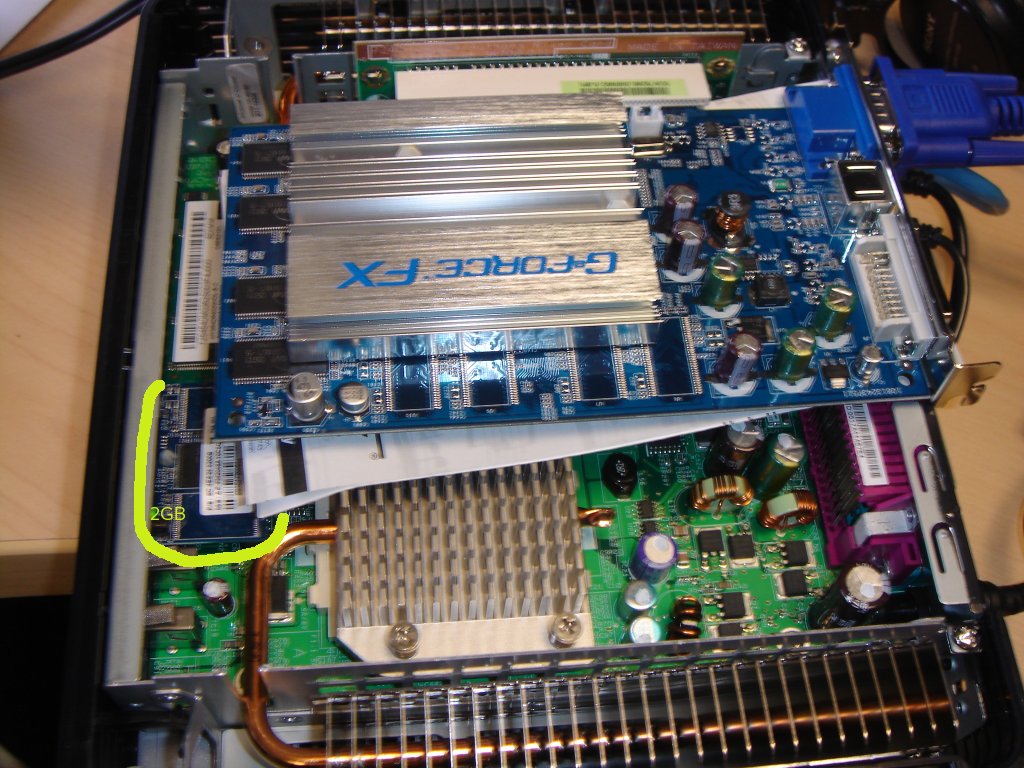
With that, I have been able to make significant headway this week on getting our design goals for our scheduled early 2007 rollout of new thin clients. We are deploying HP 5725 devices, and a new 2GB flash device has become available in the last week. I installed this 'disk drive' into the case and this increased capacity made it a LOT easier to load Linux and GNOME. Many thanks to the email messages and blog responses with ideas. We are going to experiment with some other 3D video cards and also are testing AIGLX instead of XGL. I was able to get Fedora Core 6 to install and with a kernel upgrade and a few packages it was working standalone in 3D.

[ In the shot below you can see the opened case. The flash device is circled. Installed Nvidia card into expansion slot. (Go to my blog if you don't see the images) ]


At this point, it was identical as a personal computer. Everything was running on the thin client. But our design goal is to move this to the server and turn these into thin clients. So we loaded Fedora Core 6 on a computer to simulate a server and then logged in remotely with XDMCP. The server recognized the video card and performance with Beryl is mostly, excellent; even over a network! We were really amazed at how well this works, even in prototype form. We hobbled together a quick new cubecap and the shot below shows a prototype of what our users will have early next year. This increase in capability will come in around 40 dollars extra per user for the video cards, with a projected duty cycle of 10 years -- and no support at their desks. The GNOME session and 3D elements are pushed down from one big server which is then upgraded every 3-4 years for hundreds of users.

[ In the shot below, Beryl cube running over the network via remote display, with Evolution, GIMP and GoogleEarth ]


Up next, testing of other video cards for performance and ease of installation.

Beryl guys: Nice job on what is running on Fedora Core 6. Some issues that seem to need work over remote display: wobble windows and initial startup time. I hope to work with you in the near future on testing over remote display.

Monday, December 04, 2006

Sometimes It's Just The Bling

Two things in the last few days reminded me about how important desktop bling is to the user community. I tend to focus on the technical and bug issues, and sometimes forget this point.

Last week, I did a 2007 technology preview for about 20 City employees, and showed the 3-D rotating desktop found on newer distributions. They were simply amazed and there was a gasp in the room.

Today I took a few minutes to download some free wallpapers for the Christmas holidays. I also compiled the 'oldie but goodie' Xsnow for those people that are helping me test SLED 10 on thin clients. When I first saw it 10 years ago, it was such a server and network hog that it wasn't something that could be deployed. With the technology of today, it barely even shows up on the process list. For some reason I remembered that it didn't work well with GNOME, but obviously this has been fixed. Snowflakes drop down from the top and stack on the top of windows in your current view. (Shot below, follow link to my blog if it doesn't display)


Ok, back to bug reports now :)