Yup, I now it's old. We have NFS server running on OpenSuse 10.3 and everything is working great. We now have a circumstance where we need detailed logging to this machine for a short period of time and the command line arguments for rpc.mountd don't seem to work as I expect them.
By appending --debug all (and optionally --foreground to run on the foreground) I was expecting to see lots of spewage and be able to monitor all NFS activity including reads, writes and deletes in realtime. But the only thing that is bring reported is when the initial mount comes from the client. All interaction with files creates no logging at all.
I thought maybe this was a syslog problem, and thus ran it in the foreground and expected to see this information displayed; yet I'm getting no logging at all.
Drop me a line in the comments area if I'm having a conceptual failure in this area. :) I also have been looking for a description of the debug levels (all, auth, call, general and parse)...yet no man pages seem to tell you exactly what they mean. I guess this might fall under 'read the source code'?
Happy weekend all.
Friday, March 26, 2010

Wednesday, March 17, 2010
Why We Develop With Panther
People are pretty passionate about their development tools, we found something that works for us based on our needs. Maybe if you are in the Government or Business segments, this information will be useful.
The development tools on Linux most commonly in use are great for writing 'desktop applications'. Want an email client? Use C. Want a note taking package? Use Mono. But those tools are not a good fit for our needs. We want to quickly connect to a database, drop and drag fields out, give the users a simple grid and entry system; and then give them quick reports. We always say that the type of software that we write boils down to "enter, list, sort and print". When we get a request, they usually want it finished quickly, and we don't want our staff debugging garbage collection, threads, compilation and fighting every widget interaction. Our custom software isn't as complicated as Firefox or Evolution, and does not need low level languages. We also want it to run on Linux, and carry no runtime licenses.
The other big issue for us is portability and server upgrades. When an operating system or hardware becomes obsolete, you don't want to spend a time messing with stable software trying to get it to work correctly on a new box. It's much easier to just tar it all up and move it over and it just *works*. Sometimes too you move to new operating systems. All of our software started on SCO Unix and then moved to Linux, and we didn't want to have to recompile and debug working applications during that transition. Lastly, when database upgrades and changes come we didn't want to have to touch the software yet again and fight library interactions.
So how did we obtain these goals? We are using a software package called Panther from Prolifics. The way that it works in a nutshell is that when you develop, you are writing GUI layout instructions and logic code into the 'client.lib'. This file itself does not execute and is highly portable. You then get a 'prorun' binary from Prolifics for whatever platform you wish to deploy on, and it converts your UI instructions into native widgets of the current operating system. It's super fast, with a small memory footprint and serves us well.
This image shows how software is deployed with Panther. You develop your screens on any platform, and a runtime engine on other operating systems instantly convert your screens to that platform.

I built a very simple (blingless!) screen to demonstrate. Here is a shot of the development environment running on Linux/X.
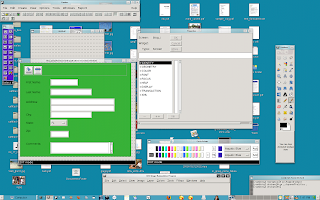
Once your screen is finished all of your instructions are stored in client.lib. You can then pass it to the prorun binary for various platforms unmodified. I do want to be clear that you do of course have to make considerations for the real estate of the various platforms. But Panther does a good job of adding scroll bars to screens when they don't fit. Making this work becomes kind of a art form, and is elegant.
Here is the screen running in Linux/X

If you unset DISPLAY, it instantly runs in character mode. It replicates the widgets as closely as possible, and on a workstation with a mouse, you are able to click into fields and activate the pulldown menus.
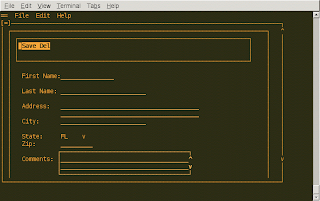
They have a prorun (jserver) process that can go into the cgi-bin directory of your web server and once called converts the client.lib into HTML. Your screens are instantly on the web, unmodified. In theory you could NFS mount the client.lib file and run the same code on MS WIndows, Linux/X, Linux/Character and on the web. Any changes you made instantly were deployed to all users.
Here is the screen running in the webserver.

Here is the same screen running on Microsoft Windows.
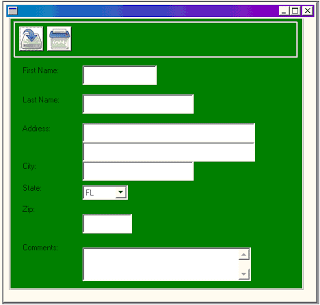
So for the last few months I have been working with our Integration staff in making Panther fit better into the GNOME desktop. Artwork is being upgraded and all hard coded colors are being removed. GNOME themes automatically set old school X resources as closely as possible to the right colors, which Panther picks up nicely. These steps along with anti-aliased fonts in newer versions of Motif have allowed us to deliver better looking software. The shots below demonstrate a deployed screen, with colors picked up from GNOME theme.


Linux is a wonderful runtime environment for running custom in-house software, and maybe this post has given you some ideas for your own organization.
Update: Receiving and uploaded Microsoft Windows screenshot.
The development tools on Linux most commonly in use are great for writing 'desktop applications'. Want an email client? Use C. Want a note taking package? Use Mono. But those tools are not a good fit for our needs. We want to quickly connect to a database, drop and drag fields out, give the users a simple grid and entry system; and then give them quick reports. We always say that the type of software that we write boils down to "enter, list, sort and print". When we get a request, they usually want it finished quickly, and we don't want our staff debugging garbage collection, threads, compilation and fighting every widget interaction. Our custom software isn't as complicated as Firefox or Evolution, and does not need low level languages. We also want it to run on Linux, and carry no runtime licenses.
The other big issue for us is portability and server upgrades. When an operating system or hardware becomes obsolete, you don't want to spend a time messing with stable software trying to get it to work correctly on a new box. It's much easier to just tar it all up and move it over and it just *works*. Sometimes too you move to new operating systems. All of our software started on SCO Unix and then moved to Linux, and we didn't want to have to recompile and debug working applications during that transition. Lastly, when database upgrades and changes come we didn't want to have to touch the software yet again and fight library interactions.
So how did we obtain these goals? We are using a software package called Panther from Prolifics. The way that it works in a nutshell is that when you develop, you are writing GUI layout instructions and logic code into the 'client.lib'. This file itself does not execute and is highly portable. You then get a 'prorun' binary from Prolifics for whatever platform you wish to deploy on, and it converts your UI instructions into native widgets of the current operating system. It's super fast, with a small memory footprint and serves us well.
This image shows how software is deployed with Panther. You develop your screens on any platform, and a runtime engine on other operating systems instantly convert your screens to that platform.

I built a very simple (blingless!) screen to demonstrate. Here is a shot of the development environment running on Linux/X.

Once your screen is finished all of your instructions are stored in client.lib. You can then pass it to the prorun binary for various platforms unmodified. I do want to be clear that you do of course have to make considerations for the real estate of the various platforms. But Panther does a good job of adding scroll bars to screens when they don't fit. Making this work becomes kind of a art form, and is elegant.
Here is the screen running in Linux/X

If you unset DISPLAY, it instantly runs in character mode. It replicates the widgets as closely as possible, and on a workstation with a mouse, you are able to click into fields and activate the pulldown menus.

They have a prorun (jserver) process that can go into the cgi-bin directory of your web server and once called converts the client.lib into HTML. Your screens are instantly on the web, unmodified. In theory you could NFS mount the client.lib file and run the same code on MS WIndows, Linux/X, Linux/Character and on the web. Any changes you made instantly were deployed to all users.
Here is the screen running in the webserver.

Here is the same screen running on Microsoft Windows.

So for the last few months I have been working with our Integration staff in making Panther fit better into the GNOME desktop. Artwork is being upgraded and all hard coded colors are being removed. GNOME themes automatically set old school X resources as closely as possible to the right colors, which Panther picks up nicely. These steps along with anti-aliased fonts in newer versions of Motif have allowed us to deliver better looking software. The shots below demonstrate a deployed screen, with colors picked up from GNOME theme.


Linux is a wonderful runtime environment for running custom in-house software, and maybe this post has given you some ideas for your own organization.
Update: Receiving and uploaded Microsoft Windows screenshot.
Thursday, March 04, 2010
18 Second Boot
I have been working in between things on the hp 4410t thin client laptop based on ideas from some of users and IT staff. One thing that was important to me was making it work better than our fat PCs that are used to remotely log into the City network. One part of that goal is making so that it's ready to work as quickly as possible after it's powered on. I stripped out all services not required and have gotten the machine fully booted and networked in 18 seconds. I might be able to shave off a few seconds yet, but I think it's getting pretty close to the fastest possible experience with this hardware. Not bad.
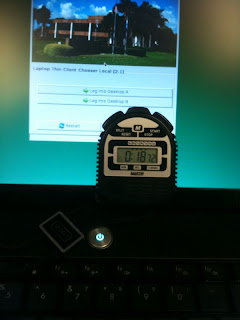
When I'm finished with everything, I'll post a flowchart showing the design flow of network connections and features. I'm working to make this as simple as possible and want to reach a goal of users just having to know to push a single button and everything is networked and ready for their login.
Items left for me tinker with: Backlight issues when moving back and forth to battery, More intelligent WiFi logic to understand whether it's in our buildings to reduce boot times, resolve issue of very buggy x-server-xorg-video-intel (2.9.1-2) on Debian squeeze/sid, remove unneeded packages to try and reclaim a bit more flash drive space and resolve some pulseaudio problems at boot time.

When I'm finished with everything, I'll post a flowchart showing the design flow of network connections and features. I'm working to make this as simple as possible and want to reach a goal of users just having to know to push a single button and everything is networked and ready for their login.
Items left for me tinker with: Backlight issues when moving back and forth to battery, More intelligent WiFi logic to understand whether it's in our buildings to reduce boot times, resolve issue of very buggy x-server-xorg-video-intel (2.9.1-2) on Debian squeeze/sid, remove unneeded packages to try and reclaim a bit more flash drive space and resolve some pulseaudio problems at boot time.
Monday, March 01, 2010
Miserable Admin Things
Some things make the life of an Admin absolutely miserable when you are trying to keep hundreds of users working with adequate performance. My updated /etc/hosts entry sure makes things work better. :)
192.168.99.99 apps.facebook.com

192.168.99.99 apps.facebook.com

Tuesday, February 23, 2010
Various Updates
I haven't posted any new information for a while, but the City has been keeping me busy. Here are the things that I have been working in no particular order.
OpenOffice
I upgraded the whole City to OpenOffice 3.2 this morning. As I have mentioned previously upgrades are very simple when they are deployed from a centralized server. All I do is point the launch scripts to the new version and it immediately goes live. So far, no major support issues.
Firefox 3.6
We went live with 3.6 and so far everything is working well. Performance is good over remote display on multi-user servers. I have already started beta testing 3.7.
Evolution
Migration to the new Evolution has been slower going than I would have liked. We were running a developer build and have now synced to the official release. We found a few regressions and issues, and I sent a document which contains our show stoppers. Hopefully we can get this project finished soon.
Thin Client OS 2.0
I finished our internal "2.0" thin client operating system release and it's starting to be pushed out into widespread use. Another week or so, and I'll be comfortable deploying to our other 550 thin clients. HP released Debian Lenny, and I made all of the modifications required to better support our design goals. The major changelog items: + Increased USB stick supported files + Click sound when USB stick is inserted and removed + Upgraded NX client for remote sites + Graphical first boot which requests information about how thin client will be used and desired resolution and color depth + Merged Intel Xorg drivers + Support for 5745 thin client + Hard code 5735 thin clients to only work in our cyber cafes + Custom Largo splashy at boot + Support for SmartBoard white boards + Removed Xinerama and moved to xrandr. + Automatic shutdown in 3 hours of inactivity + Faster startups and shutdowns.
I'm very pleased with this release, all of our thin clients work with an identical Linux OS.
5745 Thin Client
Our loaner t5745 HP thin client is working *great*. I have started to move it around to regular users who are testing it with their own monitor hardware and their own techniques. Reports are that it's 10-15% faster than the 5725. Nice.
SmartBoard (Electronic White Board)
The new IT conference is finished, and we have deployed an electronic white board. The drivers and software works 100% on Linux, so I installed it in the 2.0 thin client release. That means anyone in the City that wants to use this technology just has to buy the right hardware. The picture below is the smart board mounted to a wall, running off a thin client. You can export these documents into PDF with just a few clicks.

4410t Thin Client Laptop
I have gotten some time to work on the back burner project of adding a thin client laptop into our infrastructure. I'll blog about this in more detail in the coming days. I downloaded some bleeding edge Intel drivers which are buggy, but making progress in the design and work flow. I basically want to make it so that you just turn on the device and within a few seconds you are able to log into our network. I'm experimenting with how best to drop from wired to wireless to EVDO automatically. I'm not reinventing the wheel, just trying to eliminate applets and prompts and just work for our needs and network. Lots to think about.
The picture below is my testing of an EVDO modem, testing ideas on how to handle the phone number and when exactly it should dial. Our number one support issue on fat laptops is networking.

OpenOffice
I upgraded the whole City to OpenOffice 3.2 this morning. As I have mentioned previously upgrades are very simple when they are deployed from a centralized server. All I do is point the launch scripts to the new version and it immediately goes live. So far, no major support issues.
Firefox 3.6
We went live with 3.6 and so far everything is working well. Performance is good over remote display on multi-user servers. I have already started beta testing 3.7.
Evolution
Migration to the new Evolution has been slower going than I would have liked. We were running a developer build and have now synced to the official release. We found a few regressions and issues, and I sent a document which contains our show stoppers. Hopefully we can get this project finished soon.
Thin Client OS 2.0
I finished our internal "2.0" thin client operating system release and it's starting to be pushed out into widespread use. Another week or so, and I'll be comfortable deploying to our other 550 thin clients. HP released Debian Lenny, and I made all of the modifications required to better support our design goals. The major changelog items: + Increased USB stick supported files + Click sound when USB stick is inserted and removed + Upgraded NX client for remote sites + Graphical first boot which requests information about how thin client will be used and desired resolution and color depth + Merged Intel Xorg drivers + Support for 5745 thin client + Hard code 5735 thin clients to only work in our cyber cafes + Custom Largo splashy at boot + Support for SmartBoard white boards + Removed Xinerama and moved to xrandr. + Automatic shutdown in 3 hours of inactivity + Faster startups and shutdowns.
I'm very pleased with this release, all of our thin clients work with an identical Linux OS.
5745 Thin Client
Our loaner t5745 HP thin client is working *great*. I have started to move it around to regular users who are testing it with their own monitor hardware and their own techniques. Reports are that it's 10-15% faster than the 5725. Nice.
SmartBoard (Electronic White Board)
The new IT conference is finished, and we have deployed an electronic white board. The drivers and software works 100% on Linux, so I installed it in the 2.0 thin client release. That means anyone in the City that wants to use this technology just has to buy the right hardware. The picture below is the smart board mounted to a wall, running off a thin client. You can export these documents into PDF with just a few clicks.

4410t Thin Client Laptop
I have gotten some time to work on the back burner project of adding a thin client laptop into our infrastructure. I'll blog about this in more detail in the coming days. I downloaded some bleeding edge Intel drivers which are buggy, but making progress in the design and work flow. I basically want to make it so that you just turn on the device and within a few seconds you are able to log into our network. I'm experimenting with how best to drop from wired to wireless to EVDO automatically. I'm not reinventing the wheel, just trying to eliminate applets and prompts and just work for our needs and network. Lots to think about.
The picture below is my testing of an EVDO modem, testing ideas on how to handle the phone number and when exactly it should dial. Our number one support issue on fat laptops is networking.

Thursday, February 04, 2010
HP t5745 Externals And Internals
Of course one is always tempted to take apart something that is working fine and see what makes it tick. I have been running the new HP t5745 thin client at my desk for about a week now and it's working really well. Performance still feels about 10% faster than the older model. The Intel Xorg drivers are stable and fast, and I haven't seen any blinking or video problems. Looks like this one is a winner.
The inside is very clean. Memory, Apacer flash module and CPU take up the most space.

The front is well designed; microphone, headphone and two USB ports easily available to the users.

The back is clean, and offers all the ports we need. PS2 ports are appreciated to keep the USB ports clear for other devices.

If you are considering a move to thin clients, this is the best model I have seen to date. With a 400 dollar price point, and anticipated 10 year duty cycle it's certainly attractive. Our 5725s are proving to be solid work horses with very few failures even after 3 years.
The inside is very clean. Memory, Apacer flash module and CPU take up the most space.

The front is well designed; microphone, headphone and two USB ports easily available to the users.

The back is clean, and offers all the ports we need. PS2 ports are appreciated to keep the USB ports clear for other devices.

If you are considering a move to thin clients, this is the best model I have seen to date. With a 400 dollar price point, and anticipated 10 year duty cycle it's certainly attractive. Our 5725s are proving to be solid work horses with very few failures even after 3 years.
Tuesday, January 26, 2010
HP 5745 Thin Client Arrived
Yesterday we received our first HP 5745 thin client, and I'm pleased to say that it's working well so far. The onboard Intel video card supports 3D/Compiz and will not require us to add our own video cards; which will lower their price point by at least 75 dollars. Compiz is fluid and responsive and movement is crisp.
It was really perfect timing for the 5745 to arrive. I had just finished the Lenny update for the 5725s and 5735s and the build installed and booted with very few modifications. So for us, all three models will run the same operating system and have identical features. I just need to write a small amount of auto-detection code for first boot.
In the next few days, I'll take the new thin client apart and take photos of the internals. The new footprint and design is excellent; it's only 1.75 inches wide.

It was really perfect timing for the 5745 to arrive. I had just finished the Lenny update for the 5725s and 5735s and the build installed and booted with very few modifications. So for us, all three models will run the same operating system and have identical features. I just need to write a small amount of auto-detection code for first boot.
In the next few days, I'll take the new thin client apart and take photos of the internals. The new footprint and design is excellent; it's only 1.75 inches wide.

Wednesday, January 06, 2010
XrandR, No More Xinerama
This issue apparently is well documented on the Internet, but it was new to me. Quoted from Wikipedia:
XRandR 1.2
HP ports Debian Linux to our thin clients periodically, and I then take their builds and customize them for our needs. I was pretty excited to be able to deploy Lenny after it was finalized on our hardware. But it turns out that Xinerama support was dropped before xrandr (1.2) was feature complete. After lots of tinkering I was able to get dual screens working, but unfortunately it seems that VGA-0 is hard wired to be your left screen and DVI-0 is the right. When they are flipped, XDM authentication and the GNOME panel open on the right screen which doesn't work well at all. So the net result is that when we touch thin clients that are running two monitors, our support staff is going to have to move cables and move things around. We purposely put the DVI monitor on the left side because it offers a slightly better picture quality.
As was noted in the Wikipedia article, three monitors are not supported at all, so we are going to have to run Etch on users that need that many screens.
I guess the point I wanted to make is that I understand that things need to evolve and move ahead, but there are really people using features like Xinerama. I don't care if something replaces it, but please don't drop the old features until the new ones are working. It's embarrassing that our custom GUI when the thin clients boot the first time looks like this now (Three Monitors is disabled):

XRandR 1.2
XRandR 1.2 only permits one virtual screen per display device. It is not possible to assign each monitor on a device to a different screen (sometimes called "Zaphod" mode), or to combine monitors from multiple devices into a single screen.[3]
One practical limiting effect of this is that it is not possible to run a different WM on each monitor, since window managers are limited to one per screen.
These specific issues are resolved in XRandR 1.3[4], but the Xorg Foundation has been criticised for removing useful, and widely used[citation needed], functionality before an effective substitute is available
(end of Wikipedia snip)HP ports Debian Linux to our thin clients periodically, and I then take their builds and customize them for our needs. I was pretty excited to be able to deploy Lenny after it was finalized on our hardware. But it turns out that Xinerama support was dropped before xrandr (1.2) was feature complete. After lots of tinkering I was able to get dual screens working, but unfortunately it seems that VGA-0 is hard wired to be your left screen and DVI-0 is the right. When they are flipped, XDM authentication and the GNOME panel open on the right screen which doesn't work well at all. So the net result is that when we touch thin clients that are running two monitors, our support staff is going to have to move cables and move things around. We purposely put the DVI monitor on the left side because it offers a slightly better picture quality.
As was noted in the Wikipedia article, three monitors are not supported at all, so we are going to have to run Etch on users that need that many screens.
I guess the point I wanted to make is that I understand that things need to evolve and move ahead, but there are really people using features like Xinerama. I don't care if something replaces it, but please don't drop the old features until the new ones are working. It's embarrassing that our custom GUI when the thin clients boot the first time looks like this now (Three Monitors is disabled):

Monday, December 14, 2009
Etch Becomes Lenny
HP recently released a new thin client operating system based on Debian Lenny for the soon to be released 5745 model. They support the older 5735 as well. While they don't support our 5725s officially, I felt confident that it would work.
When HP released Etch, I made our custom modifications all self contained and easily linked into /etc/rc2.d. So it was easier than ever to accept this upgrade and prep it for release to our employees. Newer X.org and Mesa libraries should make it easier to test gnome-shell and Compiz upgrades. After just a few hours, it's already running and stable. The 5725s worked fine; just needed to install the SiS driver. I should be able to deliver this to additional testers in the next few days. The UI and login screens haven't changed, so they shouldn't even notice a difference.
I am introducing one new feature, which is going through my QA process at this time. We have had a digital smart/white board for a number of years that has been under utilized because it never had a permanent home. IT is getting a new conference room, so it's finally going to get the wall mount it deserves. It works just like a white board with magic markers, except it's done electronically. One picks up 'fake' colored pens, and as you write the 'ink' appears on the screen through a projector. You can then save your pages into PDF or image format, clear the board with a click and start adding more notes. The company (Smart Tech) fully supports Linux, and I am at this time loading their software on our thin clients. This is one of the rare exceptions where the software is better suited to be running locally. So what I did was create a custom XDMCP connection that once activated waits 60 seconds before launching the dashboard type interface used by the board. This gives you enough time to get logged into the GNOME server so the software doesn't sit over your authentication screen. I'll take some pictures of the board in operation once everything is tested and the room is finished.
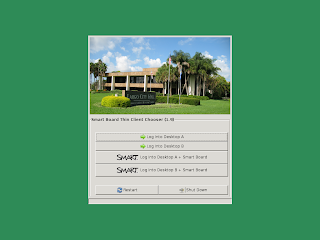
The shot below is the chooser which is available on thin clients connected to the Smart Boards. This is the first thing you see after the thin clients are booted.
The shot below is the software which connects to the Smart board products. One can use a mouse or virtual pens to create output.

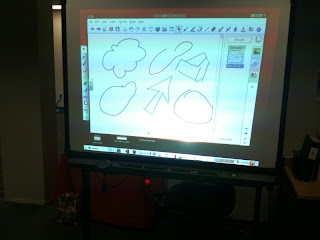
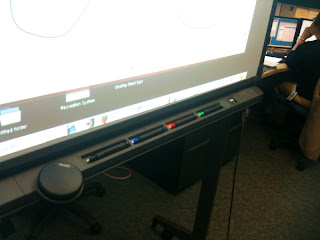
Update: The Smart Board is working on Linux and the thin client, pictures below.
When HP released Etch, I made our custom modifications all self contained and easily linked into /etc/rc2.d. So it was easier than ever to accept this upgrade and prep it for release to our employees. Newer X.org and Mesa libraries should make it easier to test gnome-shell and Compiz upgrades. After just a few hours, it's already running and stable. The 5725s worked fine; just needed to install the SiS driver. I should be able to deliver this to additional testers in the next few days. The UI and login screens haven't changed, so they shouldn't even notice a difference.
I am introducing one new feature, which is going through my QA process at this time. We have had a digital smart/white board for a number of years that has been under utilized because it never had a permanent home. IT is getting a new conference room, so it's finally going to get the wall mount it deserves. It works just like a white board with magic markers, except it's done electronically. One picks up 'fake' colored pens, and as you write the 'ink' appears on the screen through a projector. You can then save your pages into PDF or image format, clear the board with a click and start adding more notes. The company (Smart Tech) fully supports Linux, and I am at this time loading their software on our thin clients. This is one of the rare exceptions where the software is better suited to be running locally. So what I did was create a custom XDMCP connection that once activated waits 60 seconds before launching the dashboard type interface used by the board. This gives you enough time to get logged into the GNOME server so the software doesn't sit over your authentication screen. I'll take some pictures of the board in operation once everything is tested and the room is finished.
The shot below is the chooser which is available on thin clients connected to the Smart Boards. This is the first thing you see after the thin clients are booted.

The shot below is the software which connects to the Smart board products. One can use a mouse or virtual pens to create output.

Update: The Smart Board is working on Linux and the thin client, pictures below.


Monday, November 30, 2009
Lots Of QA Work And Testing
As December begins I have been reviewing my workload and the next 30 days is going to be busy with QA and software testing of several software packages. I have finished the next thin client OS upgrade and it's now in the hands of our Support division who will schedule it for deployment to our 550 devices.
My projects at this time, in no order:
Firefox 3.6 & Flash 10.1: Adobe labs released 10.1 and I have integrated it into Firefox 3.6 for testing. So far both products seem to be working. I'm also checking into the proxy and bandwidth issues for the Personas. Cool bling, but lots of traffic for hundreds of users to be hovering their pointers over the images and trying them out.
Evolution On SLED 11: We are waiting for integration of patches and official RPM to try and reach a milestone that will allow the rest of our users to be moved to this new version. About 190 people out of 750 are using the new version.
OpenOffice 3.2: It's getting pretty close and several features that users have requested are available in this new release. It also includes a feature in Impress that we bountied. I developed a new python/Glade GUI that pops open the first time you launch 3.2 announcing the new features.
Tomboy on SLED 11: We haven't upgraded Tomboy in a while, and I hope to soon install Tomboy on SLED 11 and get that deployed to our users to replace the current SLED 10 version.
Compiz & gnome-shell: Our current GNOME desktop servers are starting to get a bit old and I'm opening a new project to begin the process of moving to something newer. It probably will be OpenSuse 11.2. This would take many months, and probably would go live in the next 4-6 months. It looks like we will use compiz for one more iteration of the desktop and then explore gnome-shell on the next major upgrade around 2012. Gnome-shell is not yet optimized and tested for remote display and won't be ready in time. I'm going to check on the status of the C++ port and make a decision about which version to try and deploy.
ZeitGeist: I have promised to check out this technology for enterprise use, and will be doing that in the coming weeks. I have to consider how it integrates with Tracker, how to replace or compliment the features we have in Beagle, how to run this via cron jobs and not hammer drives during business hours. I also have to experiment with NFS mounting the data stores that Zeitgeist is mining, they aren't all on the same physical computers.
Thin Client DVD Support: I have been thinking about possibly loading a software DVD player on the thin clients for users that have permissions to mount DVDs. Increasingly they are receiving training and demo videos on DVD media. Lots to consider with this move, how to stop them from playing "_Dumb and Dumber_" ? :)
Lots to do, and always fun. My thanks to everyone that works on these technologies, you do the hard work!
My projects at this time, in no order:
Firefox 3.6 & Flash 10.1: Adobe labs released 10.1 and I have integrated it into Firefox 3.6 for testing. So far both products seem to be working. I'm also checking into the proxy and bandwidth issues for the Personas. Cool bling, but lots of traffic for hundreds of users to be hovering their pointers over the images and trying them out.
Evolution On SLED 11: We are waiting for integration of patches and official RPM to try and reach a milestone that will allow the rest of our users to be moved to this new version. About 190 people out of 750 are using the new version.
OpenOffice 3.2: It's getting pretty close and several features that users have requested are available in this new release. It also includes a feature in Impress that we bountied. I developed a new python/Glade GUI that pops open the first time you launch 3.2 announcing the new features.
Tomboy on SLED 11: We haven't upgraded Tomboy in a while, and I hope to soon install Tomboy on SLED 11 and get that deployed to our users to replace the current SLED 10 version.
Compiz & gnome-shell: Our current GNOME desktop servers are starting to get a bit old and I'm opening a new project to begin the process of moving to something newer. It probably will be OpenSuse 11.2. This would take many months, and probably would go live in the next 4-6 months. It looks like we will use compiz for one more iteration of the desktop and then explore gnome-shell on the next major upgrade around 2012. Gnome-shell is not yet optimized and tested for remote display and won't be ready in time. I'm going to check on the status of the C++ port and make a decision about which version to try and deploy.
ZeitGeist: I have promised to check out this technology for enterprise use, and will be doing that in the coming weeks. I have to consider how it integrates with Tracker, how to replace or compliment the features we have in Beagle, how to run this via cron jobs and not hammer drives during business hours. I also have to experiment with NFS mounting the data stores that Zeitgeist is mining, they aren't all on the same physical computers.
Thin Client DVD Support: I have been thinking about possibly loading a software DVD player on the thin clients for users that have permissions to mount DVDs. Increasingly they are receiving training and demo videos on DVD media. Lots to consider with this move, how to stop them from playing "_Dumb and Dumber_" ? :)
Lots to do, and always fun. My thanks to everyone that works on these technologies, you do the hard work!
Wednesday, November 18, 2009
DVD/CD Readers And Thin Clients
When we went live with our HP thin clients 2 years ago, one new feature we added was the ability to use USB sticks and transfer files. I know there are some tools for doing this already, but opted instead to use FTP. I felt that using a stateless connection would be more stable, and also allow us to use this feature when people are logging in with NX over low bandwidth networks. As long as the server can resolve the remote IP, it will find the FTP daemon running on the remote thin client. FTP already works fine over differing network speeds, and once the transaction is complete nothing is mounted back to the server. Very clean to me and has worked well.
After some conversations in our architecture meetings, we have agreed that CD/DVD readers are really no different than USB sticks; and in fact they probably can hold fewer files these days. So I made a last minute addition to our new thin client update to support these types of drives.
When you plug in a USB stick, it's appropriate to just mount it immediately. I then tuned the thin clients to always flush data every 10 seconds. So we tell people that if they place files on USB sticks, just wait 10 seconds and then they can remove the stick. udev sees the stick being removed and the mount is removed. This is working well, and avoids having to have some kind of "Safe To Remove" panel app that we know people don't use anyway. :)
Being that CD/DVD drives have to eject, I couldn't just mount the disk when it's inserted..or they wouldn't be able to eject the disk. The GNOME desktop is running on the server, so it too is not aware at all of these drives. So I wrote a very simple UI that pops up (no GUI Nazis please :) ), when a drive is powered on. This is running on the thin client itself. I tried to keep it to the bare minimum and so far it's working well.
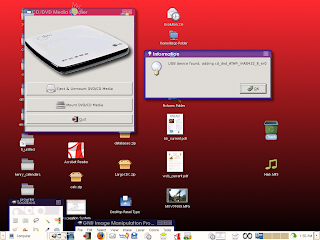
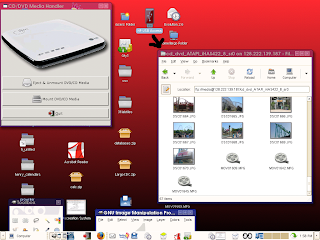
When the USB CD/DVD is turned on, udev starts up the small UI. When they click on the Mount button, it generates a directory name based on the physical hardware and creates the mount. The whole idea of mounting things to usb0, usb1 and so on has not worked well because users never were able to figure out which directories were in use. So now they only see the drives that are mounted, and each has a descriptive name. In the shot below, you can see the directory mounted from the drive after it's mounted.
The users then double-click on the USB icon and up comes Nautilus which is FTP jailed to just USB devices on the thin client. Proftpd only displays files types which we have approved. To the user, this looks just like a regular file manager that they always use. In the shot below, pictures and videos are displayed from CD media.
The user then drops and drags the files to the desktop, and the FTP feature of Nautilus is activated. Thumbnail generates and the file is now stored on the server.

I'm sure there are other ways to do this, and this definitely falls under a WFM; but if you are deploying thin clients and wondering how to handle these devices...maybe this will be a good solution.
After some conversations in our architecture meetings, we have agreed that CD/DVD readers are really no different than USB sticks; and in fact they probably can hold fewer files these days. So I made a last minute addition to our new thin client update to support these types of drives.
When you plug in a USB stick, it's appropriate to just mount it immediately. I then tuned the thin clients to always flush data every 10 seconds. So we tell people that if they place files on USB sticks, just wait 10 seconds and then they can remove the stick. udev sees the stick being removed and the mount is removed. This is working well, and avoids having to have some kind of "Safe To Remove" panel app that we know people don't use anyway. :)
Being that CD/DVD drives have to eject, I couldn't just mount the disk when it's inserted..or they wouldn't be able to eject the disk. The GNOME desktop is running on the server, so it too is not aware at all of these drives. So I wrote a very simple UI that pops up (no GUI Nazis please :) ), when a drive is powered on. This is running on the thin client itself. I tried to keep it to the bare minimum and so far it's working well.
When the USB CD/DVD is turned on, udev starts up the small UI. When they click on the Mount button, it generates a directory name based on the physical hardware and creates the mount. The whole idea of mounting things to usb0, usb1 and so on has not worked well because users never were able to figure out which directories were in use. So now they only see the drives that are mounted, and each has a descriptive name. In the shot below, you can see the directory mounted from the drive after it's mounted.

The users then double-click on the USB icon and up comes Nautilus which is FTP jailed to just USB devices on the thin client. Proftpd only displays files types which we have approved. To the user, this looks just like a regular file manager that they always use. In the shot below, pictures and videos are displayed from CD media.

The user then drops and drags the files to the desktop, and the FTP feature of Nautilus is activated. Thumbnail generates and the file is now stored on the server.

I'm sure there are other ways to do this, and this definitely falls under a WFM; but if you are deploying thin clients and wondering how to handle these devices...maybe this will be a good solution.
Thursday, November 12, 2009
Groupwise 8 Upgrade + Client
The City uses Groupwise as our post office to house all of our email and calendar data. There were some mandatory calendaring requirements from our employees and GW best fits those needs. Last weekend, we upgraded from version 7 to 8. We are experiencing normal problems and awaiting some patches, but overall it went pretty well.
One of the things that comes up often in our contact with Novell is the issue of us using Evolution vs their Java client for Linux. We had tested the version 7 client a few years ago and it was not a good fit for us. So I checked out the new version with an open mind.
A lot of work has gone into making this release have feature parity with the Windows version, and they seem to be making progress. One of the things that the users really liked about Evolution 1 was the old Summary Screen, and Groupwise 8 has a similar feature (shot below).

Another nice feature is the ability to enter your own notes and comments on each email message as pictured below:

Overall from a feature standpoint, it seems robust and delivers in that regard.
So why don't we use it? The client runs on Java, and unfortunately it's S-L-O-W. To be fair, I installed the client on SLED 11 and it's running on the same server as Evolution 2.24. It flickers a lot at startup and on resizes, drag bars are painful to move, pulldown windows are slow. It's entirely possible that this product works perfectly on a local video card, but over remote display it's really pretty painful.
The other issue from version 7 that remains is that it consumes a lot of memory, and then continues to leak badly. When you are on a standalone computer, it might be ok for 1 or 2MB to leak at a pop, but when you have 300 users running, that suddenly becomes 300MB or 600MB for me!
I started the client and then opened top. Below you can see the client running along with the same email opened in evolution for my account.

After just a few minutes, it was already leaking (below).

I'm going to run it all day and see how bad it gets. At this point, there is no way this would scale and provide the performance that users expect in our environment.
It seems like from time to time there are discussions in Novell about Evolution vs Java, and where to use development resources. From our perspective and needs, Evolution is far better and we hope that Evolution continues to get the TLC it deserves.
One of the things that comes up often in our contact with Novell is the issue of us using Evolution vs their Java client for Linux. We had tested the version 7 client a few years ago and it was not a good fit for us. So I checked out the new version with an open mind.
A lot of work has gone into making this release have feature parity with the Windows version, and they seem to be making progress. One of the things that the users really liked about Evolution 1 was the old Summary Screen, and Groupwise 8 has a similar feature (shot below).

Another nice feature is the ability to enter your own notes and comments on each email message as pictured below:

Overall from a feature standpoint, it seems robust and delivers in that regard.
So why don't we use it? The client runs on Java, and unfortunately it's S-L-O-W. To be fair, I installed the client on SLED 11 and it's running on the same server as Evolution 2.24. It flickers a lot at startup and on resizes, drag bars are painful to move, pulldown windows are slow. It's entirely possible that this product works perfectly on a local video card, but over remote display it's really pretty painful.
The other issue from version 7 that remains is that it consumes a lot of memory, and then continues to leak badly. When you are on a standalone computer, it might be ok for 1 or 2MB to leak at a pop, but when you have 300 users running, that suddenly becomes 300MB or 600MB for me!
I started the client and then opened top. Below you can see the client running along with the same email opened in evolution for my account.

After just a few minutes, it was already leaking (below).

I'm going to run it all day and see how bad it gets. At this point, there is no way this would scale and provide the performance that users expect in our environment.
It seems like from time to time there are discussions in Novell about Evolution vs Java, and where to use development resources. From our perspective and needs, Evolution is far better and we hope that Evolution continues to get the TLC it deserves.
Friday, November 06, 2009
HP 5735, Disappoints
I get email and know that some of you are thinking about thin clients in your organization. I have always tried to be honest and describe what works and what doesn't.
After a good amount of testing, we have been unable to get the HP 5735 to work well enough to put into production. They may work in other areas perfectly well, but our goal was to add ATI 9250 video cards to them and use them for the 3D desktop. Even though they have higher specs than the HP 5725, under no conditions have they ever run faster. 3D performance is very sluggish and certainly not fast enough for day to day use.
I know this isn't a perfect test, but the results seemed to correlate with Compiz "feel". It also could easily be replicated by anyone else. For my test, I booted an X server with just a xterm window and then connected to our remote Compiz servers and ran glxgears. The 5725 was the clear winner with 653 FPS. I also tested the onboard X1200 and then 2250 video cards.

We only purchased a few 5735s for testing, and will be moving them into our cyber cafes which don't use 3D and for that purpose they will work well.
We will continue to use the HP 5725 (which works great) until we have another device that performs as well.
After a good amount of testing, we have been unable to get the HP 5735 to work well enough to put into production. They may work in other areas perfectly well, but our goal was to add ATI 9250 video cards to them and use them for the 3D desktop. Even though they have higher specs than the HP 5725, under no conditions have they ever run faster. 3D performance is very sluggish and certainly not fast enough for day to day use.
I know this isn't a perfect test, but the results seemed to correlate with Compiz "feel". It also could easily be replicated by anyone else. For my test, I booted an X server with just a xterm window and then connected to our remote Compiz servers and ran glxgears. The 5725 was the clear winner with 653 FPS. I also tested the onboard X1200 and then 2250 video cards.

We only purchased a few 5735s for testing, and will be moving them into our cyber cafes which don't use 3D and for that purpose they will work well.
We will continue to use the HP 5725 (which works great) until we have another device that performs as well.
Wednesday, October 28, 2009
gnome-shell Over Remote Display
It's been my pleasure to see gnome-shell mature over the last few months. I was in Boston last year when it started on the white boards, very cool stuff.
I have been wanting to experimentally get gnome-shell and Zeitgeist into the hands of 'regular users' for feedback. I built a Fedora Core 12 server, and got gnome-shell running. I then tested it over remote display. Clutter failed in my first test because it doesn't yet support 16 bit color depth. I bumped the thin client up to 24 bit color and tried again. I built a page on Live with my results and it's here
The visuals are not working correctly, but once it's up and running performance seems fine.
I don't have the expertise to fix this type of low level bug in clutter, but if anyone with the knowledge wants to find me on the IRC, I will gladly test patches and ideas.

We aren't the only people running thin clients, and one hates to not have this major feature available for enterprise customers that want to run GNOME 3.
I have been wanting to experimentally get gnome-shell and Zeitgeist into the hands of 'regular users' for feedback. I built a Fedora Core 12 server, and got gnome-shell running. I then tested it over remote display. Clutter failed in my first test because it doesn't yet support 16 bit color depth. I bumped the thin client up to 24 bit color and tried again. I built a page on Live with my results and it's here
The visuals are not working correctly, but once it's up and running performance seems fine.
I don't have the expertise to fix this type of low level bug in clutter, but if anyone with the knowledge wants to find me on the IRC, I will gladly test patches and ideas.

We aren't the only people running thin clients, and one hates to not have this major feature available for enterprise customers that want to run GNOME 3.
Thursday, October 22, 2009
Acrobat 9.2 Is Out
I normally don't blog about software updates. But from the Acrobat site when you attempt to download Reader, they are still pushing 9.1.2. That version along with 9.1.3 has lots of security alerts. After poking around for a while, I finally found that 9.2 is only available on their FTP site.
Yup, I know about Evince...but it's not an option for us at this time.
Yup, I know about Evince...but it's not an option for us at this time.
Tuesday, October 20, 2009
Evolution 2.24 Going Live, HP 5735 Work Continues
After a one year and not always pleasant process we have reached a milestone with Evolution on SLED 11 that has the features and stability with which to deploy. The shot below is my calendar with data loaded from webcals and from the Groupwise backend.
Note to Linux desktop vendors: Having an email client, word processor and browser are the key elements to success in creating more customers. Specialty apps can still run on Windows, but these core applications need to be robust and feature rich in order to entice people to use Linux as their desktop.
The good news is that these patches will be coming for all customers on SLED, and also have mostly been merged into the community build.

I've moved over about 120 users to the new version, and the top below shows the load with 80 concurrent. The box has some kick, :) , and will easily be able to handle our maximum load of 300 concurrent.

I also have been working with HP to get some better performance out of the 5735 thin client. It has specs better than the 5725, but for some reason is slower in speed. I received a new build to test and am working on installing that now. I'm sure we will figure out the issue and be able to start deploying the newer model around the City.
Note to Linux desktop vendors: Having an email client, word processor and browser are the key elements to success in creating more customers. Specialty apps can still run on Windows, but these core applications need to be robust and feature rich in order to entice people to use Linux as their desktop.
The good news is that these patches will be coming for all customers on SLED, and also have mostly been merged into the community build.

I've moved over about 120 users to the new version, and the top below shows the load with 80 concurrent. The box has some kick, :) , and will easily be able to handle our maximum load of 300 concurrent.

I also have been working with HP to get some better performance out of the 5735 thin client. It has specs better than the 5725, but for some reason is slower in speed. I received a new build to test and am working on installing that now. I'm sure we will figure out the issue and be able to start deploying the newer model around the City.
Monday, October 12, 2009
Detailed Specs: Thin Client Hardware
I finally had a few moments to start creating blog entries about our last thin client operating system upgrade. This blog will review the hardware that is currently in use here at the City.
As I have mentioned previously, our "live" production thin client is the HP 5725. We are taking the steps to allow some HP 5735s and HP 4410s to be integrated into our infrastructure. With up to a 10 year duty cycle, costs are significantly reduced with all of this hardware.
HP 5725
This device has been discontinued but is a fantastic thin client. We have hundreds of people on these and they have proven to be great workhorses. If pictures are not loading on your feed, go to my blog site.
Here is a picture of the inside of the 5725. Note that there are no moving parts, and that heat from the CPU is pulled away in an ingenious manner.

The onboard graphic card did not support 3D, so we purchased the optional PCI expansion daughter card and cage. We were then able to use the ATI 9250 card, which has a heat sink and has no moving parts as well.

A nice clean front, power button and 2 USB connections.

Lots of ports on the back, you never know what you will need in the future.

And lspci gives us some nice information about the internals:
00:00.0 Host bridge: Silicon Integrated Systems [SiS] 741/741GX/M741 Host (rev 03)
00:01.0 PCI bridge: Silicon Integrated Systems [SiS] SiS AGP Port (virtual PCI-to-PCI bridge)
00:02.0 ISA bridge: Silicon Integrated Systems [SiS] SiS963 [MuTIOL Media IO] (rev 25)
00:02.1 SMBus: Silicon Integrated Systems [SiS] SiS961/2 SMBus Controller
00:02.5 IDE interface: Silicon Integrated Systems [SiS] 5513 [IDE]
00:02.7 Multimedia audio controller: Silicon Integrated Systems [SiS] AC'97 Sound Controller (rev a0)
00:03.0 USB Controller: Silicon Integrated Systems [SiS] USB 1.1 Controller (rev 0f)
00:03.1 USB Controller: Silicon Integrated Systems [SiS] USB 1.1 Controller (rev 0f)
00:03.2 USB Controller: Silicon Integrated Systems [SiS] USB 2.0 Controller
00:0a.0 Ethernet controller: VIA Technologies, Inc. VT6102 [Rhine-II] (rev 8d)
00:0b.0 VGA compatible controller: ATI Technologies Inc RV280 [Radeon 9200 PRO] (rev 01)
00:0b.1 Display controller: ATI Technologies Inc RV280 [Radeon 9200 PRO] (Secondary) (rev 01)
5735
The 5735 should be an excellent addition to our environment. I'm still trying to get a few technical issues resolved with HP and fully expect this to outperform the 5725 in every regard.
Once again the internals are solid state:
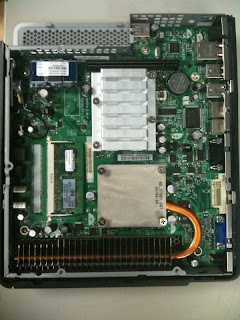
The 5735 needed an addon daughter card for our ATI 9250s, but also comes with a PCIE card as well. I ordered a PCIE based ATI FireMV 2250 for testing; but found that Etch didn't yet support it. That's on the back burner for the next update, very possibly we will get a boost in performance.

The 5735 made some improvements in the front. Users might want to easily plug in headphones? Yup! Microphone jack also provided (but not implemented by us at this time).

Lots of ports on the back, including a 4th video port and gigabit ethernet.

and lscpi reports the internals:
00:00.0 Host bridge: ATI Technologies Inc RS690 Host Bridge
00:01.0 PCI bridge: ATI Technologies Inc RS690 PCI to PCI Bridge (Internal gfx)
00:04.0 PCI bridge: ATI Technologies Inc Unknown device 7914
00:13.0 USB Controller: ATI Technologies Inc SB600 USB (OHCI0)
00:13.1 USB Controller: ATI Technologies Inc SB600 USB (OHCI1)
00:13.2 USB Controller: ATI Technologies Inc SB600 USB (OHCI2)
00:13.3 USB Controller: ATI Technologies Inc SB600 USB (OHCI3)
00:13.4 USB Controller: ATI Technologies Inc SB600 USB (OHCI4)
00:13.5 USB Controller: ATI Technologies Inc SB600 USB Controller (EHCI)
00:14.0 SMBus: ATI Technologies Inc SBx00 SMBus Controller (rev 14)
00:14.1 IDE interface: ATI Technologies Inc SB600 IDE
00:14.2 Audio device: ATI Technologies Inc SBx00 Azalia (Intel HDA)
00:14.3 ISA bridge: ATI Technologies Inc SB600 PCI to LPC Bridge
00:14.4 PCI bridge: ATI Technologies Inc SBx00 PCI to PCI Bridge
00:18.0 Host bridge: Advanced Micro Devices [AMD] K8 [Athlon64/Opteron] HyperTransport Technology Configuration
00:18.1 Host bridge: Advanced Micro Devices [AMD] K8 [Athlon64/Opteron] Address Map
00:18.2 Host bridge: Advanced Micro Devices [AMD] K8 [Athlon64/Opteron] DRAM Controller
00:18.3 Host bridge: Advanced Micro Devices [AMD] K8 [Athlon64/Opteron] Miscellaneous Control
01:05.0 VGA compatible controller: ATI Technologies Inc RS690M [Radeon X1200 Series]
02:00.0 Ethernet controller: Broadcom Corporation NetLink BCM5787M Gigabit Ethernet PCI Express (rev 02)
03:06.0 VGA compatible controller: ATI Technologies Inc RV280 [Radeon 9200 PRO] (rev 01)
03:06.1 Display controller: ATI Technologies Inc RV280 [Radeon 9200 PRO] (Secondary) (rev 01)
4410t
A laptop footprint will help us greatly in two areas. There are people that want to be able to carry a device into conference rooms, and this should work nicely. The other area is that we have fat PCs currently in use that are used as thin clients most of the time. The users are booting Windows and then immediately starting NX with EVDO cards. We are testing the idea of using these devices for this purpose.
Looks like a regular laptop, but only costs $500. This device contains no moving parts and Debian Squeeze loaded perfectly, Intel video card is working well. Note to HP: the case has a slight fingerprint problem, lots of wipes needed during testing.

Ports on the side, this device was ordered with no DVD/CD reader, but it's available.

and lspci displays more details:
00:00.0 Host bridge: Intel Corporation Mobile 4 Series Chipset Memory Controller Hub (rev 07)
00:02.0 VGA compatible controller: Intel Corporation Mobile 4 Series Chipset Integrated Graphics Controller (rev 07)
00:02.1 Display controller: Intel Corporation Mobile 4 Series Chipset Integrated Graphics Controller (rev 07)
00:1a.0 USB Controller: Intel Corporation 82801I (ICH9 Family) USB UHCI Controller #4 (rev 03)
00:1a.1 USB Controller: Intel Corporation 82801I (ICH9 Family) USB UHCI Controller #5 (rev 03)
00:1a.2 USB Controller: Intel Corporation 82801I (ICH9 Family) USB UHCI Controller #6 (rev 03)
00:1a.7 USB Controller: Intel Corporation 82801I (ICH9 Family) USB2 EHCI Controller #2 (rev 03)
00:1b.0 Audio device: Intel Corporation 82801I (ICH9 Family) HD Audio Controller (rev 03)
00:1c.0 PCI bridge: Intel Corporation 82801I (ICH9 Family) PCI Express Port 1 (rev 03)
00:1c.1 PCI bridge: Intel Corporation 82801I (ICH9 Family) PCI Express Port 2 (rev 03)
00:1c.2 PCI bridge: Intel Corporation 82801I (ICH9 Family) PCI Express Port 3 (rev 03)
00:1c.4 PCI bridge: Intel Corporation 82801I (ICH9 Family) PCI Express Port 5 (rev 03)
00:1c.5 PCI bridge: Intel Corporation 82801I (ICH9 Family) PCI Express Port 6 (rev 03)
00:1d.0 USB Controller: Intel Corporation 82801I (ICH9 Family) USB UHCI Controller #1 (rev 03)
00:1d.1 USB Controller: Intel Corporation 82801I (ICH9 Family) USB UHCI Controller #2 (rev 03)
00:1d.2 USB Controller: Intel Corporation 82801I (ICH9 Family) USB UHCI Controller #3 (rev 03)
00:1d.7 USB Controller: Intel Corporation 82801I (ICH9 Family) USB2 EHCI Controller #1 (rev 03)
00:1e.0 PCI bridge: Intel Corporation 82801 Mobile PCI Bridge (rev 93)
00:1f.0 ISA bridge: Intel Corporation ICH9M LPC Interface Controller (rev 03)
00:1f.2 IDE interface: Intel Corporation ICH9M/M-E 2 port SATA IDE Controller (rev 03)
00:1f.5 IDE interface: Intel Corporation ICH9M/M-E 2 port SATA IDE Controller (rev 03)
02:00.0 Network controller: Broadcom Corporation Device 4353 (rev 01)
85:00.0 Ethernet controller: Marvell Technology Group Ltd. Device 436c (rev 10)
If anyone is considering a move in this direction, I hope this information is helpful.
As I have mentioned previously, our "live" production thin client is the HP 5725. We are taking the steps to allow some HP 5735s and HP 4410s to be integrated into our infrastructure. With up to a 10 year duty cycle, costs are significantly reduced with all of this hardware.
HP 5725
This device has been discontinued but is a fantastic thin client. We have hundreds of people on these and they have proven to be great workhorses. If pictures are not loading on your feed, go to my blog site.
Here is a picture of the inside of the 5725. Note that there are no moving parts, and that heat from the CPU is pulled away in an ingenious manner.

The onboard graphic card did not support 3D, so we purchased the optional PCI expansion daughter card and cage. We were then able to use the ATI 9250 card, which has a heat sink and has no moving parts as well.

A nice clean front, power button and 2 USB connections.

Lots of ports on the back, you never know what you will need in the future.

And lspci gives us some nice information about the internals:
00:00.0 Host bridge: Silicon Integrated Systems [SiS] 741/741GX/M741 Host (rev 03)
00:01.0 PCI bridge: Silicon Integrated Systems [SiS] SiS AGP Port (virtual PCI-to-PCI bridge)
00:02.0 ISA bridge: Silicon Integrated Systems [SiS] SiS963 [MuTIOL Media IO] (rev 25)
00:02.1 SMBus: Silicon Integrated Systems [SiS] SiS961/2 SMBus Controller
00:02.5 IDE interface: Silicon Integrated Systems [SiS] 5513 [IDE]
00:02.7 Multimedia audio controller: Silicon Integrated Systems [SiS] AC'97 Sound Controller (rev a0)
00:03.0 USB Controller: Silicon Integrated Systems [SiS] USB 1.1 Controller (rev 0f)
00:03.1 USB Controller: Silicon Integrated Systems [SiS] USB 1.1 Controller (rev 0f)
00:03.2 USB Controller: Silicon Integrated Systems [SiS] USB 2.0 Controller
00:0a.0 Ethernet controller: VIA Technologies, Inc. VT6102 [Rhine-II] (rev 8d)
00:0b.0 VGA compatible controller: ATI Technologies Inc RV280 [Radeon 9200 PRO] (rev 01)
00:0b.1 Display controller: ATI Technologies Inc RV280 [Radeon 9200 PRO] (Secondary) (rev 01)
5735
The 5735 should be an excellent addition to our environment. I'm still trying to get a few technical issues resolved with HP and fully expect this to outperform the 5725 in every regard.
Once again the internals are solid state:

The 5735 needed an addon daughter card for our ATI 9250s, but also comes with a PCIE card as well. I ordered a PCIE based ATI FireMV 2250 for testing; but found that Etch didn't yet support it. That's on the back burner for the next update, very possibly we will get a boost in performance.

The 5735 made some improvements in the front. Users might want to easily plug in headphones? Yup! Microphone jack also provided (but not implemented by us at this time).

Lots of ports on the back, including a 4th video port and gigabit ethernet.

and lscpi reports the internals:
00:00.0 Host bridge: ATI Technologies Inc RS690 Host Bridge
00:01.0 PCI bridge: ATI Technologies Inc RS690 PCI to PCI Bridge (Internal gfx)
00:04.0 PCI bridge: ATI Technologies Inc Unknown device 7914
00:13.0 USB Controller: ATI Technologies Inc SB600 USB (OHCI0)
00:13.1 USB Controller: ATI Technologies Inc SB600 USB (OHCI1)
00:13.2 USB Controller: ATI Technologies Inc SB600 USB (OHCI2)
00:13.3 USB Controller: ATI Technologies Inc SB600 USB (OHCI3)
00:13.4 USB Controller: ATI Technologies Inc SB600 USB (OHCI4)
00:13.5 USB Controller: ATI Technologies Inc SB600 USB Controller (EHCI)
00:14.0 SMBus: ATI Technologies Inc SBx00 SMBus Controller (rev 14)
00:14.1 IDE interface: ATI Technologies Inc SB600 IDE
00:14.2 Audio device: ATI Technologies Inc SBx00 Azalia (Intel HDA)
00:14.3 ISA bridge: ATI Technologies Inc SB600 PCI to LPC Bridge
00:14.4 PCI bridge: ATI Technologies Inc SBx00 PCI to PCI Bridge
00:18.0 Host bridge: Advanced Micro Devices [AMD] K8 [Athlon64/Opteron] HyperTransport Technology Configuration
00:18.1 Host bridge: Advanced Micro Devices [AMD] K8 [Athlon64/Opteron] Address Map
00:18.2 Host bridge: Advanced Micro Devices [AMD] K8 [Athlon64/Opteron] DRAM Controller
00:18.3 Host bridge: Advanced Micro Devices [AMD] K8 [Athlon64/Opteron] Miscellaneous Control
01:05.0 VGA compatible controller: ATI Technologies Inc RS690M [Radeon X1200 Series]
02:00.0 Ethernet controller: Broadcom Corporation NetLink BCM5787M Gigabit Ethernet PCI Express (rev 02)
03:06.0 VGA compatible controller: ATI Technologies Inc RV280 [Radeon 9200 PRO] (rev 01)
03:06.1 Display controller: ATI Technologies Inc RV280 [Radeon 9200 PRO] (Secondary) (rev 01)
4410t
A laptop footprint will help us greatly in two areas. There are people that want to be able to carry a device into conference rooms, and this should work nicely. The other area is that we have fat PCs currently in use that are used as thin clients most of the time. The users are booting Windows and then immediately starting NX with EVDO cards. We are testing the idea of using these devices for this purpose.
Looks like a regular laptop, but only costs $500. This device contains no moving parts and Debian Squeeze loaded perfectly, Intel video card is working well. Note to HP: the case has a slight fingerprint problem, lots of wipes needed during testing.

Ports on the side, this device was ordered with no DVD/CD reader, but it's available.

and lspci displays more details:
00:00.0 Host bridge: Intel Corporation Mobile 4 Series Chipset Memory Controller Hub (rev 07)
00:02.0 VGA compatible controller: Intel Corporation Mobile 4 Series Chipset Integrated Graphics Controller (rev 07)
00:02.1 Display controller: Intel Corporation Mobile 4 Series Chipset Integrated Graphics Controller (rev 07)
00:1a.0 USB Controller: Intel Corporation 82801I (ICH9 Family) USB UHCI Controller #4 (rev 03)
00:1a.1 USB Controller: Intel Corporation 82801I (ICH9 Family) USB UHCI Controller #5 (rev 03)
00:1a.2 USB Controller: Intel Corporation 82801I (ICH9 Family) USB UHCI Controller #6 (rev 03)
00:1a.7 USB Controller: Intel Corporation 82801I (ICH9 Family) USB2 EHCI Controller #2 (rev 03)
00:1b.0 Audio device: Intel Corporation 82801I (ICH9 Family) HD Audio Controller (rev 03)
00:1c.0 PCI bridge: Intel Corporation 82801I (ICH9 Family) PCI Express Port 1 (rev 03)
00:1c.1 PCI bridge: Intel Corporation 82801I (ICH9 Family) PCI Express Port 2 (rev 03)
00:1c.2 PCI bridge: Intel Corporation 82801I (ICH9 Family) PCI Express Port 3 (rev 03)
00:1c.4 PCI bridge: Intel Corporation 82801I (ICH9 Family) PCI Express Port 5 (rev 03)
00:1c.5 PCI bridge: Intel Corporation 82801I (ICH9 Family) PCI Express Port 6 (rev 03)
00:1d.0 USB Controller: Intel Corporation 82801I (ICH9 Family) USB UHCI Controller #1 (rev 03)
00:1d.1 USB Controller: Intel Corporation 82801I (ICH9 Family) USB UHCI Controller #2 (rev 03)
00:1d.2 USB Controller: Intel Corporation 82801I (ICH9 Family) USB UHCI Controller #3 (rev 03)
00:1d.7 USB Controller: Intel Corporation 82801I (ICH9 Family) USB2 EHCI Controller #1 (rev 03)
00:1e.0 PCI bridge: Intel Corporation 82801 Mobile PCI Bridge (rev 93)
00:1f.0 ISA bridge: Intel Corporation ICH9M LPC Interface Controller (rev 03)
00:1f.2 IDE interface: Intel Corporation ICH9M/M-E 2 port SATA IDE Controller (rev 03)
00:1f.5 IDE interface: Intel Corporation ICH9M/M-E 2 port SATA IDE Controller (rev 03)
02:00.0 Network controller: Broadcom Corporation Device 4353 (rev 01)
85:00.0 Ethernet controller: Marvell Technology Group Ltd. Device 436c (rev 10)
If anyone is considering a move in this direction, I hope this information is helpful.
Low Level Linux Idea
I don't know if anyone that works in these areas of Linux will see this, but here goes:
What would be really helpful to me is adding a few more ulimit commands to the shell. I'd love to be able to have control over the CPUs. I understand that this slightly crosses over into the area of the 'nice' command.
Here is a real world example: We run Firefox from a centralized server for our City employees. We also have a few cyber cafe terminals configured around the City, so that they can log into their personal email during breaks. I'd like to throttle those devices back so that their Firefox sessions only run on one CPU. If only one cyber cafe is in use, response would be fine. As more are used, they would only slow down each other..and not the rest of the City sessions.
Anything running once this setting was enabled would not even see the other CPUs and perceive that you are on a single CPU workstation. I can think of numerous places where this would really help me tune for machines that run hundreds of concurrent users.
What would be really helpful to me is adding a few more ulimit commands to the shell. I'd love to be able to have control over the CPUs. I understand that this slightly crosses over into the area of the 'nice' command.
Here is a real world example: We run Firefox from a centralized server for our City employees. We also have a few cyber cafe terminals configured around the City, so that they can log into their personal email during breaks. I'd like to throttle those devices back so that their Firefox sessions only run on one CPU. If only one cyber cafe is in use, response would be fine. As more are used, they would only slow down each other..and not the rest of the City sessions.
Anything running once this setting was enabled would not even see the other CPUs and perceive that you are on a single CPU workstation. I can think of numerous places where this would really help me tune for machines that run hundreds of concurrent users.
Wednesday, September 23, 2009
Gotta Love the HP 4410t
I'm just about done with our thin client updated operating system, and am *very* impressed with the HP 4410t laptop form factor. It boots super quickly to the chooser, and the Intel Xorg drivers found in Debian Squeeze/Sid are excellent. 3D rendering is fast and responsive, video playback is fast and frame rates are high. I finally got Pulse installed and it found the audio hardware and playback is excellent.
My thanks for everyone that works on all of these software packages, you make my job a lot easier!
Shot below is two concurrent video and audio streams with cube turning. The 4410 was able to do this perfectly with no dropouts. This test was performed on the 1Gb ethernet port and everything is being pushed over the network.

My thanks for everyone that works on all of these software packages, you make my job a lot easier!
Shot below is two concurrent video and audio streams with cube turning. The 4410 was able to do this perfectly with no dropouts. This test was performed on the 1Gb ethernet port and everything is being pushed over the network.

Wednesday, September 16, 2009
OpenProj Performance Issue Fixed
We were having some slowness with OpenProj over remote display. In the area marked in black, scrolling was sluggish with certain types of charts.

So a bit of Google work and the issue was resolved. There is a java setting that seems to greatly increase performance to remote display. The setting is found in the run.conf file which is placed in $HOME/.openproj. Change the JAVA_OPTS line to disable pmoffscreen:
JAVA_OPTS="-Xms128m -Xmx768m -Dsun.java2d.pmoffscreen=false -Djava.util.prefs.userRoot=/home/drichard/.java/.userPrefs -Djava.util.prefs.systemRoot=/home/drichard/.openproj"

So a bit of Google work and the issue was resolved. There is a java setting that seems to greatly increase performance to remote display. The setting is found in the run.conf file which is placed in $HOME/.openproj. Change the JAVA_OPTS line to disable pmoffscreen:
JAVA_OPTS="-Xms128m -Xmx768m -Dsun.java2d.pmoffscreen=false -Djava.util.prefs.userRoot=/home/drichard/.java/.userPrefs -Djava.util.prefs.systemRoot=/home/drichard/.openproj"
Subscribe to:
Posts (Atom)