I'm not going to jump on the Pulse Audio bashing bandwagon, but have a real question for those with knowledge of the current status on OS 11.1
Our 550 thin clients all havePulse version 0.9.6 running as a daemon. I am in the process of building an OS 11.1 server to house Firefox 3.X for all employees. Youtube is one of my QA sites. When I play a flash video from that site, it starts fine and then after about 20 seconds starts to get choppy and then finally crashes the daemon on the thin clients. I was told on #pulseaudio that some timing patches might need to be merged, so I updated all pulse packages from the "Next" repository to the following release:
pulseaudio-0.9.14-43.7
pulseaudio-esound-compat-0.9.14-43.7
pulseaudio-lang-0.9.14-43.7
(all pulse packages were also updated to the same level).
It's still doing the same thing.
So unless there are some patches waiting to be merged, I have two bad prospects. 1) Trying to compile and install 0.9.14 for the thin clients (Debian Woody) -or- 2) trying to back out pulseaudio packages on OS 11.1 and recompiling version 0.9.6.
Anyone with more knowledge in this area have any thoughts?
Update: I just wanted to clarify that I don't think anything is wrong with OS 11.1. I believe the issue to be related to a mismatch of Pulse versions between the OS 11.1 server and the thin client. On OS 11.1, all libraries are the same version and things probably work fine. I also should have mentioned that I'm attempting to use Flash 10.
Thursday, January 29, 2009

Thursday, January 08, 2009
Merging Document Management And A Wiki
Recently we had a technology planning meeting to talk about future projects that will be coming in the next 3-4 years. I expressed my views strongly that unless we shake loose of our culture of paper, that IT would collapse under the weight of printer support. Up to this point, every software package that we have purchased has produced more paper than ever before. Anyone that supports printers know; they are a horrible amount of work to keep running. Users sometimes print documents to read them, and then throw it away. Or they take it back to their desk, stuff it into a folder and there it sits for 10 years.
This is very much a work in progress, but we have been experimenting with moving some of our work flow and document management into a Wiki. I have been telling people here how nice it was to see the GNOME wiki being used when I visited the Boston UI Summit. Notes were entered in realtime, documents were attached, thoughts were shared, white boards were photographed and loaded into pages.
After reviewing some of the Wikis, we picked MoinMoin. It not having a database backend was attractive to us, and the directory structure is very elegant. No flames please on this selection, for us it's a good fit at this time. :) The most important aspect of this test is the flow and not the software.
The image below shows our prototype plan on entering data. Project pages are created, and then meeting notes are recorded and linked into their corresponding project page. OpenOffice + OpenProj documents are uploaded right into the Wiki.

We have talked about buying some inexpensive netPCs for entry of information during meetings, and also have talked about setting up Kiosk style thin clients in meeting rooms that would allow meeting notes to be created immediately. This also would allow demonstrations and slides to be put into the meeting page *before* the meeting, and displayed to the rest of the attendees. It really promotes a collaborative work environment.
As part of our brainstorming, I created some mockups to demonstrate possible future uses of the Wiki. In theory, we could try and load most City documents into the Wiki; allowing users to create documents and actually store them has been a failure ever since the start of computers. No one knows where they are saving things, or how folders should be configured and set up. Perhaps an emerging perspective is that they *shouldn't* have to make those decisions. It's to the greater good of our City that in the future, documents are easier to find.
In this first mockup, I have built an idea of how Nautilus could interact with a Wiki. The Wiki would appear to just be a file system, and the document would load into the appropriate software package. When the user saves it, it would simply go right back into the same Wiki project page.

In the second mockup, I have added a button in Evolution so that when a meeting is scheduled, a corresponding page would be created in the Wiki. The attendees would then receive a message with the link and they could immediately begin adding notes and presentation documents.

I'm not sure of the exact directly that we will be moving, but it's great to see movement away from paper, and the inefficiencies of all meeting attendees taking their own notes.
This is very much a work in progress, but we have been experimenting with moving some of our work flow and document management into a Wiki. I have been telling people here how nice it was to see the GNOME wiki being used when I visited the Boston UI Summit. Notes were entered in realtime, documents were attached, thoughts were shared, white boards were photographed and loaded into pages.
After reviewing some of the Wikis, we picked MoinMoin. It not having a database backend was attractive to us, and the directory structure is very elegant. No flames please on this selection, for us it's a good fit at this time. :) The most important aspect of this test is the flow and not the software.
The image below shows our prototype plan on entering data. Project pages are created, and then meeting notes are recorded and linked into their corresponding project page. OpenOffice + OpenProj documents are uploaded right into the Wiki.

We have talked about buying some inexpensive netPCs for entry of information during meetings, and also have talked about setting up Kiosk style thin clients in meeting rooms that would allow meeting notes to be created immediately. This also would allow demonstrations and slides to be put into the meeting page *before* the meeting, and displayed to the rest of the attendees. It really promotes a collaborative work environment.
As part of our brainstorming, I created some mockups to demonstrate possible future uses of the Wiki. In theory, we could try and load most City documents into the Wiki; allowing users to create documents and actually store them has been a failure ever since the start of computers. No one knows where they are saving things, or how folders should be configured and set up. Perhaps an emerging perspective is that they *shouldn't* have to make those decisions. It's to the greater good of our City that in the future, documents are easier to find.
In this first mockup, I have built an idea of how Nautilus could interact with a Wiki. The Wiki would appear to just be a file system, and the document would load into the appropriate software package. When the user saves it, it would simply go right back into the same Wiki project page.

In the second mockup, I have added a button in Evolution so that when a meeting is scheduled, a corresponding page would be created in the Wiki. The attendees would then receive a message with the link and they could immediately begin adding notes and presentation documents.

I'm not sure of the exact directly that we will be moving, but it's great to see movement away from paper, and the inefficiencies of all meeting attendees taking their own notes.
Friday, January 02, 2009
Just For Fun
One of my coworkers built the fastest machine he could, and then tried to set a 'world record' Compiz benchmark. :)
The specs:
Hardware
CPU: Intel Core 2 Duo E8600 3.33Ghz Overclocked to 3.7Ghz
Ram: 4GB Crucial Ballistix Tracer
Video Card: BFG 9800GTX+ 512MB
Drives: Dual LG DVD+/-RW, Dual 500GB 7200RPM drives
Case: COOLER MASTER HAF 932 Black Steel ATX Full Tower (3x 230mm Fans, 1x 140mm Fan)
Software
Xubuntu 8.10 running kernel 2.6.27-9, Compiz 0.7.8, Nvidia Driver Version 177.80 running @ 1680x1050 24bit color
And the results:

The specs:
Hardware
CPU: Intel Core 2 Duo E8600 3.33Ghz Overclocked to 3.7Ghz
Ram: 4GB Crucial Ballistix Tracer
Video Card: BFG 9800GTX+ 512MB
Drives: Dual LG DVD+/-RW, Dual 500GB 7200RPM drives
Case: COOLER MASTER HAF 932 Black Steel ATX Full Tower (3x 230mm Fans, 1x 140mm Fan)
Software
Xubuntu 8.10 running kernel 2.6.27-9, Compiz 0.7.8, Nvidia Driver Version 177.80 running @ 1680x1050 24bit color
And the results:

Monday, December 22, 2008
Firefox 3, Leakish And CPU Heavy?
We are still using Firefox 2.0 organizationally and it's very stable. We still have some sites that are not certified for 3.X, which I am monitoring closely. Like any forward thinking Admin, I have been running 3.0 and the 3.1 betas. I have found them to render faster, and they seem to scroll faster; however it seems to have come at great expense. CPU and memory usage is substantially higher. Can anyone else confirm this? I remember there was great debate concerning file handles and sqlite databases. Are these issues resolved? Right now, Firefox seems like it will be hard for me to scale to hundreds of people.
Here is a snapshot of my session on the server, with moderate usage for a few hours:

Here is a snapshot of my session on the server, with moderate usage for a few hours:

Thursday, December 18, 2008
Webcals, Summit & Remote Evolution
Things around here have been busy. I have been QAing and testing Evolution 2.24 and its interaction with Groupwise heavily. We are nearly to a milestone where I can increase the pilot/beta and add more people. I also have been installing a MoinMoin Wiki instance for use by City employees. Right now IT is testing it and trying to create some work flow suggestions, and it looks excellent. I will be devoting an entire blog entry to our goals and ideas.
Intranet Webcals
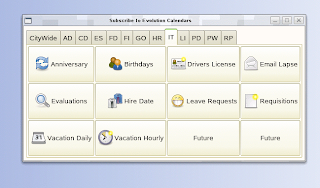
Our internal use of Webcal files has exploded over the last few years, so I have been writing a new GUI to make it easier for users to add sources to Evolution. We have a lot of information stored in databases that is appropriate for people to view on their calendars. Examples of this are employee birthdays, hire dates, anniversaries and so on. So we create .ics files of this type of information and drop it into an internal web server. That makes them available for all employees. Evolution has the ability to add webcals from the command line, so the GUI passes the webcal:// on the command line and it appears right inside their running Evolution session. All they have to do is pick a calendar color. The current state of the GUI is below:
Summit 2009
I have gotten approval to announce the availability of our facility to conduct the 2009 Summit on our premises if there is interest. I know that Boston is the tradition, so I'm just making a humble offer that it can be held at our location if you wish. We have a building that is used for training and emergency operations, and we could conduct the hacking in that facility. The one thing that we could offer is real GNOME users for focus groups and study of new features. We are a short drive from the Tampa (TPA) airport on the Gulf of Mexico. Hit me up on the IRC if this seems like a fit for the community.
Remote Evolution & Miguel
Miguel posted a blog about wanting to gain access to his Evolution while traveling. That exact product existed, was purchased and buried by SCO and now is owned by Sun. Tarantella let us run Xwindows applications 10 years ago, and was one of those great ideas that came out at the wrong time. During that period, people were still excited about client/server computing and how many Ghz you had at your desktop to care about centralizing applications. We ran Tarantella on SCO and Linux and it worked *great* for us. All you did was lay it down in your Apache web server, and point it to your applications and they immediately worked in a browser. In the pre-Evolution-1.0 days I even ran Evolution in this manner. You would log in from any browser, and it started a Java applet, and you would see the gray/white X checker boxes for a split second and your X application would immediately open. No plugins to add to the browser, no client side software. I found this old picture describing how it worked. It's too bad these types of products haven't become more commonplace.

Intranet Webcals
Our internal use of Webcal files has exploded over the last few years, so I have been writing a new GUI to make it easier for users to add sources to Evolution. We have a lot of information stored in databases that is appropriate for people to view on their calendars. Examples of this are employee birthdays, hire dates, anniversaries and so on. So we create .ics files of this type of information and drop it into an internal web server. That makes them available for all employees. Evolution has the ability to add webcals from the command line, so the GUI passes the webcal:// on the command line and it appears right inside their running Evolution session. All they have to do is pick a calendar color. The current state of the GUI is below:

Summit 2009
I have gotten approval to announce the availability of our facility to conduct the 2009 Summit on our premises if there is interest. I know that Boston is the tradition, so I'm just making a humble offer that it can be held at our location if you wish. We have a building that is used for training and emergency operations, and we could conduct the hacking in that facility. The one thing that we could offer is real GNOME users for focus groups and study of new features. We are a short drive from the Tampa (TPA) airport on the Gulf of Mexico. Hit me up on the IRC if this seems like a fit for the community.
Remote Evolution & Miguel
Miguel posted a blog about wanting to gain access to his Evolution while traveling. That exact product existed, was purchased and buried by SCO and now is owned by Sun. Tarantella let us run Xwindows applications 10 years ago, and was one of those great ideas that came out at the wrong time. During that period, people were still excited about client/server computing and how many Ghz you had at your desktop to care about centralizing applications. We ran Tarantella on SCO and Linux and it worked *great* for us. All you did was lay it down in your Apache web server, and point it to your applications and they immediately worked in a browser. In the pre-Evolution-1.0 days I even ran Evolution in this manner. You would log in from any browser, and it started a Java applet, and you would see the gray/white X checker boxes for a split second and your X application would immediately open. No plugins to add to the browser, no client side software. I found this old picture describing how it worked. It's too bad these types of products haven't become more commonplace.

Monday, December 01, 2008

Tuesday, November 25, 2008
Evolution, OpenOffice 3 And Screen Dumps
I have been busy the last few weeks QAing software for deployment. OpenOffice 3.0 is running well, and has been pushed to our beta testers and they are pleased with how it works. One interesting development in regards to OpenOffice is how much the native Mac port is helping with user perceptions. Even though we don't run it here, an ever increasing number of people are buying OS X computers for their homes. They *love* how well the Mac port turned out and use if for their personal use. This is leading to greater acceptance at the City.
OpenOffice 3.0 goes live on Monday December 1st for our 700+ employees. I wanted a greater level of notification of new features, so I wrote a quick little dialog that opens once immediately before going into the license acceptance screen in OpenOffice (please, please allow admins to accept this license once in the future!). Here is what they will see:

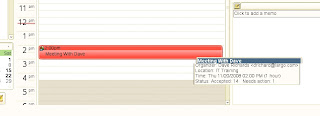
Prepping Evolution 2.24 for deployment has been taking a good amount of time. Much of the "under the hood" code had changed in the last few years, and needed to be tested with the Groupwise backend. My friends in India are knocking out the issues and we are getting closer to reaching a milestone, and working in some much needed calendaring features. Milan cooked up a patch that displays the status of whether people have accepted their meeting requests (shot below) in the tooltip. This allows you to hover your mouse and see if people have declined.
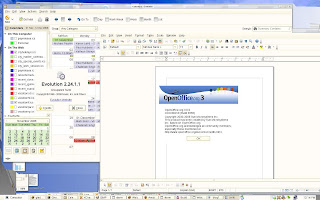
So here is a shot of how Evolution 2.24 and OpenOffice 3.0 will look to the users, coming along very nicely.
Some have been interested in modifications that I make to the standard GNOME desktop. By default, (print) does a screen dump of the whole screen. (alt)(print) allows you to dump just one window. Two other things were happening and required a third option. 1) Some users wanted to be able to take shots of pulldown menus actively in use; 2) Some MS Windows applications running over Citrix/RDP have a canvas which shifts when focus is removed from the window via mouse click or keystroke. So, I globally added (ctrl)(print) which gives them a notify-send popup and alerts them that a screenshot will occur in 10 seconds. They can then position their software was desired and the snapshot is taken.
I have been working on a Wiki/document management/GNOME integration project and will blog about it soon. It's still being discussed and designed at a very initial level, but coming along nicely.
OpenOffice 3.0 goes live on Monday December 1st for our 700+ employees. I wanted a greater level of notification of new features, so I wrote a quick little dialog that opens once immediately before going into the license acceptance screen in OpenOffice (please, please allow admins to accept this license once in the future!). Here is what they will see:

Prepping Evolution 2.24 for deployment has been taking a good amount of time. Much of the "under the hood" code had changed in the last few years, and needed to be tested with the Groupwise backend. My friends in India are knocking out the issues and we are getting closer to reaching a milestone, and working in some much needed calendaring features. Milan cooked up a patch that displays the status of whether people have accepted their meeting requests (shot below) in the tooltip. This allows you to hover your mouse and see if people have declined.

So here is a shot of how Evolution 2.24 and OpenOffice 3.0 will look to the users, coming along very nicely.

Some have been interested in modifications that I make to the standard GNOME desktop. By default, (print) does a screen dump of the whole screen. (alt)(print) allows you to dump just one window. Two other things were happening and required a third option. 1) Some users wanted to be able to take shots of pulldown menus actively in use; 2) Some MS Windows applications running over Citrix/RDP have a canvas which shifts when focus is removed from the window via mouse click or keystroke. So, I globally added (ctrl)(print) which gives them a notify-send popup and alerts them that a screenshot will occur in 10 seconds. They can then position their software was desired and the snapshot is taken.
I have been working on a Wiki/document management/GNOME integration project and will blog about it soon. It's still being discussed and designed at a very initial level, but coming along nicely.
Tuesday, November 04, 2008
Evolution Testing + Compiz Cube Caps
This last week, I have been busy doing QA work on Evolution 2.24 with the Groupwise backend and submitting all of the issues to Novell. Sankar shipped me a patch late yesterday that allows me to widen my beta testing to more employees. Looks like we will be merging in a lot more calendar functionality which will be greatly appreciated by our users. Each upgrade gets us closer and closer to feature parity to the Groupwise client, which is excellent.
When I was teaching Compiz classes to other employees it was an often requested feature to put other images on th top of the cube caps. This is another example of something too hard for most users with the ccsm interface because it assumes:
- They know what size to create the image
- They know what file format to create, and don't just change the file extension
- They know how to work with transparent layers in GIMP
- They know where to save the file.
- They know where to find the file later.
- They know how to give it permissions that other users can use as well
- They know not to delete it, because it's already been "attached" (ala email).
I went through and generated 10 pre-defined caps with color matched sky domes and then created a very simple custom GUI. All they have to do is push a button and click [ OK] and everything is taken care of for them. 4 of our departments have their logos, and it's little things like this that generate excitement about using Linux.

When I was teaching Compiz classes to other employees it was an often requested feature to put other images on th top of the cube caps. This is another example of something too hard for most users with the ccsm interface because it assumes:
- They know what size to create the image
- They know what file format to create, and don't just change the file extension
- They know how to work with transparent layers in GIMP
- They know where to save the file.
- They know where to find the file later.
- They know how to give it permissions that other users can use as well
- They know not to delete it, because it's already been "attached" (ala email).
I went through and generated 10 pre-defined caps with color matched sky domes and then created a very simple custom GUI. All they have to do is push a button and click [ OK] and everything is taken care of for them. 4 of our departments have their logos, and it's little things like this that generate excitement about using Linux.

Wednesday, October 15, 2008
Evolution Canvas Love?
In the last few weeks major projects that were consuming time have been completed. The new desktop servers have gone live and it's time to move on other projects. OpenOffice 3.0 is out and it has been installed on our server for beta testing by some of our power users. There are tons of features that need to be QA'd before it is moved "live" and that's going to take several weeks.
I also have started doing a lot of work on testing modern Evolution with the GroupWise backend. Version 2.6 (+ backports) is currently in production on SLED 10 and now it's time to upgrade. Lots of the internals of the new version have changed, and I have started putting in bug reports.
Features are an important part of Evolution and the users will be happy with what is coming. However, I can't help but think we can improve the look of the calendar. A new look widget was added a while back, but I'd love to push live something with a bit more of a dramatic look. Yes, part of success of a project is bling in the right places. Unfortunately this type of hacking is beyond my skills.
Here is how Evolution currently looks when displaying the calendars of two users:

It's functional and works, but in my view is lacking the last little bling kick that provide user excitement. In reviewing other products, I found the screenshot below. If we could land something like this in Evolution, I know it would be received well.

Here is what I like about this look:
- Black/White colors for the calendar hash marks, very clean and paper like
- Glass like event UI makes it appear modern and it seems to have depth
- Overlapping colors (which probably should be an option) gives a visual cue of conflicts.
Here is a mockup:

Email is such a critical part of the desktop, and functional and UI improvements make my life so much easier. Chen, maybe this could be finished by the time I get up tomorrow? :)
I also have started doing a lot of work on testing modern Evolution with the GroupWise backend. Version 2.6 (+ backports) is currently in production on SLED 10 and now it's time to upgrade. Lots of the internals of the new version have changed, and I have started putting in bug reports.
Features are an important part of Evolution and the users will be happy with what is coming. However, I can't help but think we can improve the look of the calendar. A new look widget was added a while back, but I'd love to push live something with a bit more of a dramatic look. Yes, part of success of a project is bling in the right places. Unfortunately this type of hacking is beyond my skills.
Here is how Evolution currently looks when displaying the calendars of two users:

It's functional and works, but in my view is lacking the last little bling kick that provide user excitement. In reviewing other products, I found the screenshot below. If we could land something like this in Evolution, I know it would be received well.

Here is what I like about this look:
- Black/White colors for the calendar hash marks, very clean and paper like
- Glass like event UI makes it appear modern and it seems to have depth
- Overlapping colors (which probably should be an option) gives a visual cue of conflicts.
Here is a mockup:

Email is such a critical part of the desktop, and functional and UI improvements make my life so much easier. Chen, maybe this could be finished by the time I get up tomorrow? :)
Friday, October 10, 2008
Fun Time In Boston And Thanks
I just got back to Florida after spending a few days at the UI Hackfest in Boston. It was my pleasure to meet everyone and watch the process of open source software taking steps forward. I hope that my presentation was able to help with ideas and to point out improvement areas in the software and widgets.
It's completely amazing to me how much functionality we are running on Linux, and I'm looking forward to seeing what we can all do in the future.
It's completely amazing to me how much functionality we are running on Linux, and I'm looking forward to seeing what we can all do in the future.
Wednesday, September 17, 2008
Going To Boston UI Summit
After some logistical work with Federico and myself, we have coordinated me going to the Boston UI Summit. I'll be doing a presentation on October 7th concerning issues that I faced deploying GNOME and Linux in a Governmental agency and custom mods and UIs that I had to build. I also will be discussing the areas in which regular users struggle using computers.
I also hope to bring along one of our HP thin clients so that we can demo Compiz and GNOME running over remote display via a network.
If anyone is attending and has topics that you want me to discuss, feel free to respond to this blog. At a minimum walk up and introduce yourself. I don't often get a chance to go to these types of events, and I'm looking forward to it.
I also hope to bring along one of our HP thin clients so that we can demo Compiz and GNOME running over remote display via a network.
If anyone is attending and has topics that you want me to discuss, feel free to respond to this blog. At a minimum walk up and introduce yourself. I don't often get a chance to go to these types of events, and I'm looking forward to it.
Monday, September 08, 2008
Document Centric Desktop
I have been thinking more lately about Federicos "Document Centric" presentation. Document and file management is by far the hardest thing for users to understand. I kind of feel that considering it's 2008, there is very little hope of that situation improving. So I was checking his mockups on ideas for helping people find their documents. Users tend to cringe on learning something new, or having to go into a new program.
So as a rough proof of concept I wrote a ksh script to convert $HOME/.recently-used documents generated by OpenOffice into a .ics file and then allowed Evolution to load the results. I kind of like all date related items being stored in the same software. Email is open all day, which makes it immediately useful. No clickable links obviously, but at least points them in the right direction. I submitted it to the cron for a few power users to see how it runs. I threw it on an internal webserver and they are now using webcal:// to view the data.
file://, easy to see it's a file. Mouse-over tooltip provides full file name

We know the time of the file touch as well, so we can put it inside a 1 hour window.

Here is the WFM code, no attempt was made to make it pretty and useful to other people:
Edit: The paste of the code failed, some of the tags were picked up as HTML. So created a link
Here is the code
So as a rough proof of concept I wrote a ksh script to convert $HOME/.recently-used documents generated by OpenOffice into a .ics file and then allowed Evolution to load the results. I kind of like all date related items being stored in the same software. Email is open all day, which makes it immediately useful. No clickable links obviously, but at least points them in the right direction. I submitted it to the cron for a few power users to see how it runs. I threw it on an internal webserver and they are now using webcal:// to view the data.
file://, easy to see it's a file. Mouse-over tooltip provides full file name

We know the time of the file touch as well, so we can put it inside a 1 hour window.

Here is the WFM code, no attempt was made to make it pretty and useful to other people:
Edit: The paste of the code failed, some of the tags were picked up as HTML. So created a link
Here is the code
Wednesday, July 30, 2008
OpenOffice Writer Objectives
I was asked to publish the objectives of our OpenOffice Writer test. The goal of this testing is to increase skills, and will also be used with new hires. Robust word processing skills are far more rare than many of you probably perceive. We are seeing that most people still use computer software as you would a typewriter.
The objectives:
Level 1
Level 1 File Management
-Create, open, name, and save files.
-Navigate a file structure to a specific file or directory.
Level 1 Text Formatting
-Copy, cut, and paste text.
-Format text with font, font size, emphasis such as underline.
-Format text with foreground and background color attributes.
-Align and indent text using formatting techniques instead of spaces or tabs.
-Use spellchecking tools to identify and correct misspelled words.
Level 1 Graphics
-Add graphics to a document using the Gallery or by navigating to a graphics file.
-Position graphics within a document.
-Copy, cut, and paste graphics from one spot within a document to another.
-Resize graphics.
Level 1 Lists
-Apply automatic numbering and bullet formatting to text.
-Select a specific number format and bullet format for the list.
-Indent list items to create subitems.
Level 1 Tables
-Create and delete tables.
-Create tables with or without specified attributes.
-Apply table formatting such as shading to existing tables.
-Add and remove rows and columns.
-Control table and column size.
Level 1 Page Setup
-Insert automatic data fields.
-Set margins and page orientation.
-Insert page breaks.
-Add content and page numbers to headers and footers, and format the content.
-Format pages with borders and shading.
Level 1 Printing
-Print to default or another printer.
-Print specific pages.
-Create a PDF copy of a document.
Level 2
Level 2 Text Formatting
-Apply spacing between lines and above and below paragraphs.
-Modify text appearance and capitalization through formatting.
-Apply borders to paragraphs.
-Indent paragraphs using an exact amount, and indent the first line of the paragraph differently -than the rest of the paragraph.
-Apply specified tab stops.
-Uses special characters in text such as an accent or other symbol.
-Link text to open a web site or document.
-Copy existing formatting from one piece of text to another.
Level 2 Graphics
-Control how text and graphics are positioned in relationship to each other, such as wrapping.
-Resize graphics proportionately.
-Apply formatting such as a border to a graphic.
-Modify the picture using effects such as grayscale.
Level 2 Lists
-Specify different number and bullet formatting for different levels in a list.
-Change level for an item, to demote it or promote it in a list.
-Restart or continue numbering to split or join lists.
-Add an unnumbered paragraph within a list.
Level 2 Tables
-Align tables.
-Control column size using automatic formatting.
-Remove formatting from a table.
-Merge and split cells.
Level 2 Page Setup
-Apply columns.
-Apply background graphics to page formatting.
-Change page number type and specify which pages page numbers appear on.
Level 2 Printing
-Use page preview.
-Use OpenOffice features to email a document in its current form, Microsoft form, and PDF form.
-Print specified-only pages of a document to PDF.
-Print multiple pages on a sheet.
The objectives:
Level 1
Level 1 File Management
-Create, open, name, and save files.
-Navigate a file structure to a specific file or directory.
Level 1 Text Formatting
-Copy, cut, and paste text.
-Format text with font, font size, emphasis such as underline.
-Format text with foreground and background color attributes.
-Align and indent text using formatting techniques instead of spaces or tabs.
-Use spellchecking tools to identify and correct misspelled words.
Level 1 Graphics
-Add graphics to a document using the Gallery or by navigating to a graphics file.
-Position graphics within a document.
-Copy, cut, and paste graphics from one spot within a document to another.
-Resize graphics.
Level 1 Lists
-Apply automatic numbering and bullet formatting to text.
-Select a specific number format and bullet format for the list.
-Indent list items to create subitems.
Level 1 Tables
-Create and delete tables.
-Create tables with or without specified attributes.
-Apply table formatting such as shading to existing tables.
-Add and remove rows and columns.
-Control table and column size.
Level 1 Page Setup
-Insert automatic data fields.
-Set margins and page orientation.
-Insert page breaks.
-Add content and page numbers to headers and footers, and format the content.
-Format pages with borders and shading.
Level 1 Printing
-Print to default or another printer.
-Print specific pages.
-Create a PDF copy of a document.
Level 2
Level 2 Text Formatting
-Apply spacing between lines and above and below paragraphs.
-Modify text appearance and capitalization through formatting.
-Apply borders to paragraphs.
-Indent paragraphs using an exact amount, and indent the first line of the paragraph differently -than the rest of the paragraph.
-Apply specified tab stops.
-Uses special characters in text such as an accent or other symbol.
-Link text to open a web site or document.
-Copy existing formatting from one piece of text to another.
Level 2 Graphics
-Control how text and graphics are positioned in relationship to each other, such as wrapping.
-Resize graphics proportionately.
-Apply formatting such as a border to a graphic.
-Modify the picture using effects such as grayscale.
Level 2 Lists
-Specify different number and bullet formatting for different levels in a list.
-Change level for an item, to demote it or promote it in a list.
-Restart or continue numbering to split or join lists.
-Add an unnumbered paragraph within a list.
Level 2 Tables
-Align tables.
-Control column size using automatic formatting.
-Remove formatting from a table.
-Merge and split cells.
Level 2 Page Setup
-Apply columns.
-Apply background graphics to page formatting.
-Change page number type and specify which pages page numbers appear on.
Level 2 Printing
-Use page preview.
-Use OpenOffice features to email a document in its current form, Microsoft form, and PDF form.
-Print specified-only pages of a document to PDF.
-Print multiple pages on a sheet.
Tuesday, July 29, 2008
Have Your Ammo Ready With OpenOffice
I've blogged about it before; users have a deep emotional connection with Microsoft Office. I'm not talking about those of you that are super power users and make use of advanced features. I'm talking about regular clerical and office workers that are not creating documents much beyond set margins/bold this/italic/insert graphics and print. What we have found is that a lot of people really struggle with word processing, regardless if it's OpenOffice or Microsoft Office. The problem with deploying the former is that they are then able to "blame the tool", and as an IT member it's important to ensure that management knows the root of their complaints. The biggest comment that they make is "it takes 10 steps in OpenOffice to do what you can do in Office in 1 step". Of course, we all know that's absurd.
I have been working with Solveig Haugland for a number of months in coming up with a word processing test that follows closely the skills required for MS Office certification. A huge side benefit of creating this test is that we created a grid matrix on these features and counted steps in both products to complete the tasks. This type of grid can then be taken to management and you can show them that the 10-to-1 complaint that you hear is unfounded. The beauty of this plan is that going into the future, the more they complain the more management knows that they don't know MS Office either!
Here is a summary of the data.
No MS Office equivalent to OpenOffice feature: 36
Openoffice can be configured to work like MS Office: 3
OpenOffice has fewer steps than MS Office: 4
Identical language and steps in OpenOffice and MS Office: 68
Slightly different language, but same number of identical steps: 41
Different steps, but not more clicks: 15
and the big one:
More steps in OpenOffice vs MS Office: 3
This disproves the theory soundly that users are hindered by the steps in OpenOffice. If you aggregate the instances of OpenOffice being easier, you actually can build a case for OpenOffice being fewer clicks on commonly used features.
If your Governmental agency is struggling with funding, this is an excellent first step to take to reduce costs. It scales well on Linux and can be deployed to hundreds of people easily.
If you need training for your organization or would like to speak to Solveig about the test, feel free to contact her from her web site.
I have been working with Solveig Haugland for a number of months in coming up with a word processing test that follows closely the skills required for MS Office certification. A huge side benefit of creating this test is that we created a grid matrix on these features and counted steps in both products to complete the tasks. This type of grid can then be taken to management and you can show them that the 10-to-1 complaint that you hear is unfounded. The beauty of this plan is that going into the future, the more they complain the more management knows that they don't know MS Office either!
Here is a summary of the data.
No MS Office equivalent to OpenOffice feature: 36
Openoffice can be configured to work like MS Office: 3
OpenOffice has fewer steps than MS Office: 4
Identical language and steps in OpenOffice and MS Office: 68
Slightly different language, but same number of identical steps: 41
Different steps, but not more clicks: 15
and the big one:
More steps in OpenOffice vs MS Office: 3
This disproves the theory soundly that users are hindered by the steps in OpenOffice. If you aggregate the instances of OpenOffice being easier, you actually can build a case for OpenOffice being fewer clicks on commonly used features.
If your Governmental agency is struggling with funding, this is an excellent first step to take to reduce costs. It scales well on Linux and can be deployed to hundreds of people easily.
If you need training for your organization or would like to speak to Solveig about the test, feel free to contact her from her web site.
Thursday, July 24, 2008
#Performance
I am starting to get some numbers for those of you interested in GNOME performance, and for those that are considering deployments. Our GNOME server is up to 106 concurrent users. More and more people are coming over each day, and it's interesting to watch the server scale. We have two identical machines, each able to run the entire City. Our total user load should be around 300 concurrent when finished, split between the two servers.
Raw data:
- Looks like it took around 8GB to get 106 users logged in + OS
- Looks like we could get about 300-400 total on this machine without swapping.
- The parent dbus-daemon is the top process 99% of the time.
- The python process for avant-window-navigator is a steady chew on the server.
- 17 users disabled gnome-panel and enabled avant-window-navigator
- Total of all CPUs sits around 10-15% consistently.
- Server is 4 CPU, dual core, 3.66Ghz
- 74 of 106 logins enabled Compiz and 3D effects.
- 15 total users are using NX from low bandwidth remote sites (no 3D for them).
- I can't add .desktop files with this user load, it hammers the server too much

Anyway, things are running well and looking forward to project completion in 30 days.
Raw data:
- Looks like it took around 8GB to get 106 users logged in + OS
- Looks like we could get about 300-400 total on this machine without swapping.
- The parent dbus-daemon is the top process 99% of the time.
- The python process for avant-window-navigator is a steady chew on the server.
- 17 users disabled gnome-panel and enabled avant-window-navigator
- Total of all CPUs sits around 10-15% consistently.
- Server is 4 CPU, dual core, 3.66Ghz
- 74 of 106 logins enabled Compiz and 3D effects.
- 15 total users are using NX from low bandwidth remote sites (no 3D for them).
- I can't add .desktop files with this user load, it hammers the server too much

Anyway, things are running well and looking forward to project completion in 30 days.
Wednesday, July 23, 2008
Training Classes Continue, Cleanups
I have been busy working on the new desktop deployment. I have been training employees and granting permissions for those that will have USB and Sound/Video/Audio access. Those permissions are based on paperwork and signature from their Directors. When we discussed deploying sound to desktops, one of my concerns was employees streaming radio stations which consumes network both on our intranet and on our internet connection. It only took a few days and sure enough that has started. A quick message to those folks halted that practice. I put mplayer and gnome-mplayer into their own group and then set them to 770 so that a Firefox user with some skill won't be able to execute them, even if they find the binaries.
During the training, I found that my hastily designed zenity UIs for weather-wallpaper and xplanet were not robust enough. So today I whipped up a few screens with Glade that are far more user friendly. (shots below).

During the training, I found that my hastily designed zenity UIs for weather-wallpaper and xplanet were not robust enough. So today I whipped up a few screens with Glade that are far more user friendly. (shots below).

Monday, July 07, 2008
New Desktop Going Live
After over a year of work, terminal upgrades, patches and custom UI's we have locked in a date for the whole City to migrate to the new OpenSuse desktop. It's going to be really nice to finally complete this project. It will allow the user to fully utilize all of the features of the new thin clients. The go-live date is August 25th.
For the next 6 weeks, I will be offering training classes to City employees. The class will cover things that are very basic to us; logging in, finding software, creating shortcuts, customizing fonts/colors/themes/wallpapers and then logging off. By default, City users will not have Compiz enabled. I will also be offering some classes in how to use Compiz, which will allow them to enable 3D effects. I perceive that most users will want to use metacity, and just get in and do their work.
There was enough interest in using the avant-window-navigator that I created a small custom GUI for them to enable/disable that type of panel. (shot below).

If they have selected the second or third option, it automatically runs avant upon startup. When avant runs, I automatically force in few applets each time it's run, so if they accidentally delete a mission critical icon, it's back upon next login. I force in an icon to get to the "Application Browser", and also always force in the Calendar applet and Quit applet. I didn't feel comfortable completely deleting their regular gnome-panel, so I issue the following two commands when avant runs:
/opt/gnome/bin/gconftool-2 --type Boolean --set /apps/panel/toplevels/bottom_panel_screen0/enable_arrows True
/opt/gnome/bin/gconftool-2 --type Boolean --set /apps/panel/toplevels/bottom_panel_screen0/auto_hide True
This allows them to turn off avant and get their panel back. It does leave a few pixels visible on the bottom however. Not perfectly clean. I didn't see any gconf settings to completely hide, yet retain a panels attributes.
Here is how avant looks at a 45 degree, on our thin clients. It was very well received:

I also have been tinkering with the idea of creating "super themes" which configure GTK + Wallpaper + Compiz all at the same time. In the future, there probably should be a mechanism for GNOME users to pick up all of these settings with a single download and install. For fun, I created the theme below:

Up next for me is probably a 1 year R&D project to get "caught up" again. I'll be staging OpenSuse 11, testing the latest version of Compiz, experimenting with newer versions of Debian on the HP thin clients, upgrading the X version, and testing the proprietary ATI driver for performance. It never ends.
For the next 6 weeks, I will be offering training classes to City employees. The class will cover things that are very basic to us; logging in, finding software, creating shortcuts, customizing fonts/colors/themes/wallpapers and then logging off. By default, City users will not have Compiz enabled. I will also be offering some classes in how to use Compiz, which will allow them to enable 3D effects. I perceive that most users will want to use metacity, and just get in and do their work.
There was enough interest in using the avant-window-navigator that I created a small custom GUI for them to enable/disable that type of panel. (shot below).

If they have selected the second or third option, it automatically runs avant upon startup. When avant runs, I automatically force in few applets each time it's run, so if they accidentally delete a mission critical icon, it's back upon next login. I force in an icon to get to the "Application Browser", and also always force in the Calendar applet and Quit applet. I didn't feel comfortable completely deleting their regular gnome-panel, so I issue the following two commands when avant runs:
/opt/gnome/bin/gconftool-2 --type Boolean --set /apps/panel/toplevels/bottom_panel_screen0/enable_arrows True
/opt/gnome/bin/gconftool-2 --type Boolean --set /apps/panel/toplevels/bottom_panel_screen0/auto_hide True
This allows them to turn off avant and get their panel back. It does leave a few pixels visible on the bottom however. Not perfectly clean. I didn't see any gconf settings to completely hide, yet retain a panels attributes.
Here is how avant looks at a 45 degree, on our thin clients. It was very well received:

I also have been tinkering with the idea of creating "super themes" which configure GTK + Wallpaper + Compiz all at the same time. In the future, there probably should be a mechanism for GNOME users to pick up all of these settings with a single download and install. For fun, I created the theme below:

Up next for me is probably a 1 year R&D project to get "caught up" again. I'll be staging OpenSuse 11, testing the latest version of Compiz, experimenting with newer versions of Debian on the HP thin clients, upgrading the X version, and testing the proprietary ATI driver for performance. It never ends.
Friday, June 20, 2008
Main-Menu Changes For OpenSuse 11.1
I read with interest this page concerning ideas and changes for the main-menu (slab) in GNOME. I have about 100 people deployed on it right now, and another 650 going live in the next 30 days. It's been in use for a while now, so it was cool to see that the development team is noticing a lot of the same things that I have.
I'm putting my comments inline with the items listed on the development ideas page. Some of the changes are going to make things harder for us (and very possibly other enterprise users).
To start with, there is how our main-menu looks with all of our software loaded. We have a lot of departments each with their own software packages. I'm positive this is way more applications than is being tested; but very probably is the amount that most bigger deployments will use.
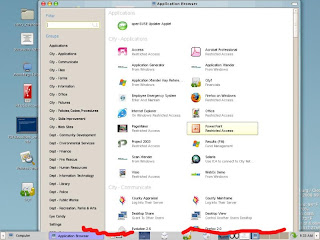
In 1024x768 users are unable to get to the window manager handles on the bottom (marked in Red). The "Groups" have no scroll bar code; so it doesn't know what to do when you have so many software packages that it doesn't fit on the physical screen.
Here is the mockup that I found for the new main-menu:
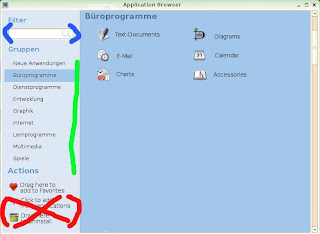
I've marked in colors some areas of note:
(Red): I love the "Actions" section, however please allow me to remove the last 2 entries for the users. "Actions" and "Drag here to add to Favorites" should be aligned to the bottom and move down as entries are removed.
(Green): Scroll bars, please that activate only when you have enough "Groups". That total number will change as people move between resolutions. We have people that are logged into 1024x768 one day and then 1680x1050 the next. We also have mobile users logging in at 800x600 from their cars. When they come into the building they mostly use 1024x768.
(Blue): Filter. One interesting thing that I have noticed is that the users use the Filter to try and search for "Groups" along with applications. This currently does not work. Right or wrong, they do it often as I look over their shoulder. One of my groups is "City - Skills Improvement" and possibly if you type in "Skills" or "Improvement" it should return all of the software contained in that Group.
So my comments now on the developers Wiki. The developer items are preceded with a carot.
> The main menu opens a second window to allow the user to launch applications not contained in the main menu.
I kind of like the second window. What I have found is that users are intimidated by lots of things on the screen. The work flow that I have seen is that they only go into the "Big Menu" a few times when they first log into the desktop. They place shortcuts on the gnome-panel, wallpaper(Desktop) or into Favorites and rarely go back into it. There are literally hundreds of software packages that they rarely or never use. It would be nice to allow a gconf setting determine whether you get a second window or not. I would use it.
> It's slow
Even with 100 people on, mine opens in 2-3 seconds even with this many software icons. What is really SLOW is when you add a .desktop file with 100 people logged into the same machine. The whole server comes to a crawl while all 100 people refresh their cache. Bug is filed here.
> It's not what the user expects
It's been well received by everyone that has seen it. It's much better than old style cascading menus. 99% of people have figured out to do [ Computer ] >> [ More Applications ] on their own. I don't think this is a weak area of design.
> People don't use the category-links or search-filter on the application-browser's left side, thus scroll a lot to find an application
True. Many people try and scroll through the list of software applications. The one bad thing that I saw in the mockup is that if the user fails to understand that clicking on different "Groups" shows more software applications they won't see that more exist. At least with the current design a scroll bar immediately shows you that many more software options can be found below. Not everyone understands the concepts of tabbed choices.
> People don't use right-click in the application-browser, so they never discover that they can add applications to their favorites, nor do they know that they can uninstall applications from within the application-browser
Very true. Right-mouse clicks should always be one method to do something in software, but not the only way. Many users *never* try the right mouse click. It should also be noted that some users log into GNOME via NX/Citrix from Macs which have sometimes only a single button mouse.
> Make richness of application-browser more obvious by use of icons/text ('Drag here to add to favorites')
Yes!. This will compliment the right-mouse method.
> Force users to find their applications faster by using tabs for categories and icons for sublevel-categories
See comments above. By hiding the scroll bar, some people will not understand that the tabs produce more options. Remember, that technology is used by people of various skills. We also have a lot of users that only log on for email and leave request entry for 10 minutes in the morning before starting their regular duties. Not all employees work on computers 8 hours of the day to tinker and try things.
It's always nice to see projects moving ahead. Hopefully my comments have given some food for thought.
I'm putting my comments inline with the items listed on the development ideas page. Some of the changes are going to make things harder for us (and very possibly other enterprise users).
To start with, there is how our main-menu looks with all of our software loaded. We have a lot of departments each with their own software packages. I'm positive this is way more applications than is being tested; but very probably is the amount that most bigger deployments will use.

In 1024x768 users are unable to get to the window manager handles on the bottom (marked in Red). The "Groups" have no scroll bar code; so it doesn't know what to do when you have so many software packages that it doesn't fit on the physical screen.
Here is the mockup that I found for the new main-menu:

I've marked in colors some areas of note:
(Red): I love the "Actions" section, however please allow me to remove the last 2 entries for the users. "Actions" and "Drag here to add to Favorites" should be aligned to the bottom and move down as entries are removed.
(Green): Scroll bars, please that activate only when you have enough "Groups". That total number will change as people move between resolutions. We have people that are logged into 1024x768 one day and then 1680x1050 the next. We also have mobile users logging in at 800x600 from their cars. When they come into the building they mostly use 1024x768.
(Blue): Filter. One interesting thing that I have noticed is that the users use the Filter to try and search for "Groups" along with applications. This currently does not work. Right or wrong, they do it often as I look over their shoulder. One of my groups is "City - Skills Improvement" and possibly if you type in "Skills" or "Improvement" it should return all of the software contained in that Group.
So my comments now on the developers Wiki. The developer items are preceded with a carot.
> The main menu opens a second window to allow the user to launch applications not contained in the main menu.
I kind of like the second window. What I have found is that users are intimidated by lots of things on the screen. The work flow that I have seen is that they only go into the "Big Menu" a few times when they first log into the desktop. They place shortcuts on the gnome-panel, wallpaper(Desktop) or into Favorites and rarely go back into it. There are literally hundreds of software packages that they rarely or never use. It would be nice to allow a gconf setting determine whether you get a second window or not. I would use it.
> It's slow
Even with 100 people on, mine opens in 2-3 seconds even with this many software icons. What is really SLOW is when you add a .desktop file with 100 people logged into the same machine. The whole server comes to a crawl while all 100 people refresh their cache. Bug is filed here.
> It's not what the user expects
It's been well received by everyone that has seen it. It's much better than old style cascading menus. 99% of people have figured out to do [ Computer ] >> [ More Applications ] on their own. I don't think this is a weak area of design.
> People don't use the category-links or search-filter on the application-browser's left side, thus scroll a lot to find an application
True. Many people try and scroll through the list of software applications. The one bad thing that I saw in the mockup is that if the user fails to understand that clicking on different "Groups" shows more software applications they won't see that more exist. At least with the current design a scroll bar immediately shows you that many more software options can be found below. Not everyone understands the concepts of tabbed choices.
> People don't use right-click in the application-browser, so they never discover that they can add applications to their favorites, nor do they know that they can uninstall applications from within the application-browser
Very true. Right-mouse clicks should always be one method to do something in software, but not the only way. Many users *never* try the right mouse click. It should also be noted that some users log into GNOME via NX/Citrix from Macs which have sometimes only a single button mouse.
> Make richness of application-browser more obvious by use of icons/text ('Drag here to add to favorites')
Yes!. This will compliment the right-mouse method.
> Force users to find their applications faster by using tabs for categories and icons for sublevel-categories
See comments above. By hiding the scroll bar, some people will not understand that the tabs produce more options. Remember, that technology is used by people of various skills. We also have a lot of users that only log on for email and leave request entry for 10 minutes in the morning before starting their regular duties. Not all employees work on computers 8 hours of the day to tinker and try things.
It's always nice to see projects moving ahead. Hopefully my comments have given some food for thought.
Friday, June 13, 2008
GNOME Improvement Areas
I have been reading a lot of blogs concerning the future direction of GNOME. Here are my comments based on the needs of Government/Business.
Email: (Evolution): It's improved greatly in the last 5 years, but the area of focus should be calendaring. Rescheduling meetings and adding people to meeting should be easier and more feature complete. One of the biggest improvement areas in GNOME is printing. Success is measured by users by how well things print. The example below is a printout of an address book. I would say this could be improved greatly. :)

Office Productivity (OpenOffice) : OpenOffice is moving ahead quickly and meeting our needs. 3.0 is going to be really nice, and I'm looking forwarded to moving it live later this year. The Base module is coming along nicely, and starting to work as a drop-in replacement for Access. Improvement areas would be increased features to replicate some of the things done in Visio, and also a stronger project management package that reads/writes MS Project files.
Browsing (Firefox) : Except for really poorly designed sites, Firefox works well. One of the worst offenders of using proprietary technology unfortunately is the State of Florida. We are required to enter information and do research from several departments, and a lot of these pages won't work without Internet Explorer. 99.9% of our browing is handled on Linux. The only improvement area that I can think of is being able to print shockwave content. That support call comes up fairly often.
Specialized Applications: Our specialized applications (Fire, Police, Community Development) almost always end up running on Microsoft Windows. In this era of a desire for lower taxes, it amazes me that these vendors develop in a manner that is so expensive for agencies to buy software. The database and operating system choices they make are very expensive to deploy in terms of dollars, and staff resources. We need to really try and push development tools to software developers. One excellent vendor is ADG . Their runtime packages can be deployed fully on Linux, both on the backend and front end.
My thanks to everyone that works on the various open source projects. You have made my life much easier.
I went out on my SeaDoo on Tampa Bay recently and it produced a great wallpaper image. If you like it, use it.

Email: (Evolution): It's improved greatly in the last 5 years, but the area of focus should be calendaring. Rescheduling meetings and adding people to meeting should be easier and more feature complete. One of the biggest improvement areas in GNOME is printing. Success is measured by users by how well things print. The example below is a printout of an address book. I would say this could be improved greatly. :)

Office Productivity (OpenOffice) : OpenOffice is moving ahead quickly and meeting our needs. 3.0 is going to be really nice, and I'm looking forwarded to moving it live later this year. The Base module is coming along nicely, and starting to work as a drop-in replacement for Access. Improvement areas would be increased features to replicate some of the things done in Visio, and also a stronger project management package that reads/writes MS Project files.
Browsing (Firefox) : Except for really poorly designed sites, Firefox works well. One of the worst offenders of using proprietary technology unfortunately is the State of Florida. We are required to enter information and do research from several departments, and a lot of these pages won't work without Internet Explorer. 99.9% of our browing is handled on Linux. The only improvement area that I can think of is being able to print shockwave content. That support call comes up fairly often.
Specialized Applications: Our specialized applications (Fire, Police, Community Development) almost always end up running on Microsoft Windows. In this era of a desire for lower taxes, it amazes me that these vendors develop in a manner that is so expensive for agencies to buy software. The database and operating system choices they make are very expensive to deploy in terms of dollars, and staff resources. We need to really try and push development tools to software developers. One excellent vendor is ADG . Their runtime packages can be deployed fully on Linux, both on the backend and front end.
My thanks to everyone that works on the various open source projects. You have made my life much easier.
I went out on my SeaDoo on Tampa Bay recently and it produced a great wallpaper image. If you like it, use it.

Thursday, May 08, 2008
Asus Eee PC And NX
We always are testing ideas for lowering the costs associated with employees that have to work in the field. In years past, many of the EVDO cards required Microsoft Windows drivers to work. So that meant buying full fat clients so that that people could do thin client work.
My coworkers at the police department did some experimental work with the Asus Eee PC and got it working on Linux. It dials the EVDO card perfectly. The NX client loaded and they were able to log into the City network and access the full suite of City applications. Very cool.
So I got my hands on the device and did some cleanups on the servers to make it work better. The screen is 800x480 so when users log in, their desktop icons were displaying "off screen" because they had been configured for 1024x768 or higher. So, I put in a few lines of code pre gnome-session that detects resolution and lowers the icon scaled size:
THUMBS_NAUTILUS="standard"
TMP1=`/usr/bin/xdpyinfo | grep dimensions`
TMP2=` echo $TMP1 | awk -F " " ' {print $2}'`
SCREEN_WIDTH=` echo $TMP2 | awk -F "x" ' {print $1}'`
SCREEN_HEIGHT=` echo $TMP2 | awk -F "x" ' {print $2}'`
if [[ $SCREEN_HEIGHT = 600 ]]
then
THUMBS_NAUTILUS="small"
fi
if [[ $SCREEN_HEIGHT = 480 ]]
then
THUMBS_NAUTILUS="smaller"
fi
/opt/gnome/bin/gconftool-2 --type String --set /apps/nautilus/icon_view/default_zoom_level $THUMBS_NAUTILUS
I'm formulating a plan in my head now to lower the font point size to 8 when they log into this device, but want to make sure I am able to restore their desired fonts when logging into a regular resolution. I'm sure a simple flat file storage of settings will be pretty easy.
Obligatory picture, with regular keyboard for scale size.

Edit: We are testing the 4G model, prices start at $299. 4G On Amazon
My coworkers at the police department did some experimental work with the Asus Eee PC and got it working on Linux. It dials the EVDO card perfectly. The NX client loaded and they were able to log into the City network and access the full suite of City applications. Very cool.
So I got my hands on the device and did some cleanups on the servers to make it work better. The screen is 800x480 so when users log in, their desktop icons were displaying "off screen" because they had been configured for 1024x768 or higher. So, I put in a few lines of code pre gnome-session that detects resolution and lowers the icon scaled size:
THUMBS_NAUTILUS="standard"
TMP1=`/usr/bin/xdpyinfo | grep dimensions`
TMP2=` echo $TMP1 | awk -F " " ' {print $2}'`
SCREEN_WIDTH=` echo $TMP2 | awk -F "x" ' {print $1}'`
SCREEN_HEIGHT=` echo $TMP2 | awk -F "x" ' {print $2}'`
if [[ $SCREEN_HEIGHT = 600 ]]
then
THUMBS_NAUTILUS="small"
fi
if [[ $SCREEN_HEIGHT = 480 ]]
then
THUMBS_NAUTILUS="smaller"
fi
/opt/gnome/bin/gconftool-2 --type String --set /apps/nautilus/icon_view/default_zoom_level $THUMBS_NAUTILUS
I'm formulating a plan in my head now to lower the font point size to 8 when they log into this device, but want to make sure I am able to restore their desired fonts when logging into a regular resolution. I'm sure a simple flat file storage of settings will be pretty easy.
Obligatory picture, with regular keyboard for scale size.

Edit: We are testing the 4G model, prices start at $299. 4G On Amazon
Subscribe to:
Posts (Atom)