Wednesday, April 25, 2012

LibreOffice, You're On Deck

After many months of prep work, QA and testing we are finally going live with LibreOffice next week.  There were a few bugs and nuances during early testing but with 3.5.2 we are to a milestone that seems ready for use with our 800+ users.  I have a group of beta testers and they have been very helpful in identifying documents and issues that needed attention and review.  Today I installed code to push them a fresh set of "defaults" each time they launch LibreOffice for a suitability test prior to deployment.  This is exactly what everyone will see next week, and this will allow me to push them the latest updates leading up to that date.  They are given a quick dialog which alerts them that settings are being reset


This dialog will go away next week.  The first time that you launch LibreOffice a dialog is presented which displays a quick summary of all things changed since our last upgrade of OpenOffice.  I have used this in the past with OpenOffice and found it to be very helpful.  No one reads the published articles and email messages about upgrades, but here it is again.  We then have acknowledgement that they clicked through.  The dialog gives them the option to receive a PDF of all release notes.  It also gives the users the ability to have a document emailed to their home address with the download links of LibreOffice; or if they want we will burn them a CD with the software already downloaded.  It's proven very helpful to promote people running these same software packages at home on their computers.


And then LibreOffice launches normally and quickly.  While you don't really ever have a "cold start" on a multi-user server, it's about 4 seconds from splash page to the point that Libre is fully rendered and ready for typing.  Certainly acceptable. 


Typing is crisp and responsive over remote display,and users are indicating that it seems to run faster in many places than did OpenOffice.  Being that OOo and Libre are on the same physical server, it certainly is an apples to apples test.  Both have identical resources, fonts and printers.   We have seen some problems with printing tables in comparison to OpenOffice and our support group has discovered some ways to align the tables for better printing.  Many of these documents have been upgraded several times going from WordPerfect 6, 7 and 8 and then OpenOffice 1, 2 and 3 and now LibreOffice.  It's a wonder they open as well as they do. 

Once this is deployed, I will be spending some time in some known problem areas.  We have seen some performance problems when Anti-Aliasing is enabled for graphic objects.  I want to better understand these problems and work with the developers to make improvements. 

Tuesday, April 24, 2012

Trapping User Crashes And Eliminating False Positives

When I was working on the new GNOME desktop servers, I wrote all of the launch scripts to go through a central set of calls so that we could trap an unprecedented amount of data.  Every click and login is recorded and we can tell when users are having problems.  One of the unexpected issues noted is the number of people that are "stealing" software packages that are running on other workstations.  We have two GNOME servers that you can log into and from there you can launch software applications such as Evolution and Libre/OpenOffice which are running on other "applications servers".  Both of these software packages cannot run on multiple heads at the same time.  This multiple login architecture was designed with the expectation that it would be used just occasionally and in a pinch; you are already logged in and running Evolution and go to a meeting in another building and need to 'steal' Evolution from the second workstation.  But the data was indicating that people were doing this all day as part of normal business practice.  When you steal Evolution it crashes and when you steal Libre/OpenOffice you are 100% assured that you will get a recovery dialog of some type.  In the dialog below, it shows how Libre and Evolution are running on servers which then can be run from the two GNOME desktops...but only to one at a time.


We had a lengthy conversation with our Director about this technique and sadly it cannot be stopped, because there are really times when users need to do this.  And there are 16 hours of the day when IT does not have support staff available to assist users.  So what we settled on was a consistent dialog to be used in places where users make an attempt to 'steal' software from one location to another.  The dialog warns the users of the severity of what they are doing and then they have to enter a six digit code which is their 'signature' that they accept the risks.  This same dialog is used for LibreOffice too and soon will be used for times when users attempt to log into the same GNOME desktop for a second time from another workstation.

The beauty of this design is that now when they terminate software with this technique it simply does an exit 0 and no longer is logged in our software as a crash and we can now make no attempt to grab a backtrace.  They are on their own and any problems they have are their own.  What they are doing is exactly like having a desktop computer with software running and pulling the cord; of course you'll have problems and very probably lose work.  We have had a huge drop in people using this technique once the dialog was installed. 

Now that false positives have been eliminated, it's now possible for the first time to grab a backtrace from software that has deadlocked. We know it's frozen because they are requesting a kill from the same workstation from which it was started the first time.  In the case of Evolution when they try and kill a running Evolution instance, they now get this dialog.  Once they select an option from the UI below, it finds the 'evolution' and 'evolution-data-server' process and grabs a backtrace and then closes them down.  Whereas previously we only had backtraces of a crash, now we have backtraces of deadlocks.  This will allow me to look for locking trends and work with Novell in improving the software. 


And if you are interested, here is the code that runs prior to starting the Evolution process.  When they click on the Evolution icon it always first tries to raise Evolution to the front of the window stack with wmctrl.  It then looks to see if it's already running.  If it's already running, it determines if it's running on their current workstation or another workstation.  If it's the current workstation it gives them the dialog to pick the last thing they did before deadlock; from this dialog they can obviously cancel and leave it alone.  If they terminate Evolution, it finds their two processes and used gdb to non-interactivity dump a backtrace.   If instead it's running on another workstation, it warns them that shutting down software is dangerous and then if they do so shuts it down and makes no attempt to create crash backtraces or deadlock backtraces...they are on their own.


I'm excited about the quality of data that we will be obtaining now, and this same code will be moved fully into LibreOffice once it's deployed next week.  We're getting complete crash and deadlock backtraces from hundreds of users without them having to mess with bug-buddy; everything is fully automated.

Thursday, April 19, 2012

Improving Window Resolutions

Things have been so busy, I have been getting a lot done and been meaning to blog about what's happening. Perhaps some of what we are doing will give you ideas to solve similar problems. The first chunk that I worked on was the user experience in regards to interacting with MS Windows software from GNOME.

Without a doubt one of the hardest parts of deploying technology to users is monitor resolutions. It's hard to explain and it's hard to explain now it relates to font size and screen appearance. Our environment allows users to roam around all of our buildings and use mobile devices to connect to the same GNOME desktop. I was not satisfied with static or hard coded user settings. I wanted them to be able to truly roam around through the City and have the experience as simple as possible and not require them to keep picking settings or have a dissimilar experience on another workstation.

All of the Linux applications work great and require no customizations. However, Microsoft Windows applications that are integrated into GNOME are a challenge. Largo uses mostly RDP/Rdesktop which works well for us. Many applications will run seamlessly and behave just like standard Linux windows and are not a problem. However many other Windows applications are not well suited to run seamlessly and require a "container" around the UI.

The code for a single monitor on the new GNOME server was already settled for how to handle launching a MS Windows application on a single monitor workstation. It subtracts enough room for the lower avant-window-navigator panel (which we do not allow users to resize or move) and then enough room for the metacity window manager. The window consumes about 90% of the screen as seen below. Users can still switch workspaces and they have the largest possible canvas to run their software. Users tend to always want to maximize windows and this gives them the best possible experience without obscuring anything and confusing those that struggle with window management and movement. This code works for all resolutions and monitors.

So of course when you settle on a design, there is always an exception. We have 1-2 applications on Windows that were developed with the expectation that users would run them in maximized mode and need close to 1024x768. (Why would anyone multi-task and use multiple windows, right? ;) ) We have a good number of users still in 1024x768 so what this means is that the lower few pixels of their software was getting chopped off sitting above the panel. After reviewing options, I decided to develop code that allows us to specify WIN_MINIMUM_RESOLUTION in the GNOME launch script and it performs the following logic:

Is their monitor physically smaller than this value? Disallow the software from running and alert the user that their resolution is too low. (Yup, we have just a few 800x600 devices still in play and home users sometimes configure their PCs in 800x600).

Is their monitor big enough to hold this value, but it's obscured by the panel? If so, enable Intellihide in avant-window-navigator and launch the software. The panel then hides only when it's launched and is active only for that session.

Is their monitor big enough to run this software completely above the panel? Just launch it in 90% mode as it did before.

Intellihide is a feature that is hard to explain to users, so only those few people that need to see it, have it enabled. Everyone else has the same experience. This code was deployed and worked well and now the users can see all of the UI.


As long as I was in this code, I have been wanting to clean up the code for those users on dual screens. Some software applications users want to fill both monitors, and some things they want to fill just 1/3 or 1/2. Previously there was an underdeveloped UI that allowed them to pick the size each time MS Windows was launched on a dual screen monitor. This was very simple and worked, but I hate being asked the same question repeatedly and I am sure they did too. So I made the assumption that each unique application is normally run with the same scaling factor. You might always use an engineering application in full screen, and you might always use Visio in 1/3 size. I added a checkbox on the UI that allowed them to store per application settings of 1/3, 1/2, 2/3 and full screen modes. If this checkbox is enabled, it keeps it and uses it automatically the next time. If they log into dual screens @ 1440x900 or @1024x768 it won't matter, everything is dynamic and opens in the same scaling factor.

If this same user logs into a single screen workstation, this code is not used and it just runs in 90% mode. So the infamous question, what if the user wants to change it after it's set. Old school thinking would be of course to make a UI where the settings are stored and allow them to go in and make the change. I have found that such screens are seldom remembered and we get support calls, or they just suffer and are not happy with the experience. So following in the trend of some recent projects, I present this information on a dialog box similar to notify-send. It's on a timer and pops up in the lower left corner. If you leave it alone, the software uses this setting automatically in five seconds. Very clean, and no "hidden screen" to change settings...it's always right there and easy to change.

Screenshots; I love them and maybe they help show how this all looks to the users:

On a single monitor @ 1440x900 Visio is launched and creates a nice workspace with no prompts.


On a dual monitor @1024x768 user is prompted for desired Visio window, checkbox allows them to make this setting "stick"
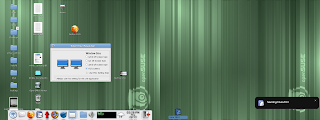


The dual screen user has selected 1/3 and opted to remember this setting each time. Container opens as requested.
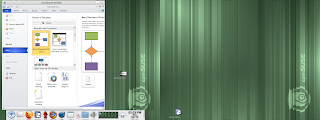


User launches this same application and GNOME finds setting and alerts the user that it's going to be used. Pseudo-notify-send popup is on a timer and allows them to easily change it later without having to hunt for a hidden UI somewhere.


Feedback has been positive and I think it was time well invested. Support calls concerning resolution problems should drop.

Quick Updates: Acrobat Reader 9.5.1 finally released and installed; Flash 11.2 seems to be working well and is now live. Testing Firefox 12.

Other Projects: Significant advances in improving techniques with shutting down software correctly to avoid recovery dialogs. Finally a way for us to grab backtraces on deadlocked software while dropping false positives....I'll blog about this next week. It's really coming together nicely.

Tuesday, March 27, 2012

Offloading To Thin Clients

When we work with outside vendors, it's always interesting to find out their misconceptions about what is a "thin client" and how it's run. When we call in issues, they always want to know the operating system of the thin client even though for the most part it doesn't come into play. Once you log into a GNOME server with XDMCP all you are doing is remote displaying the software. This concept for some reason seems to baffle people. Debian is on the thin client, but we aren't running Debian based GNOME.

In years past we always ran 100% of the software on the server and it's worked great. But in the last year we offloaded the RDP/Rdesktop client with success. The software to which we connect with RDP is obviously still host based, but now we run the client on the local workstation. In the case of RDP the users got a huge performance gain.

I'm reviewing all possible ideas for what should be offloaded to make use of distributed CPUs, while still maintaining our low costs of centralized servers. I have mentioned in the past that for sure we'll be doing the same thing with the ICA/Citrix client. The shot below was taken from our current GNOME server and you can see that wfica (the citrix client) chews CPU as the canvas is repainted. The server is certainly not taxed and we could get by running it in this manner; but I have a mind that tinkers and tunes and this really should be offloaded. Maybe a part of me wants to see 250 users running at 1% busy. :) For sure, it will increase the speed of the responsiveness and crispness of their UI interaction. RDP will communicate with the server instead of using X11 to deliver the presentation.


A few times a month, our users will stumble into a page that just does not play well over remote display. It's usually Flash and for some reason the player has problems and it just cannot keep up. I have always suspected that the video was encoded at a very high frame rate, but never have taken the time to verify that fact. As part of this whole process of reviewing offloading certain functions I have experimentally loaded Firefox 11 and Flash on the physical thin client. I wondered how it would work having access to the local video card.

I modified the master thin client to accept a request for starting a browser from the server side. Those with this new build can click on an icon on the GNOME server as picture below.


Firefox then runs locally. I didn't really know what to expect and the results were interesting. Firefox was slower in starting on the thin client than over the network from the big servers. I know that many people have complained about thin client speeds at other organizations; and I think this shows why. Software should be tested as both host based and local based and the right fit deployed. The local version of Firefox didn't have the crisp response time in the pulldown menus and UI interaction. It was certainly usable however. So the big test was then playing Flash content. My testing indicates that videos are not faster playing locally, and in fact might be a bit slower. In the shot below you can see "top" running on the thin client and Flash is just hammering the thin client. It's clear that Flash will consume as much CPU as it can get. I was testing on the older 5725 HP thin clients and once I pack up another beta build, I'll test it on the 5745s which I believe will provide a slightly better experience. But all in all I don't see any advantage to this design. Flash and Firefox constantly need upgrades and the devices would probably have to be upgraded every few weeks. I can upgrade the server in just minutes and it's deployed for all users; we'd need a strong case for offloading browsers to the local device and right now I'm not seeing it being worthwhile.


Current Projects: Installed and testing LibreOffice 3.5.2 and one by one crossing off items on my list for the next thin client release.

Friday, March 23, 2012

Software Portal Changes Pushed Live

With increasing workloads, I have been doing everything possible to increase what we can do remotely to eliminate having to send IT staff to users desks. Very often a big part of the problem is not knowing exactly what equipment they have. So I have reworked the "Thin Client Detail" screen in our support portal to give us more information than ever. All of these changes will also allow me to now begin adding new features for the end users.

I've always posted lots of pictures, I think they make it easy to understand how it's working. I'm sure that UI could be better, but it's working and will improve. When you bring up a thin client device it gets the server side configuration files and displays what it *thinks* should be configured on the workstation. This is done because very often the devices are powered off and now we'll be able to see how it's configured even if it's not currently running. The status line indicates that the information is based on configuration files and not the physical device. The REFRESH button is enabled in this case because it has done a ping and detected the device is powered on.


Once REFRESH is pressed, it physically queries the thin client and obtains as much information as possible. It detects version, function and other settings. It also then polls the Xserver and detects the resolution. One great new features is that the EDID is tested and it displays the exact make of the monitor. VG1930wm is an old ViewSonic monitor.


The next tab obtains the rest of the settings and detects their version. If they are running a Beta release of the thin client OS this is clearly indicated; otherwise it just displays a thumbs up symbol indicating they are current.


NX creates an interesting issue, the server thinks they are a thin client but it's really a virtual Xserver. So in this case the UI clearly shows that it's NX and then tries to find their connection IP.


Here is another feature now implemented. Some users have the ability to rotate their monitors as they desire. So when you enter the detail screen it detects that the monitor is configured in this manner (Rotate) but doesn't know how it's currently being used.


However when the REFRESH button is pressed, it does a query and detects the current orientation and displays it accordingly along with color depth and the exact cable (HDMI) being used. Being able to see the cable will allow us to upgrade users from VGA as time allows.


Another new features that is wonderful for us is to know the exact capabilities of the monitor. Are they configured for optimal resolution or running it in the wrong aspect ratio? Does the monitor go into a higher resolution? The portal queries xrandr and gets all of the supported resolutions and displays them as a tooltip when you hover your mouse over the monitor. Previously support would have to check this by physically going to the workstation.


The last major feature that will come is the ability to get a quick thumbnail of their session and a few other cosmetic fixes...but all in all it's working well. Centralized support has been a real time saver for us.

Other projects this week: Prepped Firefox 11 for release, tested Flash 11.2 RC, checked some pages that are having problems with sound, QA'd LibreOffice , reviewed all Evolution crashers and tried to organize them into groups and reviewed log files to look for errant networking cables and bad UPSs

Next week: The next thin client OS feature set will be started now that we have the host infrastructure to support it.

Monday, March 19, 2012

Infrastructure Upgrades

As I have mentioned previously, the new GNOME servers are live and are considered "in production". I have been doing a small amount of final tuning, but really they're running beautifully. The big areas of customization beyond base OpenSuse were 1) file cleanups; lots of software leave behind files mostly in /tmp. A single user would not have any problems, but with hundreds of users it becomes unwieldy. 2) Flushing Cache; each morning I force a sync and then force all cache to disk. Certain processes seem to leak and this frees lots of memory for user processes each day. 3) User process cleanups; certain software packages leave behind errant or stray processes. No big deal with one person, but add up quickly with many users.

I'm back on infrastructure upgrades again. In the time since the last specifications were drawn, we've had a lot of new requests. Now that we're pushing all thin client updates from the server; I have started the process of simplifying screens as they appear on the thin clients. They only display for a few seconds on first reboot after update and are not seen by employees nor IT staff. They would only be used for troubleshooting.

The UI work has been done mostly in our "support portal" software. The screens below are my works in progress, please no UI nazi type comments. :) I'm placing widgets and working through the flow; but it's starting to work. One new requirement is the ability to have dual monitors each in their own resolution and possibly in differing orientation. Previously, we would only allow dual screens in the same resolution. This requires a change in the UI for configuring and then the thin clients had to be modified to understand how to accept all of these new settings. The show below shows the thin client screen as seen by our support staff that allows them to configure monitors. It will eventually poll the devices too and obtain information concerning types of cables used and manufacturer of hardware.


The Configuration tab will obtain information about the thin client, and allow you to configure it's function/purpose. It now also will allow you to configure a local RDP application. This feature will allow users to connect right to specialized point of sale type software without first connecting to the GNOME desktop. Some of our sites have users that move around frequently between devices and assist citizens, and this will help them in that process. I'm also exploring ideas to indicate to our support staff that the thin client is on the latest release. Mockup shows a thumbs down.


We're storing lots of data concerning alerts and authentications and now when you review a thin client, it shows you all of this activity regardless of specific user. This will help us find trends where a certain device is having problems. Pinched networking cables? Bad UPS? We should be able to find it easier with this data.


On the thin client side; after reboot with an operating system upgrade the UI will display the settings that were pushed from the server for 10 seconds and then reboot and use them. This is done in the wee hours of the morning and never seen;

This very simple screen shows the current thin client settings for the monitors:


Here the simple thin client UI has received the settings for running a local RDP application


This is the new UI that users see when the thin clients are powered. As before they were able to log into two GNOME desktop servers (A and B). But the circled space shows the local RDP application that displays when configured. If they don't have access to an application from their workstation, this area grays out.


Other things that I have done in the new thin client build: * Disabled XZap (Alt-Control-Backspace), * Fixed an issue with HP 5745s where the CPU was running through the code so fast that some data was not being saved correctly on update, * Continued adding support for this to work on VMWare.

I pushed an early alpha release out for testing by the end users and now am going to continue adding the rest of the features that we wanted to include in the upgrade.

I also have continued to QA LibreOffice with some beta testers and tracked and reviewed Evolution crashers on SLED 11.

Tuesday, March 13, 2012

Projects And Starting New Thin Client Release

I'm back in the office after an extended weekend and right back into projects. All of the new GNOME servers ran great while I was gone. I have started to add a few more scripts and crons to tune it further based on how it's running and processes that are being left behind by various user techniques. For the most part I consider the migration to the new desktop/GNOME server to be finished and I have already started moving into new areas.

I added a bit of code post authentication that polls the users thin clients and requests it to send a version number string back to the server. This will allow us to see if any devices were missed during the recent upgrades. 525 thin clients in multiple buildings...there are always times when a handful will escape upgrade for whatever reason. Now we'll see them. This data displays in real time in our support portal software.


We continue to beta test LibreOffice with a small group of users and we're making progress on testing and the QA process. There were some settings that were changed in OpenOffice years ago, and you kind of forget about some of them and then have to make changes. We'll build a standard template of settings for users which will be pushed into $HOME on first launch. From there, they'll be responsible for their own settings. We have found a few issues, but so far nothing major. Bug reports are being filed and it's moving along.

I have started to gather more detailed information on Evolution crashes based on the backtraces we're auto-generating. I wrote a little script that tries to group them together based on the crash location and we're finding that many of them are the same issue. A few well placed patches in SLED 11 should fix many of them at once.

I have started the process of creating the next release of our thin client software. This upgrade will improve the end user experience and also benefit IT in lowering support calls. This will be QA'd for several months before being deployed and it's still at an early stage. Here is a list of features that will be implemented:

+ Disable X-Zap; Alt-Control-Backspace resets your Xserver and we think that users are finding this by accident. No reason for it to be enabled, all it does is kick them off the server.
+ Fix configuration issue with HP 5745 thin clients; the latest HP thin clients have an odd timing issue related to receiving a FOG update that is corrected by powering off the device and rebooting. I want to hunt this down because it's causing support to have to touch a small percentage of devices after update.
+ Local Citrix: We still have at least a year left of using Citrix and right now it's running on our GNOME server. Offloading this will drop CPU cycles used on the hosts greatly and give the users a faster experience. This replicates what was done in the last release with RDP which has worked out very well.
+ Fix Xclients bug: Users are finding certain techniques that allow them to drop off the server and have running xclients that messes with their logging back in again. This sometimes is just a failing UPS and power dip -- It's enough to return them to the system chooser, but the host reconnects and their software continues to run. I'll check for clients and xkill them. Right now they have to reboot when this happens.
+ Rdesktop 1.7.1; it's out and includes some bug fixes.
+ USB Device scanning; we're going to try and use lsusb to look for devices they have plugged in that might affect our updates and cause them problems. Some people apparently are bringing in their own pointer and keyboard devices. We want to be aware of them when troubleshooting problems.
+ Local applications; We want to allow a kiosk mode to be available to start up a Windows application via RDP. This will allow them to log into point of sale software without having to log fully into GNOME.
+ VM support; the thin clients will run in VMPlayer and understand that infrastructure. This will allow us to replace NX running on computers on our high speed network. NX will of course continue to be used where we don't have enough bandwidth.
+ Photo management improvements; the simple UI that allows them to move photos into our software will be improved and be more robust.
+ Monitor support; We'll allow for monitors of different resolutions side by side, and also for a portrait monitor to work side by side with a landscape one. Right now this was disabled in order to keep the configurations simple and consistent. But there are some needs for this design.
+ The thin clients will connect to our time server and sync clocks at boot. Previously this was not a big deal because all software was host based, but we want the local apps to know the right time.
+ Local email; the thin clients will email us when they have certain problems. If the Xserver crashes, it will grab a copy of the log files before they're deleted.
+ Detecting power off; if the users power off their thin clients while logged into GNOME we really don't know they have done this. The button will detect server connection and log this activity.

I'm looking forward to these changes and the challenges ahead in implementing them.

Friday, March 02, 2012

LibreOffice QA Creates Better User Interaction

I have been testing LibreOffice 3.5.1 on our server with anticipation of a migration from OpenOffice in the next 30 days. The users are going to like the advancements made in the code base since OpenOffice 3.3 and the migration should go pretty painlessly.

This project has given me time to revisit one of the drawbacks of server based computing from the user perspective -- control over recycling power and resetting software. There are many drawbacks to running software at their desk, but one thing it does is allow them to "reboot" the computer. If LibreOffice locks on a file, all children processes thereafter are dead as well and the end user cannot "fix" this issue. On a PC they'd reboot. Doing something with a process killer is beyond the scope of what most people can do. They don't know what to kill, and how to pick and troubleshoot errant processes. When a user requests a document while another document is already open, the server really can't tell if the first process is running correctly. Consideration is also needed to the fact that we are only staffed from 7am until 5pm with people that can assist with these matters. The previous design was to give them a dialog when a second document opened and ask them if they wanted to kill the previous document. Clunky, but required to ensure off hour users the ability to fix their sessions. My mindset since OpenOffice went live was that I needed something like notify-send that had a pushbutton trigger on a timer. With resources allocated to installing LibreOffice, I created my own with Python/Glade. Instead of something intrusive, they get a popup in the lower left corner when they launch a second document. If everything is working fine, they leave the dialog alone and it closes after 5 seconds. If the first process is locked, they can click on [ Terminate All LibreOffice Sessions ] and it does exactly that.

As time allows, I'm going to see if I can file a feature request to make it so that children process of LibreOffice can "poll" the parent and see if he is alive and then reset itself if required. This would solve issues and remove the dialogs completely.


I have been revisiting other dialogs and messages on the servers and have made changes. Many of these changes have been made because we are now tracking a more information regarding how they are reacting to and using our dialogs. I'll blog more about that in the coming days.

Wednesday, February 29, 2012

250 Concurrent Users, Tuning and Citrix

Over the last week the server loads have grown and it's interesting to see how well it's running GNOME and all of those sessions. The shot below is how it looks right around 250 concurrent users, and for the most part everything is working well. I've marked some areas in color.

I'm seeing a high level of communication between polkit and dbus (purple); I'm not sure what's happening here but I'll try and sniff it with dbus-monitor and see exactly what's chewing CPU. This activity is not slowing the machine terribly.

Evince-thumbnailer had a feature added that is not in OpenSuse 11.4 that terminates the thumbnailer after about 5 seconds if it cannot finish. On certain PDFs, it appears that it either hangs or that the PDF is so huge it takes more than a few minutes to complete. This is causing a small spike in CPU. As users navigate, these thumbnails get cached so we'll see fewer and fewer of them as time goes by.

Host based Citrix sessions are chewing CPU as I have mentioned previously, the canvas rewrites are expensive.. As marked in red, you can see that they're collectively using a good amount. More information below on this project.


The server has 64G of memory and right about at 250 users it's starting to begin to have to write some cache files to disk and there are sometimes very short pauses a few times a day while this happens. We're going to throw in a few more memory sticks and that should allow us to run closer to 300. This is not a serious problem, and is only happening for a few seconds a few times a day and only under very heavy conditions.

The users have discovered ways to leave "dead" gdm child processes behind that don't seem to halt on their own. I suspect people are doing things like powering off thin clients with sessions running, starting to log in and then turning off thin clients and also allowing the server to sever their connections because they don't log off at night. Our server kicks users off after 13 hours. I'm writing a little script that will run nightly and remove these processes. They aren't affecting speed, but probably are consuming a bit of memory.

As mentioned, I'm making progress with running Citrix locally on the thin clients. When the user picks a MS Windows application that uses Citrix, a signal is passed to the thin client and Citrix is then initiated and forms a connection to the Windows server. Once this is handed off, no additional resources are consumed by the GNOME server and the users have a compressed stream directly to the thin client; no more X11 traffic running over the network. Early testing already indicates this will run faster. I'll mount a section of memory for the Citrix cache so they aren't hammering the flash drives of the thin clients and this should give them optimal speeds.

Other concurrent projects: Connecting LibreOffice to our infrastructure and testing it fully, reviewing Evolution crashes and working with Novell on fixes.

Tuesday, February 21, 2012

GNOME Migration Almost Complete, New Projects

It's been a busy, but productive few weeks. We have slowly been flashing more and more thin clients with the latest release of customized software and it's going very well. This morning the upgrades were performed on the Police department and they are the last major group to bring over to the new servers. Today we hit 210 concurrent GNOME users, and the "top" is below. It's very interesting to watch how memory is handled as the capacities grow and it's doing a great job. It tried to keep user processes and active disk IO in memory. When physical memory was getting low, it started to write disk IO out and then take cache memory away and use it for user processes. Very cool, and the server is running like a champ! Anyone that in years past ever had to tune SCO Unix on Intel hardware and recompile the kernel over and over again will appreciate how this all works. :)


I marked in red that we are seeing higher CPU usage on Citrix sessions, which are still running on the host. The canvas repaints of Citrix appear "expensive". So I have opened a new R&D project to begin the process of developing our next thin client upgrade; and this one will feature a local Citrix client. This will move all of this CPU activity to the local workstation and drop the server load. Running clients locally is always done with caution because once done, that means all updates (and exploits) have to be pushed to 500+ devices instead of being done once on the server. But in this case the benefit is just too great -- We have another 1-2 years of Citrix usage.

Our thin client build right now runs on the HP 5725, 5735 and 5745 thin clients and I spent some time last week getting it to understand and run in a VMware player. NX/Nomachine does a great job with compression, but for those few PCs that we have on our high speed fiber optic network there isn't really a reason to use this technology. The server needlessly has to run a whole X session, when it could be offloaded to the native (Windows, Mac) operating systems. So we are going to experimentally put a few test users on this new build and see how it works. Almost all of our users are on thin clients, but there are maybe about 25 PCs and Macs on the network for various functions and they'll benefit from this technology change. They also would get local RDP (and future Citrix) sessions which will run faster than the current host based design.

All in all, it's been a great few weeks. Next up for me: Working with Novell on some technical advances in Evolution and also moving ahead with converting from OpenOffice to LibreOffice.

Wednesday, February 08, 2012

135 Concurrent Users And Growing

So we're into the migration process to the new GNOME server and are hitting concurrent users loads of around 135. We pushed the thin client updates Monday night and found one tiny regression Tuesday. It was quickly fixed and we re-pushed to that department and then upgraded yet another department last night. So far no major issues in scaling. The upgrade process will conclude on the 23rd, lots more devices to go. Once you get past the initial tuning issues, it's amazing how well this stuff scales.

For those interested, here is top running with the 135 users....very nice.

Monday, February 06, 2012

And One More Desktop Change

This is really a small change, but thought I'd publish it in case it's useful to anyone else for deployments. Users really, really struggle with three areas: File types, File Size and Folder Locations. I've blogged many times about steps taken to make interaction with files simple and not require file managers. Now that the major technology pieces are finished for us to go live, I can get back into some ideas that have been in my head. I had development something like this for use with our USB sticks on the thin clients, and brought it over to the GNOME desktop. When you double-click on an image now, it allows you to change the size before it's placed into the clipboard. They can shoot in 10megapixel all they want, and with a single click make it "email friendly" for delivery. Having people go into GIMP and reduce and then copy and paste is just way too many steps.

In the shot below the tux picture is double-clicked and the MIME helper bar appears. By selecting "OriginalSize" the image is then pasted into Evolution at 1024x768. This is the default.


However, if if they want to copy it 320x240, all they do is select the ComboBox setting and then put it into the clipboard and python reduces it automatically and then it goes right into Evolution.


It's nice to have some time to make these changes, perhaps it's the calm before the storm :)

GNOME Desktop, Away We Go

After prepping and testing the new GNOME desktop, we have closed up all of the beta code and it's being moved into production. The new thin client release is moved into our FOG server and we'll be pushing it out to all users starting today. 60 of the 525 devices will get new code today and be disconnected from the old GNOME server and be moved to the new one. That should net us about 50 more concurrent users to stress test the server. Right now the machine is running great around 100 users, and I think it will absorb another 50 with no problems. Additional departments will be touched Tuesday, Wednesday and Thursday nights.

In other news, looks like SuseCON is being held this fall in Orlando. That's only about 1 1/2 hours from Largo, so seems like a good place to meet more of you.

I am a person that LOVES data. I love to accumulate it, and do research and see what types of things people are doing on the servers. I have been writing data on certain trigger events into flat CSV files and starting to connect the data to our support portal. When the infrastructure is in place and fleshed out, I'll probably move it to sqlite or something. The user detail screen has been modified to show you at a glance all information concerning our employees. The left edge shows their information and shows their active sessions. The right side shows this new data.

In the UI below, I'm showing all of the Alerts. This includes double and triple clicking on icons (which often indicates some kind of problem), logging off the server with software still running (which yields OpenOffice recovery dialogs on next login), instances of forcing software to quit and software crashes. It's very cool watching this all in real time, and we already are finding users having problems that never called. One bad cable can ruin a users entire perception of the servers...and with these tools we should be able to help locate issues.


The next tab shows all authentications, device names and technology used. Very often it's difficult to know exactly where a user is in our buildings and their current connection technique. It's now all available at a glance.


And we are collecting all data concerning *.desktop icons clicked from GNOME. We can see all of their clicks through the data. Very often users describe software to you, and with hundreds of icons it's hard to tell what they are running. Now we can see it at a glance.


Exciting times as all of this technology is pushed live and it's my hope it lives up to its potential.

Friday, January 27, 2012

Losing Planet GNOME Feed

Looks like I'll be losing my Planet GNOME feed in the next few weeks based on the new policy changes. I'll still be blogging at the same frequency, but you'll have to pick up the feed from Blogspot. I've greatly enjoyed the interaction with all of you and hope that it continues.

Thursday, January 26, 2012

Full Steam Ahead

Now that the tuning issues have been resolved, we have started to move more and more users over to the GNOME server. Just now we hit a new high of 108 concurrent users logged into one server.


And as promised let's see how the server is doing with the 108 users. (shots below). The answer is: excellent. Time to ramp up workstation upgrades and move more people over. There have been a few bumps in completing this project but it's been worth the effort. All City employees will be able to log in and get core software packages (Browser, authentication, word processing, image editing and more) without any license costs.


Tuesday, January 24, 2012

DBus Fixed + Support Portal Changes

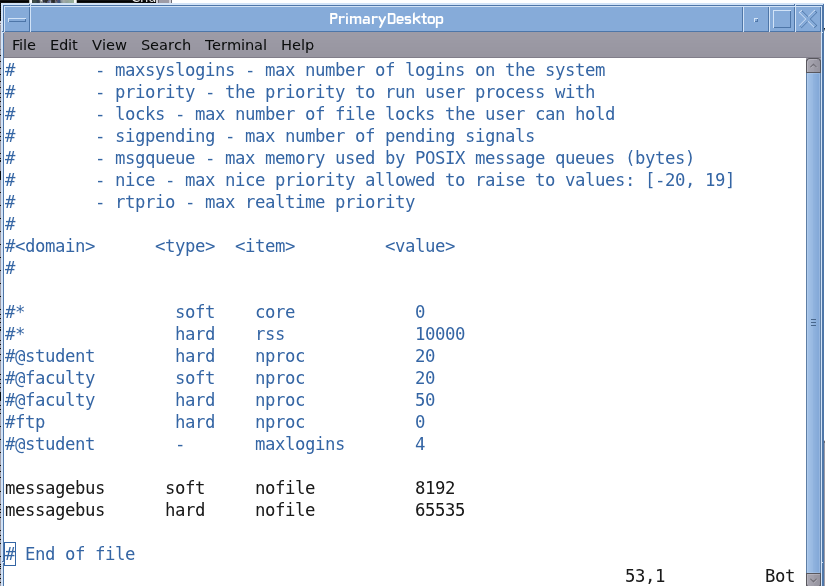
After a lengthy process, finally there was a solution in the issue of dbus not allowing more than about 95 users into our new GNOME server. Dbus needed to be patched (thanks Vincent!), and then we continued to hit the limit of 1024 files being opened by the user 'messagebus'. /etc/sysconfig/ulimit has an entry that is supposed to configure the number of files that a user can open at once. It turns out that PAM is performing the same function and was doing the blocking. So I made the change as seen below to /etc/security/limits.conf and it worked. I don't see any other roadblocks and we'll start moving people over to the new server in greater numbers starting next week. Good news!


And here is our support portal showing the 100 concurrent load, woohoo.


We met yesterday and finally made some decisions on the way that NX will be implemented for outside connections. The world has changed greatly in 5 years since the last install, and we are trying to find the right balance between security and functionality. I added a new tab to the portal to show "Logs" and we now can see people logging into the GNOME server is real time. The servers are full of information to alert us that people are having problems or technique issues; so I started to gather all of that information and get it into a new section called "Alerts". We'll be able to see people who tried to launch software that they do not have a license to run, crashes, password problems and problems with settings. This should allow us to be a bit more proactive and do more with less (tm).

Thursday, January 19, 2012

Poor Mans GoogleEarth

In my last blog, I mentioned that I had gone in and made changes to our thin client build to accommodate running NX sessions along with local RDP. We had another thin client project scheduled for 30-45 days in the future and because I was already in the code it was the best choice to just finish it and roll out all features at the same time.

Our county is doing a cool project to gather GPS information on the squad cars from all of the agencies and build a KML file for Google Earth. This will allow the various departments to see if fellow police officers are nearby. My coworkers did all of the front work and got this connectivity working back to the county. Our police department wanted to display this information on a TV in the 911 center. Instead of allocating a full PC with operating system to this function (a waste), we decided to just build a new kiosk mode on our thin clients. So I made the changes to the build. A chooser comes up, you click on a button and GoogleEarth runs on one of our big servers and remote displays back to the thin client. Easy and works great and saves time and money vs installing a thick client for this function.

The next logical step of their project is trying to get this information into the squad cars. There are many scaling and bandwidth problems with trying this. The hardware in rugged PCs is sub-optimal for this function. These devices are run 5 years, so many of them are very old and would come to a crawl with GoogleEarth installed. There also is the issue of sharing bandwidth of this function with the EVDO cards. The networking already is busy doing mission critical functions and cannot be bogged down with another major feature. Another idea would be to run the Google Earth software on a server with their already existing NX infrastructure, but the prospect of 25+ of these running concurrently was not pleasant.

So I had an idea that we are testing now, which was to create a poor mans Google Earth. This was so simple that it took me literally less than 1 hour to write, test and put on the GNOME menu. A cron job runs every five minutes and does a screen grab of the Google Earth session running in the 911 center and dumps it to an image file. I then wrote a quick Glade/Python UI that simply displays this picture and is on a 2 minute timer and refreshes the image. The memory footprint is very light, and everyone is sharing the same image file. So this should scale wonderfully and will barely produce any server load.

Here is the UI. Buttons are nice and big to accommodate their touch screens and allow them to touch with their fingers in a moving car. The image is in a scroll region to ensure it works correctly with their 800x600 and 1024x768 resolutions.


In the shot below, I have marked the memory footprint of Google Earth on the server. 25+ of these would be quite a load in memory and CPU. That's 25+ users all performing the same steps and retrieving the same information independently...not a good design. The other window shows the very simple code used to grab the screenshot from the 911 center. The script pings the device, if it's alive it grabs a shot, creates multiple scales and then moves the finished product into place. The Glade/UI then loads the image into the canvas.

Tuesday, January 17, 2012

Local RDP, NX 3.5 Installed

After waiting many months for the release of NX 4 we reached a point where we could not wait any longer to use compression technology with the new GNOME desktop servers. We were really hoping that NX 4 would fall into place so that we could deploy iPads running host based software. So last week I removed the NX 4 beta and installed the released/stable NX 3.5 After remembering a few tweaks we did a number of years ago, it's all up and running. I removed the NX 4 client from our thin clients and reinstalled the older version as well. A few script changes and improvements and things were working. I should be able to get a test build to remote site users this week.

Our division got word very late in the implementation process of the new MS Windows based Recreation software that thin client workstation IDs were needed for the software to properly know which cash drawer to use. For Recreation sites running XDMCP, this was no problem and already implemented. I had offloaded RDP/Rdesktop sessions many thin client releases ago and they were already running on the local device. But we have one site that was using NX in full screen mode with no window manager. So when a local RDP session was started, there was no window manager to grab it and allow the user to move the two windows around. RDP would just sit over NX and obscure the view. It was clear that a new type of thin client build was required, one that connected to our servers with NX and that was running a local window manager. After a few white board drawings, I picked the path that seemed the best solution and made the necessary changes. As is seen in the shot below, when the user picks this option it automatically detects the size of the screen and NX is started consuming about 90% of the screen. The window manager then wraps this window and they are able to move it around nicely. When they click on this MS Windows app, the server sends a signal to the thin client who then launches Rdeskop locally and the window manager grabs this window as well. I put a small modal applet in the upper left hand corner to allow the user to disconnect this session and shut down the window manager. A bit more testing and this should be ready for beta testing; hopefully later this week.


Friday, January 06, 2012

DBus Root Cause, iPad Testing

In my last blog I mentioned we were having dbus problems. Right around 96-98 users it would stop allowing additional people into the server and dbus would begin chewing lots of CPU. At first I thought it was hitting a limit and denying additional requests. It turns out that it was hitting a 1024 open file limit, which is clearly seen by going into /proc/process_number/fd and watching the number grow. When it hits 1024 the server goes bad. The ever wonderful Vincent Untz found the git entry in dbus that fixed this issue. These patches had not been merged into OpenSuse 11.4. He is going to generate a new RPM for us. I'll test and we'll try and get it into the update channels. The OpenSuse bug is here.

It's been a disappointment that NX 4 hasn't been far enough along to deploy iPads using NX technology. We have been testing other ideas and only found them to be good enough for IT staff, and they are not ready for consumption by regular users. The various techniques under testing:

VNC: Fast over Wifi; doesn't work over EVDO from iPad; resume not working well; no rotary of ports
RDP: We tested RDP/iPad -- Windows/NX Client -- GNOME/Linux; the hop in the middle produces lag, applications like Xournal are too slow.
Citrix: We are going to test Citrix/iPad - -Windows/NX Client -- GNOME/Linux to see how it works. This is not yet working.
NX4/Safari: The alpha release allows you to connect to GNOME with the Safari browser. It's way too slow on a tablet for regular use. We're hopeful a native client will fix this.

Because of increasing requests for this technology to move in beta testing, we are going to move ahead with an approach that is more "client/server". We will continue working on host based solutions as we move into the new year. Document records retention is paramount in Government, we need solutions that will comply with the law.

The tablet solution as it's shaping up now:

For email we have been looking over Groupwise 2012 and it's wonderful on the tablets. Using just Safari, one gets the UI below. Unlike the older Groupwise version, a single touch of the message list instantly opens the message in a preview pane.


The calendar also is designed well for the real estate of at tablet


Dragon Naturally Speaking works well, and allows you to easily email the text generated by your spoken word:


So being that the NX upgrades are not yet ready, how do we allow people to transfer and read their documents on tablets? There are many middle-ware type applications for this function. But we always have to consider cost and more importantly staff size. At a certain point your infrastructure is so complicated that you almost get to the point that no single can take a day of vacation. We found an application for the iPad that seems elegant in simplicity and are going to begin testing. It's called FileApp. This software is very suited for integration into a GNOME (and even mentions it!) desktop, and supports OpenDocument (OpenOffice/LibreOffice) files. It gives you a very simple interface that shows you all documents you have downloaded from your GNOME desktop, and a single tap of the UI starts an FTP server on the tablet. You are then able to gain access to it the desktop and transfer files. Once the connection is closed, your document list refreshes and you can view them "offline".

From FileApp tap the WiFi symbol and the drop down appears. When this is displaying, FTP is running on the tablet. The UI gives the end users their FTP address which is based on their IP address at the time.


From the GNOME desktop, simply type in the FTP address into Nautilus and it displays all of the documents stored on the tablet:


Once the drop window is removed,FTP closes and your document list refreshes and all available documents appear. You can view them by date or file type.


And further firming up the fact that OpenDocument files are not second class citizens, they open directly on the tablet and won't have to be converted to PDF before their viewing.


This software is moving through our Infrastructure group for testing and then will move to the IT Director. Once that's done, we'll move this to a limit number of testers.