Thursday, May 08, 2008

Asus Eee PC And NX

We always are testing ideas for lowering the costs associated with employees that have to work in the field. In years past, many of the EVDO cards required Microsoft Windows drivers to work. So that meant buying full fat clients so that that people could do thin client work.

My coworkers at the police department did some experimental work with the Asus Eee PC and got it working on Linux. It dials the EVDO card perfectly. The NX client loaded and they were able to log into the City network and access the full suite of City applications. Very cool.

So I got my hands on the device and did some cleanups on the servers to make it work better. The screen is 800x480 so when users log in, their desktop icons were displaying "off screen" because they had been configured for 1024x768 or higher. So, I put in a few lines of code pre gnome-session that detects resolution and lowers the icon scaled size:

THUMBS_NAUTILUS="standard"

TMP1=`/usr/bin/xdpyinfo | grep dimensions`
TMP2=` echo $TMP1 | awk -F " " ' {print $2}'`
SCREEN_WIDTH=` echo $TMP2 | awk -F "x" ' {print $1}'`
SCREEN_HEIGHT=` echo $TMP2 | awk -F "x" ' {print $2}'`

if [[ $SCREEN_HEIGHT = 600 ]]
then
THUMBS_NAUTILUS="small"
fi

if [[ $SCREEN_HEIGHT = 480 ]]
then
THUMBS_NAUTILUS="smaller"
fi

/opt/gnome/bin/gconftool-2 --type String --set /apps/nautilus/icon_view/default_zoom_level $THUMBS_NAUTILUS

I'm formulating a plan in my head now to lower the font point size to 8 when they log into this device, but want to make sure I am able to restore their desired fonts when logging into a regular resolution. I'm sure a simple flat file storage of settings will be pretty easy.

Obligatory picture, with regular keyboard for scale size.


Edit: We are testing the 4G model, prices start at $299. 4G On Amazon

Monday, April 28, 2008

Support Your Local Governmental IT Staff

The IT services provided for Governmental workers is mostly "internal". This is especially true at a City level. When your taxpayer dollars are spent upgrading a park or adding a bike trail you see it and it has value. Mostly, IT dollars spent are barely seen by the taxpayers. So that's why I feel it's especially important to keep these costs to a minimum and use open source software as much as possible.

It's disheartening to see the number of people in the 23-40-ish age group that have been brainwashed all of these years that if you don't have a personal computer running MS Windows on your desktop that you being hindered. These people are so used to creating islands of data and being able to implement poor techniques that they get angered when their work flow is reviewed for movement to centralized servers. Even when we meet with people, they cannot give you exact things that have been hindered, it's more about how they feel instead of any logical conclusions. So almost weekly around here we seem to have uncomfortable meetings with people that are complaining. We spend more time having these meetings than it would take to learn a slightly different way of working. It seems the most vocal, usually have the lowest skills and just don't want to admit it. What's ironic is that in their mind, it's OK to have training classes to learn Office 2007 with its new interface, but not worth learning the differences in OpenOffice. Lately the question has been posed to these people: If we spend $500,000+ to install Office for year one, will you be able to produce work faster or reduce staff size? Of course no one can guarantee this is the case.

The point that I am making is that if you find out your local Government is using open source software, go to your commission meetings and make sure that you speak and show support for them. Tell your elected officials that you want files saved in file formats that will open without proprietary software. Tell them that purchases of these unneeded proprietary packages is taking money from your wallet and providing you with no improvement in quality of life. So many Goverment agencies have forgotten that we work for *you*!

Tuesday, April 22, 2008

Compiz Predefined Levels

Everyone is back in the office so we are gearing up for deploying the 3D desktop with our thin clients. One issue that we have finalized is how many settings to allow our users to configure. The ccsm utility is great, but has way too many things that they can do to make their sessions work poorly. So what I did was build 4 settings; 1 for 2d and 3 for 3D. I then created a simple GUI with Glade (image below). This will allow a diverse group of settings that are all tested and QA'd by me in advance. This lock down feature will reduce calls to our support group.

Thursday, March 20, 2008

Future Evolution Printouts

I've mentioned it in the past, but one thing that eludes developers is the passion that users have for eye candy and especially printouts. Regular computer users just absolutely *love* to hold paper, even if it's easier and more efficient to do the same tasks with their software.

Evolution really needs a simple plugin system for creating printout templates. I would love to contribute templates in this manner, for inclusion in future releases. I suspect many others feel the same way.

We had an immediate need to create a printout that should come from Evolution itself. I ended up just writing my own little program using the CreateSimple perl library which allows for easy generation of PDF files. The script opens an .ics file and then formats the output. It only prints boxes for dates with appointments. All of the current Evolution printouts are time based, and this one is more event based.

This is the kind of stuff that would move Evolution ahead of competing products in the minds of regular computer users.


Monday, March 17, 2008

Relax Time

If you work full time and own a home, it's very easy to lose almost all of your hours of the day. 4-5 times a week I try and get on my bike and ride around my neighborhood. This weekend was particularly wonderful. I always enjoy seeing pictures from around the world, these are from my neck of the woods:


Tuesday, March 11, 2008

Compiz Bounty Possibility

We use a development tool for City applications that is using the Motif widgets. When I have more time, I'll create a detailed blog about why we continue to use this product. It really works very well, and allows for developing business applications with just a few clicks.

I suspect Motif applications are not tested on Compiz heavily and we have two minor problems. If anyone wants to chat with me about a possible bounty, find me on the IRC as 'dave_largo' and private me to get my attention.

The first issue is that about 1 out of 100 times a motif dialog box will open as 1 pixel by 1 pixel. See the two shots below, one is how it *should* look and the other is how it looks when if fails.

(note small emerald container hovering over the application)


(The next time that I clicked on it, it worked fine)


The other issue is that this application loses focus when you move your mouse off the UI. On Metacity, it works correctly. So the users are having to always keep their mouse hovered over the top of this screen, which will force us to re-train people.

Thursday, March 06, 2008

Screenlets

Off and on I have been tinkering with screenlets. Poking around, I found that the dbus-python package that ships with OpenSuse 10.2 does not work with them. After some updated RPMs were installed, things started working. I went through the shipped screenlets and the extra third party ones and installed those that were appropriate for business and to be run on a server. (I don't want users watching the temperatures of the CPUs :) ). I also did not feel the screenlet manager could be deployed to users, and created unique icons for each application. It all seems to work fine.

Screenlets are written in Python, which should allow us to rapidly develop some small standalone applications that look great from the users perspective. I already have a few ideas:

- An application that shows realtime status at our recreation sites, money received in the current day.
- An application to show the items on the upcoming Commission meetings via iCal.
- Show current and upcoming meetings in conference rooms.

Thanks to those working on that project, this will allow the Linux desktop to continue to have excellent presentation. As much as we hate to admit it as IT people, much of the success of technology comes from eye candy.

The screenshot below was taken with a camera, and shows exactly the current users experience on our thin clients.

Friday, February 29, 2008

HP Thin Clients And USB Access For Users

We have been incrementally adding features to our new HP thin clients. The initial install gave the users their previous functionality, with much better performance. The next step was to enable 3D support for Compiz. Next, we pushed a build that included PULSEAUDIO and enabled full multimedia support. I just built and pushed a new build to about 10 people that allows USB stick access from desktops. Previously, the loading of outside files was handled using email or media was uploaded and verified by our support staff. Users out of the office and working from home log into our servers remotely, so there isn't a huge need for files to be transferred back and forth; the files always stay here at the City where they can be backed up and retained. Increasingly there are photos and other documents that require USB and immediate uploads, and this build will help resolve that need.

I blogged about this topic when I built my first proof of concept. I read the feedback and considered all options and have decided that my original plan seems the most robust, stable and feature rich. The HP thin clients run a Debian build, so I installed proftpd and got it working. The beauty of FTP is that it's stateless. Anyone that supports users of differing skills knows they will find ways to disrupt the best laid technology plans. :) I therefore did not want any stateful mounts from the servers to the thin clients. With the various techniques used by people, I know they would find a way to cause a problem with a mount or get something locked/stuck. FTP performs a task (list, upload, download) and then is immediately finished. Very clean, to me. I added a permissions based icon to the desktop:
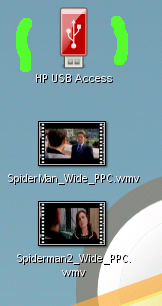


When launched, the script gets the hostname of the thin client currently connected and then opens a nautilus window. The FTP account on the thin client has a password that is entered via the dialog window.

SDISPLAY=` echo $DISPLAY | awk -F ":" ' {print $1}'`
nautilus ftp://media@$SDISPLAY

From the users perspective they don't think about the technology, and simply get a file manager as expected. The files can be moved to the server or desktop as desired. Files on USB sticks at remote sites will upload and move right to the servers located here at City Hall.
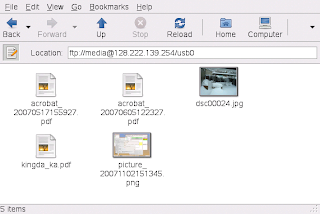


Here are the lines in proftpd.conf of interest in this deployment:

ScoreboardFile /etc/proftpd.scoreboard # file system allows writes

DefaultRoot /media # FTP can only get to media only

MaxInstances 100 #Lots of quick UI clicking counts as new users, increased


HideFiles (\.bas|\.bat|\.cab|\.cmd|\.com|\.dll|\.exe|\.inf|\.js|\.mdb|\.msi|\.vb|\.vbe)

IgnoreHidden on


The last section hides most executables from view completely. If they are on the users USB stick, GNOME won't even see or display them. If you can't see them, you can't drop and drag them.

I'm sure there will be some tuning, but it's working well enough for a pre-release.

We are testing some perks of this design:
- Being able to share your USB stick with other users, from any facility.
- Someone in our support group might be at a remote site fixing something, and they need a utility or program here at City Hall. Staff can push it right to them.

Fun stuff, it will be interesting to see how it goes.

Wednesday, February 20, 2008

Misconception About Server Performance

One of the biggest misconceptions about running software on servers is that it will be slower than having a local personal computer. My experience is that for the most part, the reverse is true when you buy hardware big enough to run your highest concurrent loads. That server will end up being of much higher quality and have better performance than any desktop computer or laptop you will purchase. This is especially true as desktop hardware moves through a normal 3-4 year duty cycle.

Following that line of thought, our 5 year old OpenOffice server is moving into retirement and I'm testing the new one. It's a 4 processor, quad core 2.4Ghz HP rack mounted box with 16GB of memory. Using a stop watch I'm starting the swriter binary and getting cold starts around 2.69 seconds for the UI to fully display. The splash screen only displays for about 1 second. I think the users will be very pleased with this upgrade.


Thursday, February 14, 2008

GNOME Scaling Problem

In March we will be putting the new OpenSuse 10.2 server live to our thin clients, with support for 3D/Compiz.

Federico is always very cool about me bouncing off him the odd things we sometimes see when running hundreds of concurrent GNOME users on the same server. I found such an issue, and have come up with a work around. When you have around 30-40 people logged into one server, and push live a new .desktop file the whole computer gets very slow as all of the application-browsers are updated at one time. The presentation freezes for all users for about 4-5 seconds while everyone updates. The more people on the server, the worse it gets. In case anyone is interested in improving this situation, I have snapped a screenshot that shows it happening. In the gnome-terminal window I am just duping an icon to simulate a new program being added. In the "top" window, you can see the CPU hitting 90% and all of the application-browser processes appearing at once. This sample was done with about 50 people. When I put on a full load next month, it will be far worse. The work around is low tech; icons will be added only at night when no users are on. :)

I'll say it again, all of this technology is working extremely well. This one small issue is hardly a show stopper.

Firefox 3.0 Beta Testing

I have loaded Firefox 3.0 (Beta 3) on our production server for testing. I also am testing the newer version of Flash that was released in December. I will try and use 3.0 fulltime until it's released. That will allow me to test all features and see how the upgrade will be perceived; and how best to alert users of changes.

Here are the issues that I am seeing. Some of these might be "user technique" (me), so I will continue tinkering and learning.

- Flash still seems crash prone when viewing videos. The PULSEAUDIO voice sync seems better on the December release. I'll continue to test. I know this is unrelated to Firefox, but I keep hoping this will get better.

- The first thing that I always do in Firefox is add a "Home" button on the top toolbar. But it appears to be gone in this build. I see it's available on the bookmarks toolbar, which I always immediately turn off. Hopefully this is an oversight, and will return in later builds (shot below).


- My mms and rtsp settings which worked perfectly in 2.0 are not working. In the shot below you can see the about:config setting. It's supposed to call a script which opens gnome-mplayer. I'll keep testing this and see if I can figure out the problem. Standard out and error provide no spewage.


--- The dialog appears for rtsp feeds, but when you click [ OK ] nothing happens.


-- gtkprint. It seems not to find CUPS printers on OpenSuse 10.2 I know 10.3 is out, but there are still a lot of 10.2 users out there, including us. "Print to LPR" for 99% of regular users means nothing and from their perspective printing is broken. I need to poke around and see if I can figure out how to get gtkprint to find and list the CUPs printers. I believe someone told me this behaviour is based on how it was compiled.


Update: Canvas scrolling on 3.0 using remote display to thin clients and Compiz is at least 50% slower. The scrollbars are very slow, as is movement with the scroll wheel. Thanks to those that commented, still tinkering here.

Thursday, February 07, 2008

OpenOffice And Understanding User Work Flow

One of the things that I am tasked with this year is improving relations between OpenOffice and our users. From a technical perspective it works well, is extremely stable, easy to support and upgrade and performs all of features required for 99% of work here at the City. My goal is to fill in the gaps between this technical view, and the technique/skills of users.

We are going to have some meetings in March to identify areas of improvement, and then explore using bounties to expedite some features. A bounty will be a onetime cost that hopefully can be merged into the main distribution for everyone to use.

The hardest part in obtaining information from users is separating "feature" from "specific product". My task today was to review the functionality of Publisher 2007, because it's an often mentioned missing feature in our current work flow. From how it was described, I was expecting a super powerful layout package with advanced features. It's not that at all. I had to take off my IT/Geek/Computer hat and focus myself like a regular user. When I personally approach a document, my mind is on the substance and text. The presentation and polish is the easy part, and last 5% of my process. But in reviewing Publisher you can see that many people work exactly opposite. They need to see pictures and thumbnails, and see an empty template first. They then want to use pre-defined text boxes, and load in the text from other documents into a finished product.

So experimentally I am using the thumbnailer in Nautilus to allow them to work in this manner. Instead of opening OpenOffice and constructing, I'll show them the finished product via .ott (template) files which are easily edited. I do know that OpenOffice has the ability to load templates inside the product, but I found them to be too many clicks and too hidden from view. The finished presentation needs to be the first thing they see.

Below is a shot of my first templates in this regard. I quickly built some awards and made them available from the main-menu. In this design, Openoffice isn't even seen until they have chosen their desired template. It will be interesting to see how this is received.

Monday, January 28, 2008

Compiz In 3D

Many thanks for "wodor" for updating the anaglyph plugin to compile with the latest version of Compiz. While certainly one could not sit and work at their desk all day with this plugin enabled, it shows that the community is thinking outside the box. The current plugin requires the old style red/blue glasses but I made the recommendation today to see if it can be changed to work with the newer polarized style.

Keep up the good work guys. Not everything can be deployed, but I'm enjoying the ride.

(shot below)

Friday, January 11, 2008

Largo Updates

Things have been busy for me in the new year, and I thought I would relay my current projects:

Evolution Debugging
I have been working with Sankar and Chen on improving Evolution on SLED 10 SP1. We have made some gains, but still have more work to reach my goal. I received -debug packages from Novell and we are now auto-generating crash dumps when users crash. The good news is that all of these patches should be landing in 2.21 as well and will help advance Evolution connectivity to GroupWise.

Kyle TX Visit
The City of Kyle TX did a site visit and sent us a really nice email message with their observations. I think that people in general have seen so little of the Linux desktop and Compiz that they are shocked when they see how far it's come in the last few years. We demonstrated license free authentication, desktop presentation, email, web surfing and groupware. We also demonstrated single click access to MS Windows applications. I'm very glad they took the time to visit and wish them the best of luck.

Testing NoMachine NX
We are evaluating NoMachine as a replacement for Metaframe For Unix. We use Citrix for our distant remote sites that are connected over lower bandwidth lines. We have always had to keep a Sparc machine around just for this function. So far, NoMachine is running well and they seem to have some things on their possible road map that will be very useful to us; PulseAudio support and compositing for Compiz.

New OpenOffice Server
Our current OpenOffice still runs well and has been in production since 2003. However, it needs an operating system refresh in order to allow me to build the current PulseAudio. Pulse will allow the users to hear sounds in their Impress documents and anywhere else where sounds are present.

Weather-Wallpaper
This is completely bling, but the users love it. I have added weather-wallpaper to the desktop server. It automatically generates wallpaper based on the weather in the Largo Florida area. By default it requires users to enter the NOAA code for our area. Weather-wallpaper creates a directory called .weather-wallpaper which contains your personal settings. So all I did was get it working correctly and put a tarball of this directory into /u2/local/skel which is extracted for the users immediately before it's launched. This eliminates completely them having to do anything, and restores it back to a working state if they tinker. (shot below)

Wednesday, December 19, 2007

Running Hundreds Of Evolution Users

Over the last few months, we have had an increase in number of concurrent Evolution users, and also have had an increase in calendar and email usage. Evolution makes heavy use of cache when interacting with GroupWise and we were starting to have disk IO performance problems from 8am until about 10:00am. This is the heaviest load, when everyone is downloading heavily from the post office. The disk drives were getting so busy that the UI was starting to slow and performance was not acceptable. Interestingly, CPU usage was under 10% even with 250 people.

We had just ordered our annual allotment of servers. We use a trickle approach and move servers around based on changing requirements. Three new HP DL580G5s arrived . The older DL580s used 15K 3.5" Ultra320 SCSI 72GB drives. The new server uses 10K 2.5" SAS 146GB drives. Below are the specs, the difference in speed is amazing. We also had previously used RAID 5 which might have contributed to the bottleneck. We configured the new server and used RAID 1+0. A backup and restore of /home and IP number change the new server immediately went live with only a 15 minute interruption. The new server is so fast that when you hit [ Send/Receive] the dialog flashes and disappears so quickly it can barely be seen.

Disk performance is excellent even with 250 people:

iostat -x 10

Linux 2.6.16.54-0.2.3-bigsmp (oa3) 12/20/07
avg-cpu: %user %nice %system %iowait %steal %idle
0.97 0.00 0.24 0.01 0.00 98.81

Device: rrqm/s wrqm/s r/s w/s rsec/s wsec/s rkB/s wkB/s avgrq-sz avgqu-sz await svctm %util
cciss/c0d0 0.00 71.90 0.00 22.30 0.00 1507.20 0.00 753.60 67.59 0.01 0.43 0.25 0.56


Previously, the drives were %util from 75-100%

Technical Specifications:

  • Hard Drive Capacity : 72.8GB
  • Generation: Ultra320
  • Data Transfer Rate: 320 MB/sec
  • Rotational Speed: 15,000 rpm
  • Form Factor (Drive): 3.5-inch low profile
  • Interface: Wide Ultra 320 SCSI; LVD
  • Data Storage Device Type: SAS (Server Attached Storage) device
  • Hard Drive Device Type: Hard drive for server/storage unit (Hot-plug)
  • Height: 1 inch
  • Pin Configuration: 80 pin Hot Swappable/ Pluggable
  • Hotswap Tray: Included (Attached)
Technical Specifications:
  • Hard Drive Capacity : 146GB
  • Generation: SAS
  • External Data Transfer Rate: 3.0 GB/sec
  • Rotational Speed: 10,000 rpm
  • Form Factor (Drive): 2.5-inch low profile
  • Interface: SAS (Serial Attatched SCSI)
  • Data Storage Device Type: SAS (Server Attached Storage) device
  • Hard Drive Device Type: Hard drive for server/storage unit (Hot-plug)
  • Height: 0.591"
  • Width: 2.75"
  • Hotswap Tray: Included (Attached)

Friday, December 14, 2007

Largo Desktop Video

I have recorded my first video to show everyone the new Compiz-Fusion desktop on our thin clients. The speeds that you are see are under normal loads, and exactly what the users experience. I'm just about finished setting up all of the icons and software launch scripts.

Notes:
- The blinking is not seen on the thin clients, movement is smooth
- I demonstrate the MIME bars I wrote to make it easier for them to process files
- Evolution is being moved to a new server next week that is much faster, you are seeing the speed of the current machine. Preview pane display is *much* faster on the new server.
- Video encoding for the web is new to me, so I'll do better next time. :)

Thursday, December 13, 2007

Wednesday, December 12, 2007

DBera Is My Beagle Hero

We use Beagle extensively at Largo for searching historical documents. We have hundreds of thousands of documents going back 20 years. Each night I build a static index of each department, a static index of the city-wide shared directory and then the users personal directories. One of the requirements we have is to block users from searching departments of which they are not a member. We also had the requirement that we wanted users to be able to search individual static sources as well, to reduce the number of hits. The only way previously to do this was to have a zenity front end run before Beagle, and display all available indexes available to each user and then allow them to toggle the desired sources. It then passed this list to the beagle daemon and started the UI. Ok, it worked. But if you wanted to change your criteria you had to close Beagle and relaunch. Not very friendly.

So DBera cooked up a small fix that allows you to select from the sources via the UI itself. When a user runs Beagle now it figures out which sources they have access to search. It then starts the daemon with all of these sources and displays a dialog as below:


The UI then comes up and you are able to alter your search criteria on the fly. While all sources appear in the pulldown, only those connected with the beagle daemon will return results.


It's working perfectly for us. There is an ongoing conversation about how to integrate something like this into the main build. The patch right now is hard coded for our needs, but it sure seems like this would be helpful for other people. If you have comments or suggestions, add them to the feature request.

DBera, thanks for this step forward.

Friday, December 07, 2007

Friday Afternoons

Sometimes you do fun/stupid things on a Friday afternoon, especially after a week of troubleshooting and debugging.

I can now confirm that Stella works fine with Compiz-Fusion and Pulse Audio via remote display to thin clients. :) [shot below]

Have a great weekend all.

Wednesday, November 28, 2007

3D Desktop Release And Testing

The replacement desktop server for our thin clients is nearly ready, but unfortunately vacations and Christmas have pushed the go live date into January. That gives us time to finalize, test and do some training for volunteers.

The new desktop server is running OpenSuse 10.2. Users can pick running regular 2D GNOME or they can enable 3D (Compiz-Fusion) if they so wish. The login scripts check hardware at login and if a user is configured for 3D and logs in with an Xserver that doesn't support Compiz, it automatically drops back into regular metacity.

I created the following cheat sheet which I will be handing out in the class tomorrow. I always gain more respect for technical documentation writers when I try and create content for 'regular users'. Let's see what the users say tomorrow :)


I also have experimentally added avant-window-manager to the desktop which is enabled via icon for those that like to try new things. This provides a 3D panel. Because users like to delete things, the startup script automatically adds an icon to the far left of avant that looks like our City seal; this icon when clicked opens the application-browser. That way they never get themselves in a position that they cannot reach software applications. Further testing is ongoing, but seems like it's deployable and runs well over remote display.