Tuesday, February 21, 2012

GNOME Migration Almost Complete, New Projects

It's been a busy, but productive few weeks. We have slowly been flashing more and more thin clients with the latest release of customized software and it's going very well. This morning the upgrades were performed on the Police department and they are the last major group to bring over to the new servers. Today we hit 210 concurrent GNOME users, and the "top" is below. It's very interesting to watch how memory is handled as the capacities grow and it's doing a great job. It tried to keep user processes and active disk IO in memory. When physical memory was getting low, it started to write disk IO out and then take cache memory away and use it for user processes. Very cool, and the server is running like a champ! Anyone that in years past ever had to tune SCO Unix on Intel hardware and recompile the kernel over and over again will appreciate how this all works. :)


I marked in red that we are seeing higher CPU usage on Citrix sessions, which are still running on the host. The canvas repaints of Citrix appear "expensive". So I have opened a new R&D project to begin the process of developing our next thin client upgrade; and this one will feature a local Citrix client. This will move all of this CPU activity to the local workstation and drop the server load. Running clients locally is always done with caution because once done, that means all updates (and exploits) have to be pushed to 500+ devices instead of being done once on the server. But in this case the benefit is just too great -- We have another 1-2 years of Citrix usage.

Our thin client build right now runs on the HP 5725, 5735 and 5745 thin clients and I spent some time last week getting it to understand and run in a VMware player. NX/Nomachine does a great job with compression, but for those few PCs that we have on our high speed fiber optic network there isn't really a reason to use this technology. The server needlessly has to run a whole X session, when it could be offloaded to the native (Windows, Mac) operating systems. So we are going to experimentally put a few test users on this new build and see how it works. Almost all of our users are on thin clients, but there are maybe about 25 PCs and Macs on the network for various functions and they'll benefit from this technology change. They also would get local RDP (and future Citrix) sessions which will run faster than the current host based design.

All in all, it's been a great few weeks. Next up for me: Working with Novell on some technical advances in Evolution and also moving ahead with converting from OpenOffice to LibreOffice.

Wednesday, February 08, 2012

135 Concurrent Users And Growing

So we're into the migration process to the new GNOME server and are hitting concurrent users loads of around 135. We pushed the thin client updates Monday night and found one tiny regression Tuesday. It was quickly fixed and we re-pushed to that department and then upgraded yet another department last night. So far no major issues in scaling. The upgrade process will conclude on the 23rd, lots more devices to go. Once you get past the initial tuning issues, it's amazing how well this stuff scales.

For those interested, here is top running with the 135 users....very nice.

Monday, February 06, 2012

And One More Desktop Change

This is really a small change, but thought I'd publish it in case it's useful to anyone else for deployments. Users really, really struggle with three areas: File types, File Size and Folder Locations. I've blogged many times about steps taken to make interaction with files simple and not require file managers. Now that the major technology pieces are finished for us to go live, I can get back into some ideas that have been in my head. I had development something like this for use with our USB sticks on the thin clients, and brought it over to the GNOME desktop. When you double-click on an image now, it allows you to change the size before it's placed into the clipboard. They can shoot in 10megapixel all they want, and with a single click make it "email friendly" for delivery. Having people go into GIMP and reduce and then copy and paste is just way too many steps.

In the shot below the tux picture is double-clicked and the MIME helper bar appears. By selecting "OriginalSize" the image is then pasted into Evolution at 1024x768. This is the default.


However, if if they want to copy it 320x240, all they do is select the ComboBox setting and then put it into the clipboard and python reduces it automatically and then it goes right into Evolution.


It's nice to have some time to make these changes, perhaps it's the calm before the storm :)

GNOME Desktop, Away We Go

After prepping and testing the new GNOME desktop, we have closed up all of the beta code and it's being moved into production. The new thin client release is moved into our FOG server and we'll be pushing it out to all users starting today. 60 of the 525 devices will get new code today and be disconnected from the old GNOME server and be moved to the new one. That should net us about 50 more concurrent users to stress test the server. Right now the machine is running great around 100 users, and I think it will absorb another 50 with no problems. Additional departments will be touched Tuesday, Wednesday and Thursday nights.

In other news, looks like SuseCON is being held this fall in Orlando. That's only about 1 1/2 hours from Largo, so seems like a good place to meet more of you.

I am a person that LOVES data. I love to accumulate it, and do research and see what types of things people are doing on the servers. I have been writing data on certain trigger events into flat CSV files and starting to connect the data to our support portal. When the infrastructure is in place and fleshed out, I'll probably move it to sqlite or something. The user detail screen has been modified to show you at a glance all information concerning our employees. The left edge shows their information and shows their active sessions. The right side shows this new data.

In the UI below, I'm showing all of the Alerts. This includes double and triple clicking on icons (which often indicates some kind of problem), logging off the server with software still running (which yields OpenOffice recovery dialogs on next login), instances of forcing software to quit and software crashes. It's very cool watching this all in real time, and we already are finding users having problems that never called. One bad cable can ruin a users entire perception of the servers...and with these tools we should be able to help locate issues.


The next tab shows all authentications, device names and technology used. Very often it's difficult to know exactly where a user is in our buildings and their current connection technique. It's now all available at a glance.


And we are collecting all data concerning *.desktop icons clicked from GNOME. We can see all of their clicks through the data. Very often users describe software to you, and with hundreds of icons it's hard to tell what they are running. Now we can see it at a glance.


Exciting times as all of this technology is pushed live and it's my hope it lives up to its potential.

Friday, January 27, 2012

Losing Planet GNOME Feed

Looks like I'll be losing my Planet GNOME feed in the next few weeks based on the new policy changes. I'll still be blogging at the same frequency, but you'll have to pick up the feed from Blogspot. I've greatly enjoyed the interaction with all of you and hope that it continues.

Thursday, January 26, 2012

Full Steam Ahead

Now that the tuning issues have been resolved, we have started to move more and more users over to the GNOME server. Just now we hit a new high of 108 concurrent users logged into one server.


And as promised let's see how the server is doing with the 108 users. (shots below). The answer is: excellent. Time to ramp up workstation upgrades and move more people over. There have been a few bumps in completing this project but it's been worth the effort. All City employees will be able to log in and get core software packages (Browser, authentication, word processing, image editing and more) without any license costs.


Tuesday, January 24, 2012

DBus Fixed + Support Portal Changes

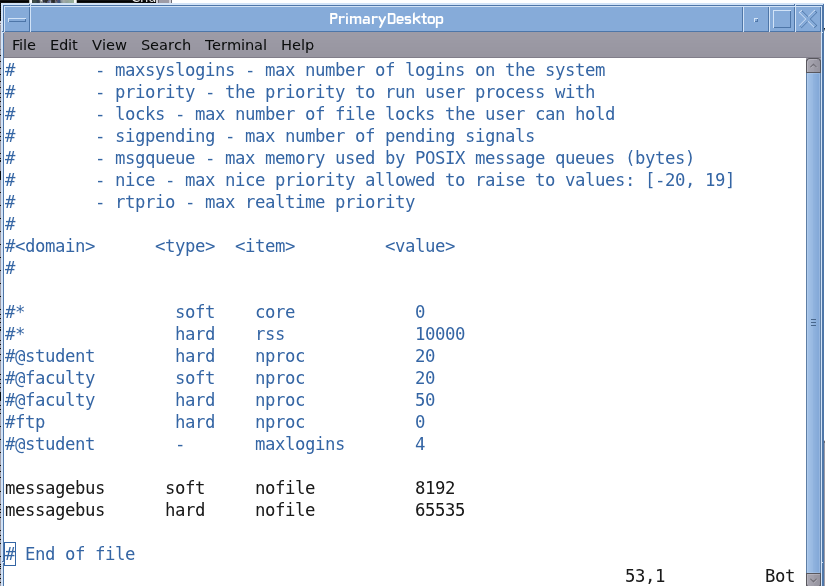
After a lengthy process, finally there was a solution in the issue of dbus not allowing more than about 95 users into our new GNOME server. Dbus needed to be patched (thanks Vincent!), and then we continued to hit the limit of 1024 files being opened by the user 'messagebus'. /etc/sysconfig/ulimit has an entry that is supposed to configure the number of files that a user can open at once. It turns out that PAM is performing the same function and was doing the blocking. So I made the change as seen below to /etc/security/limits.conf and it worked. I don't see any other roadblocks and we'll start moving people over to the new server in greater numbers starting next week. Good news!


And here is our support portal showing the 100 concurrent load, woohoo.


We met yesterday and finally made some decisions on the way that NX will be implemented for outside connections. The world has changed greatly in 5 years since the last install, and we are trying to find the right balance between security and functionality. I added a new tab to the portal to show "Logs" and we now can see people logging into the GNOME server is real time. The servers are full of information to alert us that people are having problems or technique issues; so I started to gather all of that information and get it into a new section called "Alerts". We'll be able to see people who tried to launch software that they do not have a license to run, crashes, password problems and problems with settings. This should allow us to be a bit more proactive and do more with less (tm).

Thursday, January 19, 2012

Poor Mans GoogleEarth

In my last blog, I mentioned that I had gone in and made changes to our thin client build to accommodate running NX sessions along with local RDP. We had another thin client project scheduled for 30-45 days in the future and because I was already in the code it was the best choice to just finish it and roll out all features at the same time.

Our county is doing a cool project to gather GPS information on the squad cars from all of the agencies and build a KML file for Google Earth. This will allow the various departments to see if fellow police officers are nearby. My coworkers did all of the front work and got this connectivity working back to the county. Our police department wanted to display this information on a TV in the 911 center. Instead of allocating a full PC with operating system to this function (a waste), we decided to just build a new kiosk mode on our thin clients. So I made the changes to the build. A chooser comes up, you click on a button and GoogleEarth runs on one of our big servers and remote displays back to the thin client. Easy and works great and saves time and money vs installing a thick client for this function.

The next logical step of their project is trying to get this information into the squad cars. There are many scaling and bandwidth problems with trying this. The hardware in rugged PCs is sub-optimal for this function. These devices are run 5 years, so many of them are very old and would come to a crawl with GoogleEarth installed. There also is the issue of sharing bandwidth of this function with the EVDO cards. The networking already is busy doing mission critical functions and cannot be bogged down with another major feature. Another idea would be to run the Google Earth software on a server with their already existing NX infrastructure, but the prospect of 25+ of these running concurrently was not pleasant.

So I had an idea that we are testing now, which was to create a poor mans Google Earth. This was so simple that it took me literally less than 1 hour to write, test and put on the GNOME menu. A cron job runs every five minutes and does a screen grab of the Google Earth session running in the 911 center and dumps it to an image file. I then wrote a quick Glade/Python UI that simply displays this picture and is on a 2 minute timer and refreshes the image. The memory footprint is very light, and everyone is sharing the same image file. So this should scale wonderfully and will barely produce any server load.

Here is the UI. Buttons are nice and big to accommodate their touch screens and allow them to touch with their fingers in a moving car. The image is in a scroll region to ensure it works correctly with their 800x600 and 1024x768 resolutions.


In the shot below, I have marked the memory footprint of Google Earth on the server. 25+ of these would be quite a load in memory and CPU. That's 25+ users all performing the same steps and retrieving the same information independently...not a good design. The other window shows the very simple code used to grab the screenshot from the 911 center. The script pings the device, if it's alive it grabs a shot, creates multiple scales and then moves the finished product into place. The Glade/UI then loads the image into the canvas.

Tuesday, January 17, 2012

Local RDP, NX 3.5 Installed

After waiting many months for the release of NX 4 we reached a point where we could not wait any longer to use compression technology with the new GNOME desktop servers. We were really hoping that NX 4 would fall into place so that we could deploy iPads running host based software. So last week I removed the NX 4 beta and installed the released/stable NX 3.5 After remembering a few tweaks we did a number of years ago, it's all up and running. I removed the NX 4 client from our thin clients and reinstalled the older version as well. A few script changes and improvements and things were working. I should be able to get a test build to remote site users this week.

Our division got word very late in the implementation process of the new MS Windows based Recreation software that thin client workstation IDs were needed for the software to properly know which cash drawer to use. For Recreation sites running XDMCP, this was no problem and already implemented. I had offloaded RDP/Rdesktop sessions many thin client releases ago and they were already running on the local device. But we have one site that was using NX in full screen mode with no window manager. So when a local RDP session was started, there was no window manager to grab it and allow the user to move the two windows around. RDP would just sit over NX and obscure the view. It was clear that a new type of thin client build was required, one that connected to our servers with NX and that was running a local window manager. After a few white board drawings, I picked the path that seemed the best solution and made the necessary changes. As is seen in the shot below, when the user picks this option it automatically detects the size of the screen and NX is started consuming about 90% of the screen. The window manager then wraps this window and they are able to move it around nicely. When they click on this MS Windows app, the server sends a signal to the thin client who then launches Rdeskop locally and the window manager grabs this window as well. I put a small modal applet in the upper left hand corner to allow the user to disconnect this session and shut down the window manager. A bit more testing and this should be ready for beta testing; hopefully later this week.


Friday, January 06, 2012

DBus Root Cause, iPad Testing

In my last blog I mentioned we were having dbus problems. Right around 96-98 users it would stop allowing additional people into the server and dbus would begin chewing lots of CPU. At first I thought it was hitting a limit and denying additional requests. It turns out that it was hitting a 1024 open file limit, which is clearly seen by going into /proc/process_number/fd and watching the number grow. When it hits 1024 the server goes bad. The ever wonderful Vincent Untz found the git entry in dbus that fixed this issue. These patches had not been merged into OpenSuse 11.4. He is going to generate a new RPM for us. I'll test and we'll try and get it into the update channels. The OpenSuse bug is here.

It's been a disappointment that NX 4 hasn't been far enough along to deploy iPads using NX technology. We have been testing other ideas and only found them to be good enough for IT staff, and they are not ready for consumption by regular users. The various techniques under testing:

VNC: Fast over Wifi; doesn't work over EVDO from iPad; resume not working well; no rotary of ports
RDP: We tested RDP/iPad -- Windows/NX Client -- GNOME/Linux; the hop in the middle produces lag, applications like Xournal are too slow.
Citrix: We are going to test Citrix/iPad - -Windows/NX Client -- GNOME/Linux to see how it works. This is not yet working.
NX4/Safari: The alpha release allows you to connect to GNOME with the Safari browser. It's way too slow on a tablet for regular use. We're hopeful a native client will fix this.

Because of increasing requests for this technology to move in beta testing, we are going to move ahead with an approach that is more "client/server". We will continue working on host based solutions as we move into the new year. Document records retention is paramount in Government, we need solutions that will comply with the law.

The tablet solution as it's shaping up now:

For email we have been looking over Groupwise 2012 and it's wonderful on the tablets. Using just Safari, one gets the UI below. Unlike the older Groupwise version, a single touch of the message list instantly opens the message in a preview pane.


The calendar also is designed well for the real estate of at tablet


Dragon Naturally Speaking works well, and allows you to easily email the text generated by your spoken word:


So being that the NX upgrades are not yet ready, how do we allow people to transfer and read their documents on tablets? There are many middle-ware type applications for this function. But we always have to consider cost and more importantly staff size. At a certain point your infrastructure is so complicated that you almost get to the point that no single can take a day of vacation. We found an application for the iPad that seems elegant in simplicity and are going to begin testing. It's called FileApp. This software is very suited for integration into a GNOME (and even mentions it!) desktop, and supports OpenDocument (OpenOffice/LibreOffice) files. It gives you a very simple interface that shows you all documents you have downloaded from your GNOME desktop, and a single tap of the UI starts an FTP server on the tablet. You are then able to gain access to it the desktop and transfer files. Once the connection is closed, your document list refreshes and you can view them "offline".

From FileApp tap the WiFi symbol and the drop down appears. When this is displaying, FTP is running on the tablet. The UI gives the end users their FTP address which is based on their IP address at the time.


From the GNOME desktop, simply type in the FTP address into Nautilus and it displays all of the documents stored on the tablet:


Once the drop window is removed,FTP closes and your document list refreshes and all available documents appear. You can view them by date or file type.


And further firming up the fact that OpenDocument files are not second class citizens, they open directly on the tablet and won't have to be converted to PDF before their viewing.


This software is moving through our Infrastructure group for testing and then will move to the IT Director. Once that's done, we'll move this to a limit number of testers.

Wednesday, January 04, 2012

Calling DBUS Experts....

We're expanding our GNOME desktop project and dbus on OpenSuse 11.4 is kicking our butts.  If anyone with knowledge of this code has any tips, they are gladly accepted as a comment.

What's happening is that right around 96 to 99 users the system dbus seems to no longer accept GDM connections and more users cannot log in.  Very often during this threshold we also see dbus chewing lots of CPU as it seems to be receiving retries over and over again which all fail.  /var/log/messages show gdm crashing and to my eyes it's happening when it's trying to talk to dbus.  I have installed the debug symbols and should get better backtraces starting tomorrow.  The shot below shows the crash 

The documentation is kind of lacking in regards to the tunable parameters.  One doesn't always know the default settings so as to know what should be increased.  It's also not very clear which resource is failing.  I set the following resources this morning and the issue happened again:


The technique that I used was to look at the source code and find where the defaults are set and then try and double them.  There are more parameters, any ideas which ones might help?  It would be wonderful if dbus-monitor showed you these types of failures, but it seems to only show you bus activity which really doesn't help.  As soon as we drop below the 96 users, everything works correctly and users can log on and off with no problems.   This leads me to strongly believe this is a parameter that is being reached. 

Any tips?  Drop a comment.  Thanks!

Friday, December 16, 2011

Thank You For All You Do!

I only have two work days until an extended Christmas vacation and when I return it will nearly be the New Year.  I have received many very kind comments and email messages this last year, but to me the true heroes are those writing open source software.  When we speak to other Government agencies we are always proud of the fact that authentication, GNOME desktop, email client, internet browsing, photo editing and document construction are all done with NO LICENSES OR COST.  (( hardware cost aside).  You guys all rock.

As is tradition, I enabled good ol' Xsnow for users to activate on their desktops for these last few weeks of December; which is especially fitting here in Florida.

Thanks again to all of your hard word,  we have been able to deploy a desktop that looks like this:


Wednesday, December 14, 2011

GNOME Server Load, Project Updates

The new GNOME server project has continued since the last blog. We had a slight setback in that the server was reporting ECC errors, which indicates failure of memory, but possibly caused by memory, backplane, motherboard or CPU. The server never failed or halted, but we held off adding more users until it can be resolved. We have been replacing pieces. Motherboard was swapped out yesterday and so far the error has not returned. When we get past a burn in period with no problems,we'll start adding more users.

So the always interesting issue of how well GNOME scales. One is always concerned that a certain feature or function of the desktop will chew up a lot of CPU and slow the performance of the other users. Many software applications are designed with the perception that they will be run from a stand alone computer with little regard for chewing CPU, disk or leaking memory. The shot below is 'top' running for 90 concurrent users. The server runs about .5% to 4% busy, and normally sits around 1-2%. This is excellent and should scale nicely. I would think we could get 300 users on the server with no problems.


I have continued testing Groupwise 2012 and its web interface in Firefox and then on iPads and the result so far have been quite good. I'll post a more thorough blog concerning the testing and results. I also have been teaching myself how to use the Groupwise server as an LDAP server to allow the iPad tablets to get complete address books of all City employees. It's an area that I have never done before, so I have been reading lots of examples and documentation. I'll figure it out. Groupwise 2012 also has a feature that allows you to publish your calendars to the Internet as ics/iCal files and I've been working on getting that working and tested. Cool stuff.

The City is buying new recreation software that runs a front end from Microsoft Windows. Using the local RDP/Rdesktop client from the thin clients it's working well. We had an unforeseen issue where the software requires the client (dhcp) names to be used as part of the cash register groups. In the past, all thin clients in the City were generically named and addressed because it never mattered. This meant we had to do a complete reorganize of IPs into logical groups. This change was implemented Tuesday morning and after a few hiccups is now complete.

I have been pondering again the prospects of a Largo Hackfest for 2012. It sure would be nice to meet all of you and show everyone how Linux can and is being used in the enterprise. Maybe we can make that work.

Tuesday, December 06, 2011

86 Users With Difficulties

In the last few weeks we have been adding more and more users to the new GNOME desktop server and hit a tuning issue where it would stop allowing people right at 80 concurrent. My first inclination was that it was a tuning issue with GDM and I had a few IRC conversations with the ever friendly Halfline. I found some error messages in /var/log/messages and after Googling was able to find the cause: Dbus. There appears to be a bug in the code that counts the number of concurrent processes from the same user account. My reading indicates it's supposed to be 256, but others have reported it stopping far short.

So someone working on Hardy found a fix, which I copied and it works on OpenSuse 11.4 as well. You add a system-local.conf file to /etc/dbus-1 with the following XML parameter. After this change was made, we now have hit 86 users with excellent results. I'll blog in the coming days about the user loads, so far we're very pleased.

Thursday, December 01, 2011

Easier Photo Management

I have previously blogged about the fact that we implemented a simple photo management tool on our thin clients so that users could easily get pictures into software without having to understand file management. This also eliminates the need to give users full access to USB sticks when all they want to do is take a few photos and insert them into OpenOffice Draw for a flyer. It's been working well.

A conversation with an end user has produced a new feature. I added the ability to select the size of the image that is placed into the clipboard. Their options are 320x240, 640x480, 800x600 and 1024x768. All they have to do is click on the thumbnail and it's immediately in the clipboard, and then paste into the various products and all the work is done. The issues of file size and megapixels is not easily explained to end users and this keeps it very simple.

In the shot below, pictures were taken at 5MP and then I selected 320x240 and then pasted it into Evolution and for an email message, it's the perfect size. This keeps the original high quality off the server when only this smaller photo is required.

(( This feature and function is unrelated to those users that have full access to USB sticks, this is just the default UI that all City employees have available. ))

One interesting issue is the Glade screen opening in a mismatched theme. This is because the software is running physically on the thin client and the theme is not loaded on the local flash drive. A project for another day. ;)

Tuesday, November 29, 2011

Support Portal Updates, Groupwise 2012

I took vacation days around Thanksgiving and am back in the office and once again working on projects. Over the last few weeks I have been poking at our support portal software end-of-day and adding a bit of code here and there. Yup, the theme is probably ugly ;) , but I'm trying to test various settings to see if any of them affect speed. In the past certain themes caused OpenOffice to perform more slowly, and I'm testing this concept against LibreOffice. Always nice for me though to see the old school mwm buttons.

In the portal, the user detail screen now allows you to set the record as a bookmark and also the UI has been cleaned up for setting a watchdog to alert you when the user logs either on or off the network. Very often someone in IT will have an action item to fix something for the end user that requires them to be logged out. Now we don't have to watch them manually.


The thin client detail screen now has the ability to record a movie (cyan below) of the user session using the wonderful vnc2swf utility. We can see their session, it records a swf file at the same time. These files are easily opened in browsers and can be sent to vendors to show them multiple steps. Similar to the user detail screen, you can configure a watchdog item for when a thin client is powered on. You can also set a thin client as a bookmark. These simple little things save lots of times and lots of scribbled pieces of paper.


I'm revisiting the clunky UI of the charts generated on the server summary screen. Right now it's just creating an image with perl. Simple, but not elegant. Sure would be nice if we had some charts in GTK that had hover tooltips. Maybe some Googling will find something that works better. You can also see that our two GNOME servers are now running 80+ concurrent users (circled in green). Loads are great, and capacities will be increased as we go through the month of December. The concurrent loads of the various software packages can be seen below as well. CPU loads are excellent.


Groupwise 2012 was released for beta testing as part of a technology preview. I built a new SLES 11 server on some old physical hardware and got the pieces working. Probably all of the design considerations being discussed warrant an entire blog update; but we are reviewing the concept of just using a web interface instead of Evolution to gain access to Groupwise. In the past this was not an option because the UI was a bit clunky and major features (such as free/busy) were missing. GW 2012 has moved in the direction of having the web interface be your primary login. Seems like maybe the days of having a client piece for email might be nearing an end. The shot below shows 2012 running. GW detects an iPad/tablet login and presents and interface designed for that footprint. I should be able to begin testing that aspect in the coming days. So far it's much nicer than the older interface.


On deck for me: continued testing of GW 2012, more testing of Evolution patches we just received, increasing the number of users logged into the new GNOME servers, implementing some user suggestions to make the thin clients interact better with digital photos, iPad testing, MoinMoin 2.0 beta testing.

Thursday, November 17, 2011

New Desktop Progress Continues

We have been adding more groups of users to the new GNOME desktop and have gotten loads around 80 concurrent and besides a few bumps things have been going well. We are going to run in the 80-90 concurrent range for another few weeks and then add more people after Thanksgiving.

I'm always fascinated with the support calls and UI questions that arise. Usually prior to deployment I get a feeling for places that are going to cause us problems, but sometimes I'm completely surprised by how others perceive software.

The one area that I knew would be troublesome is the GNOME keyring. That feeling proved itself true. We're using "mail-notification" which connects to Groupwise and sits in the notification area and alerts you of mail that has arrived. Works great and people love it. The launch scripts are fully ware of Groupwise and the IP and their user names and pre-fills it in for them. So all they need to do is enter their email passwords. The key ring opens, asks for the email password and then continues to the screen where it's requesting the keyring password. Users don't understand why it's asking for another password and then are annoyed by the keyring popping open each day. One can store the passwords in the default keyring, which is great...but the UI doesn't really tell you that fact. You have to NOT enter passwords; even though it's asking for passwords. You then have to accept a dialog indicating this storage to be unsafe. I fully understand what it's designed for, but we have found this whole process to be support intensive. I filed a bug report, and included a small mockup of an idea of how to make it easier in my view:


Some users are calling because they don't know how to lock the screen. The Quit docklet in Avant has this feature, but it's displayed in a secondary menu. This applet has been helpful to us because we have lots of users in 1024x768 so real estate is at a premium for them. A hover tooltip might help a bit, but unfortunately most users don't check nor use tooltips. I might just make a regular desktop icon and for those people with the space, they can pull it to their panel as a shortcut. This issue hasn't been too bad, only a few people called.


One of the more interesting issues is concerning calls we were getting about "Microsoft documents being empty and blank when opened". So we got the documents and they appeared to work fine with LibreOffice and OpenOffice. Further questioning found the issue: The gsf-thumbnailer is not able to create a thumbnail for Office documents as it can for OpenOffice files. So the users were double-clicking on them and seeing the preview window (below) and then seeing an empty page and never physically opening it in OpenOffice; because in their mind the document was empty. So what I'm going to do is change the code slightly so the default/blank panel will say something like, "No preview for this document, open to view contents".


It's great to continue advancing this project and be able to provide newer technology for our end users.

Thursday, November 10, 2011

Excellent Scaling Numbers

We have been slowly moving users to the new GNOME desktop and the results have been excellent. The server is a 4 processor, quad core HP and today we hit 75 concurrent users. CPU usage is under 1% and memory consumption is not bad at all. Unless we hit some as of yet unknown limitation, it looks like we could get a full load of 300 concurrent users pretty easily.

It's interesting that the highest amount of CPU is being chewed up the Citrix client (wfica) which seems to be very "talky". We are in the process of moving to 100% RDP as our connection technique to Windows, so in the coming months those will all go away.

Very promising start to the migration process.

Monday, November 07, 2011

Get It While It's Hot

Seemingly unannounced a new version of Adobe Reader was released in the last few days and it's here.
We have been very disappointed that that the last release was in February. I've seen countless exploit bulletins about this software in the last 9 months, but we'll take it.

The shot below shows Adobe 9.4.6 along with a friendly reminder popup that users see alerting them that other software exists for reading PDFs. :)

Bi-annual disclaimer: Yup, I know that Evince does a great job with PDFs. However there are certain types of 3D content that can be inserted into a PDF that will not display in Evince; we therefore have to offer both software packages.


Friday, November 04, 2011

Desktop, Portal & NX 4

I haven't blogged in a while, but things here have been busy. The new GNOME desktop has passed all tests and with the 3.0 kernel on has been performing like a champ. We had a meeting and decided to begin deployment and will be going live starting next week. I modified our thin client builds to no longer allow users to connect to the older GNOME server and that will be the official cutoff once it's pushed with FOG. A few of our departments are already basically live on the new desktop, and next week we'll make it official. Over the next few months, we'll push over more and more people until the old server is no longer used. It's nice to see this project moving to completion. When we get heavier user loads running, I'll post information about performance.

The back burner project of the support portal software continues. Now that we have our heads around the functionality we desire, I have been cleaning up the UI and making it more consistent with other software. The [Reports] tab (shot below) has been developed and is already saving us time. I have been trying to create reports that would take a LONG time to do manually. For instance, in the shot below the portal compares devices in the FOG server vs those devices configured to boot via DHCP. Through the years there have been device failures and sometimes the old entry is not removed. To manually check this on 500+ devices would take hours. It now happens in about a second. I have other reports in mind, and will continue advancing them a bit each week. UI needs work, but data is accurate.


I started revamping the UI and the results have been pleasing. The beauty of Glade is that these changes are cosmetic and very few coding changes were needed. Move widgets around, give them the same name and they just start working. In the [Users] tab (below), I moved all of the filters to the right side and cleaned up the results area. I started writing a new feature to alert us when users login or logoff the network. I also added the ability to see the last 3 people that you viewed in detail. You can now save users as a bookmark for later use. When going in and out of 800+ users, these features are wonderful. Lots of room for improvements, but making progress.


We received a new alpha build of NX 4 and I spent a few afternoons testing it fully and considering ways to get it deployed. The thin clients are all running the same universal build, so settings need to be configured to work in all types of logins and with rotating users and differing monitor resolutions. Making progress slowly and submitted to them a list of all issues that hinder deployment.

NX 4 still does not have a technique to deploy on iPads in the current build. It's coming, but not yet available. So we had an idea to get them up and running until we can deploy 100% NX. My coworker Brian set up a virtual Windows session to allow RDP connections from our tablets. The user profiles are then configured to automatically start NX and then connect to the GNOME server. This simulates how a native NX client would work, and at least will allow us to get some beta testers out there. In the shot below it's Ipad-->RDP-->Windows-->NX-->GNOME Desktop. Performance is good, and should get even better when the middle hop is removed.


Good days ahead for us as we move in lots of new technology, all of it as cost efficient and stable as possible. Happy Friday.