I only have two work days until an extended Christmas vacation and when I return it will nearly be the New Year. I have received many very kind comments and email messages this last year, but to me the true heroes are those writing open source software. When we speak to other Government agencies we are always proud of the fact that authentication, GNOME desktop, email client, internet browsing, photo editing and document construction are all done with NO LICENSES OR COST. (( hardware cost aside). You guys all rock.
As is tradition, I enabled good ol' Xsnow for users to activate on their desktops for these last few weeks of December; which is especially fitting here in Florida.
Thanks again to all of your hard word, we have been able to deploy a desktop that looks like this:
Friday, December 16, 2011
Wednesday, December 14, 2011
GNOME Server Load, Project Updates
The new GNOME server project has continued since the last blog. We had a slight setback in that the server was reporting ECC errors, which indicates failure of memory, but possibly caused by memory, backplane, motherboard or CPU. The server never failed or halted, but we held off adding more users until it can be resolved. We have been replacing pieces. Motherboard was swapped out yesterday and so far the error has not returned. When we get past a burn in period with no problems,we'll start adding more users.
So the always interesting issue of how well GNOME scales. One is always concerned that a certain feature or function of the desktop will chew up a lot of CPU and slow the performance of the other users. Many software applications are designed with the perception that they will be run from a stand alone computer with little regard for chewing CPU, disk or leaking memory. The shot below is 'top' running for 90 concurrent users. The server runs about .5% to 4% busy, and normally sits around 1-2%. This is excellent and should scale nicely. I would think we could get 300 users on the server with no problems.

I have continued testing Groupwise 2012 and its web interface in Firefox and then on iPads and the result so far have been quite good. I'll post a more thorough blog concerning the testing and results. I also have been teaching myself how to use the Groupwise server as an LDAP server to allow the iPad tablets to get complete address books of all City employees. It's an area that I have never done before, so I have been reading lots of examples and documentation. I'll figure it out. Groupwise 2012 also has a feature that allows you to publish your calendars to the Internet as ics/iCal files and I've been working on getting that working and tested. Cool stuff.
The City is buying new recreation software that runs a front end from Microsoft Windows. Using the local RDP/Rdesktop client from the thin clients it's working well. We had an unforeseen issue where the software requires the client (dhcp) names to be used as part of the cash register groups. In the past, all thin clients in the City were generically named and addressed because it never mattered. This meant we had to do a complete reorganize of IPs into logical groups. This change was implemented Tuesday morning and after a few hiccups is now complete.
I have been pondering again the prospects of a Largo Hackfest for 2012. It sure would be nice to meet all of you and show everyone how Linux can and is being used in the enterprise. Maybe we can make that work.
So the always interesting issue of how well GNOME scales. One is always concerned that a certain feature or function of the desktop will chew up a lot of CPU and slow the performance of the other users. Many software applications are designed with the perception that they will be run from a stand alone computer with little regard for chewing CPU, disk or leaking memory. The shot below is 'top' running for 90 concurrent users. The server runs about .5% to 4% busy, and normally sits around 1-2%. This is excellent and should scale nicely. I would think we could get 300 users on the server with no problems.

I have continued testing Groupwise 2012 and its web interface in Firefox and then on iPads and the result so far have been quite good. I'll post a more thorough blog concerning the testing and results. I also have been teaching myself how to use the Groupwise server as an LDAP server to allow the iPad tablets to get complete address books of all City employees. It's an area that I have never done before, so I have been reading lots of examples and documentation. I'll figure it out. Groupwise 2012 also has a feature that allows you to publish your calendars to the Internet as ics/iCal files and I've been working on getting that working and tested. Cool stuff.
The City is buying new recreation software that runs a front end from Microsoft Windows. Using the local RDP/Rdesktop client from the thin clients it's working well. We had an unforeseen issue where the software requires the client (dhcp) names to be used as part of the cash register groups. In the past, all thin clients in the City were generically named and addressed because it never mattered. This meant we had to do a complete reorganize of IPs into logical groups. This change was implemented Tuesday morning and after a few hiccups is now complete.
I have been pondering again the prospects of a Largo Hackfest for 2012. It sure would be nice to meet all of you and show everyone how Linux can and is being used in the enterprise. Maybe we can make that work.
Tuesday, December 06, 2011
86 Users With Difficulties
In the last few weeks we have been adding more and more users to the new GNOME desktop server and hit a tuning issue where it would stop allowing people right at 80 concurrent. My first inclination was that it was a tuning issue with GDM and I had a few IRC conversations with the ever friendly Halfline. I found some error messages in /var/log/messages and after Googling was able to find the cause: Dbus. There appears to be a bug in the code that counts the number of concurrent processes from the same user account. My reading indicates it's supposed to be 256, but others have reported it stopping far short.
So someone working on Hardy found a fix, which I copied and it works on OpenSuse 11.4 as well. You add a system-local.conf file to /etc/dbus-1 with the following XML parameter. After this change was made, we now have hit 86 users with excellent results. I'll blog in the coming days about the user loads, so far we're very pleased.
Thursday, December 01, 2011
Easier Photo Management
I have previously blogged about the fact that we implemented a simple photo management tool on our thin clients so that users could easily get pictures into software without having to understand file management. This also eliminates the need to give users full access to USB sticks when all they want to do is take a few photos and insert them into OpenOffice Draw for a flyer. It's been working well.
A conversation with an end user has produced a new feature. I added the ability to select the size of the image that is placed into the clipboard. Their options are 320x240, 640x480, 800x600 and 1024x768. All they have to do is click on the thumbnail and it's immediately in the clipboard, and then paste into the various products and all the work is done. The issues of file size and megapixels is not easily explained to end users and this keeps it very simple.
In the shot below, pictures were taken at 5MP and then I selected 320x240 and then pasted it into Evolution and for an email message, it's the perfect size. This keeps the original high quality off the server when only this smaller photo is required.
(( This feature and function is unrelated to those users that have full access to USB sticks, this is just the default UI that all City employees have available. ))
One interesting issue is the Glade screen opening in a mismatched theme. This is because the software is running physically on the thin client and the theme is not loaded on the local flash drive. A project for another day. ;)
A conversation with an end user has produced a new feature. I added the ability to select the size of the image that is placed into the clipboard. Their options are 320x240, 640x480, 800x600 and 1024x768. All they have to do is click on the thumbnail and it's immediately in the clipboard, and then paste into the various products and all the work is done. The issues of file size and megapixels is not easily explained to end users and this keeps it very simple.
In the shot below, pictures were taken at 5MP and then I selected 320x240 and then pasted it into Evolution and for an email message, it's the perfect size. This keeps the original high quality off the server when only this smaller photo is required.
(( This feature and function is unrelated to those users that have full access to USB sticks, this is just the default UI that all City employees have available. ))
One interesting issue is the Glade screen opening in a mismatched theme. This is because the software is running physically on the thin client and the theme is not loaded on the local flash drive. A project for another day. ;)
Tuesday, November 29, 2011
Support Portal Updates, Groupwise 2012
I took vacation days around Thanksgiving and am back in the office and once again working on projects. Over the last few weeks I have been poking at our support portal software end-of-day and adding a bit of code here and there. Yup, the theme is probably ugly ;) , but I'm trying to test various settings to see if any of them affect speed. In the past certain themes caused OpenOffice to perform more slowly, and I'm testing this concept against LibreOffice. Always nice for me though to see the old school mwm buttons.
In the portal, the user detail screen now allows you to set the record as a bookmark and also the UI has been cleaned up for setting a watchdog to alert you when the user logs either on or off the network. Very often someone in IT will have an action item to fix something for the end user that requires them to be logged out. Now we don't have to watch them manually.

The thin client detail screen now has the ability to record a movie (cyan below) of the user session using the wonderful vnc2swf utility. We can see their session, it records a swf file at the same time. These files are easily opened in browsers and can be sent to vendors to show them multiple steps. Similar to the user detail screen, you can configure a watchdog item for when a thin client is powered on. You can also set a thin client as a bookmark. These simple little things save lots of times and lots of scribbled pieces of paper.

I'm revisiting the clunky UI of the charts generated on the server summary screen. Right now it's just creating an image with perl. Simple, but not elegant. Sure would be nice if we had some charts in GTK that had hover tooltips. Maybe some Googling will find something that works better. You can also see that our two GNOME servers are now running 80+ concurrent users (circled in green). Loads are great, and capacities will be increased as we go through the month of December. The concurrent loads of the various software packages can be seen below as well. CPU loads are excellent.

Groupwise 2012 was released for beta testing as part of a technology preview. I built a new SLES 11 server on some old physical hardware and got the pieces working. Probably all of the design considerations being discussed warrant an entire blog update; but we are reviewing the concept of just using a web interface instead of Evolution to gain access to Groupwise. In the past this was not an option because the UI was a bit clunky and major features (such as free/busy) were missing. GW 2012 has moved in the direction of having the web interface be your primary login. Seems like maybe the days of having a client piece for email might be nearing an end. The shot below shows 2012 running. GW detects an iPad/tablet login and presents and interface designed for that footprint. I should be able to begin testing that aspect in the coming days. So far it's much nicer than the older interface.

On deck for me: continued testing of GW 2012, more testing of Evolution patches we just received, increasing the number of users logged into the new GNOME servers, implementing some user suggestions to make the thin clients interact better with digital photos, iPad testing, MoinMoin 2.0 beta testing.
In the portal, the user detail screen now allows you to set the record as a bookmark and also the UI has been cleaned up for setting a watchdog to alert you when the user logs either on or off the network. Very often someone in IT will have an action item to fix something for the end user that requires them to be logged out. Now we don't have to watch them manually.

The thin client detail screen now has the ability to record a movie (cyan below) of the user session using the wonderful vnc2swf utility. We can see their session, it records a swf file at the same time. These files are easily opened in browsers and can be sent to vendors to show them multiple steps. Similar to the user detail screen, you can configure a watchdog item for when a thin client is powered on. You can also set a thin client as a bookmark. These simple little things save lots of times and lots of scribbled pieces of paper.

I'm revisiting the clunky UI of the charts generated on the server summary screen. Right now it's just creating an image with perl. Simple, but not elegant. Sure would be nice if we had some charts in GTK that had hover tooltips. Maybe some Googling will find something that works better. You can also see that our two GNOME servers are now running 80+ concurrent users (circled in green). Loads are great, and capacities will be increased as we go through the month of December. The concurrent loads of the various software packages can be seen below as well. CPU loads are excellent.

Groupwise 2012 was released for beta testing as part of a technology preview. I built a new SLES 11 server on some old physical hardware and got the pieces working. Probably all of the design considerations being discussed warrant an entire blog update; but we are reviewing the concept of just using a web interface instead of Evolution to gain access to Groupwise. In the past this was not an option because the UI was a bit clunky and major features (such as free/busy) were missing. GW 2012 has moved in the direction of having the web interface be your primary login. Seems like maybe the days of having a client piece for email might be nearing an end. The shot below shows 2012 running. GW detects an iPad/tablet login and presents and interface designed for that footprint. I should be able to begin testing that aspect in the coming days. So far it's much nicer than the older interface.

On deck for me: continued testing of GW 2012, more testing of Evolution patches we just received, increasing the number of users logged into the new GNOME servers, implementing some user suggestions to make the thin clients interact better with digital photos, iPad testing, MoinMoin 2.0 beta testing.
Thursday, November 17, 2011
New Desktop Progress Continues
We have been adding more groups of users to the new GNOME desktop and have gotten loads around 80 concurrent and besides a few bumps things have been going well. We are going to run in the 80-90 concurrent range for another few weeks and then add more people after Thanksgiving.
I'm always fascinated with the support calls and UI questions that arise. Usually prior to deployment I get a feeling for places that are going to cause us problems, but sometimes I'm completely surprised by how others perceive software.
The one area that I knew would be troublesome is the GNOME keyring. That feeling proved itself true. We're using "mail-notification" which connects to Groupwise and sits in the notification area and alerts you of mail that has arrived. Works great and people love it. The launch scripts are fully ware of Groupwise and the IP and their user names and pre-fills it in for them. So all they need to do is enter their email passwords. The key ring opens, asks for the email password and then continues to the screen where it's requesting the keyring password. Users don't understand why it's asking for another password and then are annoyed by the keyring popping open each day. One can store the passwords in the default keyring, which is great...but the UI doesn't really tell you that fact. You have to NOT enter passwords; even though it's asking for passwords. You then have to accept a dialog indicating this storage to be unsafe. I fully understand what it's designed for, but we have found this whole process to be support intensive. I filed a bug report, and included a small mockup of an idea of how to make it easier in my view:

Some users are calling because they don't know how to lock the screen. The Quit docklet in Avant has this feature, but it's displayed in a secondary menu. This applet has been helpful to us because we have lots of users in 1024x768 so real estate is at a premium for them. A hover tooltip might help a bit, but unfortunately most users don't check nor use tooltips. I might just make a regular desktop icon and for those people with the space, they can pull it to their panel as a shortcut. This issue hasn't been too bad, only a few people called.

One of the more interesting issues is concerning calls we were getting about "Microsoft documents being empty and blank when opened". So we got the documents and they appeared to work fine with LibreOffice and OpenOffice. Further questioning found the issue: The gsf-thumbnailer is not able to create a thumbnail for Office documents as it can for OpenOffice files. So the users were double-clicking on them and seeing the preview window (below) and then seeing an empty page and never physically opening it in OpenOffice; because in their mind the document was empty. So what I'm going to do is change the code slightly so the default/blank panel will say something like, "No preview for this document, open to view contents".

It's great to continue advancing this project and be able to provide newer technology for our end users.
I'm always fascinated with the support calls and UI questions that arise. Usually prior to deployment I get a feeling for places that are going to cause us problems, but sometimes I'm completely surprised by how others perceive software.
The one area that I knew would be troublesome is the GNOME keyring. That feeling proved itself true. We're using "mail-notification" which connects to Groupwise and sits in the notification area and alerts you of mail that has arrived. Works great and people love it. The launch scripts are fully ware of Groupwise and the IP and their user names and pre-fills it in for them. So all they need to do is enter their email passwords. The key ring opens, asks for the email password and then continues to the screen where it's requesting the keyring password. Users don't understand why it's asking for another password and then are annoyed by the keyring popping open each day. One can store the passwords in the default keyring, which is great...but the UI doesn't really tell you that fact. You have to NOT enter passwords; even though it's asking for passwords. You then have to accept a dialog indicating this storage to be unsafe. I fully understand what it's designed for, but we have found this whole process to be support intensive. I filed a bug report, and included a small mockup of an idea of how to make it easier in my view:

Some users are calling because they don't know how to lock the screen. The Quit docklet in Avant has this feature, but it's displayed in a secondary menu. This applet has been helpful to us because we have lots of users in 1024x768 so real estate is at a premium for them. A hover tooltip might help a bit, but unfortunately most users don't check nor use tooltips. I might just make a regular desktop icon and for those people with the space, they can pull it to their panel as a shortcut. This issue hasn't been too bad, only a few people called.

One of the more interesting issues is concerning calls we were getting about "Microsoft documents being empty and blank when opened". So we got the documents and they appeared to work fine with LibreOffice and OpenOffice. Further questioning found the issue: The gsf-thumbnailer is not able to create a thumbnail for Office documents as it can for OpenOffice files. So the users were double-clicking on them and seeing the preview window (below) and then seeing an empty page and never physically opening it in OpenOffice; because in their mind the document was empty. So what I'm going to do is change the code slightly so the default/blank panel will say something like, "No preview for this document, open to view contents".

It's great to continue advancing this project and be able to provide newer technology for our end users.
Thursday, November 10, 2011
Excellent Scaling Numbers
We have been slowly moving users to the new GNOME desktop and the results have been excellent. The server is a 4 processor, quad core HP and today we hit 75 concurrent users. CPU usage is under 1% and memory consumption is not bad at all. Unless we hit some as of yet unknown limitation, it looks like we could get a full load of 300 concurrent users pretty easily.
It's interesting that the highest amount of CPU is being chewed up the Citrix client (wfica) which seems to be very "talky". We are in the process of moving to 100% RDP as our connection technique to Windows, so in the coming months those will all go away.
Very promising start to the migration process.
It's interesting that the highest amount of CPU is being chewed up the Citrix client (wfica) which seems to be very "talky". We are in the process of moving to 100% RDP as our connection technique to Windows, so in the coming months those will all go away.
Very promising start to the migration process.
Monday, November 07, 2011
Get It While It's Hot
Seemingly unannounced a new version of Adobe Reader was released in the last few days and it's here.
We have been very disappointed that that the last release was in February. I've seen countless exploit bulletins about this software in the last 9 months, but we'll take it.
The shot below shows Adobe 9.4.6 along with a friendly reminder popup that users see alerting them that other software exists for reading PDFs. :)
Bi-annual disclaimer: Yup, I know that Evince does a great job with PDFs. However there are certain types of 3D content that can be inserted into a PDF that will not display in Evince; we therefore have to offer both software packages.
We have been very disappointed that that the last release was in February. I've seen countless exploit bulletins about this software in the last 9 months, but we'll take it.
The shot below shows Adobe 9.4.6 along with a friendly reminder popup that users see alerting them that other software exists for reading PDFs. :)
Bi-annual disclaimer: Yup, I know that Evince does a great job with PDFs. However there are certain types of 3D content that can be inserted into a PDF that will not display in Evince; we therefore have to offer both software packages.
Friday, November 04, 2011
Desktop, Portal & NX 4
I haven't blogged in a while, but things here have been busy. The new GNOME desktop has passed all tests and with the 3.0 kernel on has been performing like a champ. We had a meeting and decided to begin deployment and will be going live starting next week. I modified our thin client builds to no longer allow users to connect to the older GNOME server and that will be the official cutoff once it's pushed with FOG. A few of our departments are already basically live on the new desktop, and next week we'll make it official. Over the next few months, we'll push over more and more people until the old server is no longer used. It's nice to see this project moving to completion. When we get heavier user loads running, I'll post information about performance.
The back burner project of the support portal software continues. Now that we have our heads around the functionality we desire, I have been cleaning up the UI and making it more consistent with other software. The [Reports] tab (shot below) has been developed and is already saving us time. I have been trying to create reports that would take a LONG time to do manually. For instance, in the shot below the portal compares devices in the FOG server vs those devices configured to boot via DHCP. Through the years there have been device failures and sometimes the old entry is not removed. To manually check this on 500+ devices would take hours. It now happens in about a second. I have other reports in mind, and will continue advancing them a bit each week. UI needs work, but data is accurate.

I started revamping the UI and the results have been pleasing. The beauty of Glade is that these changes are cosmetic and very few coding changes were needed. Move widgets around, give them the same name and they just start working. In the [Users] tab (below), I moved all of the filters to the right side and cleaned up the results area. I started writing a new feature to alert us when users login or logoff the network. I also added the ability to see the last 3 people that you viewed in detail. You can now save users as a bookmark for later use. When going in and out of 800+ users, these features are wonderful. Lots of room for improvements, but making progress.

We received a new alpha build of NX 4 and I spent a few afternoons testing it fully and considering ways to get it deployed. The thin clients are all running the same universal build, so settings need to be configured to work in all types of logins and with rotating users and differing monitor resolutions. Making progress slowly and submitted to them a list of all issues that hinder deployment.
NX 4 still does not have a technique to deploy on iPads in the current build. It's coming, but not yet available. So we had an idea to get them up and running until we can deploy 100% NX. My coworker Brian set up a virtual Windows session to allow RDP connections from our tablets. The user profiles are then configured to automatically start NX and then connect to the GNOME server. This simulates how a native NX client would work, and at least will allow us to get some beta testers out there. In the shot below it's Ipad-->RDP-->Windows-->NX-->GNOME Desktop. Performance is good, and should get even better when the middle hop is removed.

Good days ahead for us as we move in lots of new technology, all of it as cost efficient and stable as possible. Happy Friday.
The back burner project of the support portal software continues. Now that we have our heads around the functionality we desire, I have been cleaning up the UI and making it more consistent with other software. The [Reports] tab (shot below) has been developed and is already saving us time. I have been trying to create reports that would take a LONG time to do manually. For instance, in the shot below the portal compares devices in the FOG server vs those devices configured to boot via DHCP. Through the years there have been device failures and sometimes the old entry is not removed. To manually check this on 500+ devices would take hours. It now happens in about a second. I have other reports in mind, and will continue advancing them a bit each week. UI needs work, but data is accurate.

I started revamping the UI and the results have been pleasing. The beauty of Glade is that these changes are cosmetic and very few coding changes were needed. Move widgets around, give them the same name and they just start working. In the [Users] tab (below), I moved all of the filters to the right side and cleaned up the results area. I started writing a new feature to alert us when users login or logoff the network. I also added the ability to see the last 3 people that you viewed in detail. You can now save users as a bookmark for later use. When going in and out of 800+ users, these features are wonderful. Lots of room for improvements, but making progress.

We received a new alpha build of NX 4 and I spent a few afternoons testing it fully and considering ways to get it deployed. The thin clients are all running the same universal build, so settings need to be configured to work in all types of logins and with rotating users and differing monitor resolutions. Making progress slowly and submitted to them a list of all issues that hinder deployment.
NX 4 still does not have a technique to deploy on iPads in the current build. It's coming, but not yet available. So we had an idea to get them up and running until we can deploy 100% NX. My coworker Brian set up a virtual Windows session to allow RDP connections from our tablets. The user profiles are then configured to automatically start NX and then connect to the GNOME server. This simulates how a native NX client would work, and at least will allow us to get some beta testers out there. In the shot below it's Ipad-->RDP-->Windows-->NX-->GNOME Desktop. Performance is good, and should get even better when the middle hop is removed.
Good days ahead for us as we move in lots of new technology, all of it as cost efficient and stable as possible. Happy Friday.
Friday, October 14, 2011
IE Deployed For Testing
As I mentioned yesterday we are testing an idea to make it easier for those users that need IE to just click on links in Evolution and have it work. Initial code has been pushed to our Beta GNOME Desktop and is being reviewed. You have 10 seconds to request IE after clicking on a link via a small dialog in the lower right hand corner. In the shot below, I requested IE and it used the email link. FF always launches and is sitting behind.

So how best to get the URL to Windows from Linux? Here is the technique we used, low tech and simple...which means it will work. :) This snippet of code is from the python/glade UI. It takes the URL and writes it to a file in a temporary folder. Multi-user systems need file names that will never clobber one another, so we use $USER. We then simulate them clicking on IE from GNOME via the command line. This ensures that all licenses are checked and also that we log the launch of the software.

On the Windows side of things, the .bat file looks for the file written out from python. If it's there it uses it, otherwise it just opens IE on the users configured home page.

Now to send out email to the user and alert them of the change and await feedback.

So how best to get the URL to Windows from Linux? Here is the technique we used, low tech and simple...which means it will work. :) This snippet of code is from the python/glade UI. It takes the URL and writes it to a file in a temporary folder. Multi-user systems need file names that will never clobber one another, so we use $USER. We then simulate them clicking on IE from GNOME via the command line. This ensures that all licenses are checked and also that we log the launch of the software.

On the Windows side of things, the .bat file looks for the file written out from python. If it's there it uses it, otherwise it just opens IE on the users configured home page.

Now to send out email to the user and alert them of the change and await feedback.
Thursday, October 13, 2011
Integrating IE Into GNOME & Firefox
One of the things that has improved greatly over the last 5 years is the number of web sites that are now more compliant to standards. We used Netscape and Firefox on SCO Unix and then Linux through the years and there were always sites that just failed to work. In those cases we had to give people licenses for Internet Explorer on Windows. In this last upgrade to IE 8, we are down to 12 people out of 800 that need IE. WooHoo.
One of the sites that won't work is when our users have to do Webinars/Webex. The bad part has always been that the links come in email and are clicked. This of course opens Firefox on Linux. The users then had to copy and paste the link over to IE and away they would go. Sub-optimal obviously. So how best to handle this for those 12 users? Having a dialog appear to ask which browser you want to use is clunky, and very few sites really need IE anymore. So I'm developing a solution that promotes users using Firefox first and then dropping back to IE as a fallback. When they click on a link in email, it launches Firefox as always. Then based on $USER it knows if you have an IE license and gives you a secondary popup windows (circled in blue) for 10 seconds. If you do nothing, it goes away. From this dialog, you are able to select IE if needed and the URL is then going to be passed to Windows; and RDP will delivery the browser. This only happens if you click on a link in email, not when you just launch the Firefox icon.
I installed this rough code to get an idea of how the users will like the functionality. I'm pleased with the results and it seems like it will work well.
One of the sites that won't work is when our users have to do Webinars/Webex. The bad part has always been that the links come in email and are clicked. This of course opens Firefox on Linux. The users then had to copy and paste the link over to IE and away they would go. Sub-optimal obviously. So how best to handle this for those 12 users? Having a dialog appear to ask which browser you want to use is clunky, and very few sites really need IE anymore. So I'm developing a solution that promotes users using Firefox first and then dropping back to IE as a fallback. When they click on a link in email, it launches Firefox as always. Then based on $USER it knows if you have an IE license and gives you a secondary popup windows (circled in blue) for 10 seconds. If you do nothing, it goes away. From this dialog, you are able to select IE if needed and the URL is then going to be passed to Windows; and RDP will delivery the browser. This only happens if you click on a link in email, not when you just launch the Firefox icon.
I installed this rough code to get an idea of how the users will like the functionality. I'm pleased with the results and it seems like it will work well.
Friday, September 30, 2011
Software Usage Tracking
Time has allowed me to put in some code to the new support portal for tracking software usage. We'll easily recoup this time in three areas. 1) the amount of time support spends looking for this information in the various license files 2) support is now one click away from being able to log into the server running the software without having to look through multiple sheets of information 3) we will be able to now begin the process of reducing software packages that are no longer being used.
In the shot below, the software packages are searched from /usr/share/applications and matches appear on the primary UI. When clicked the detail screen opens and displays a bar chart of the current month which indicates the total number of times users clicked on the icon. Below that it displays all of the users that are licensed to use this software. You can click on their name to pull up the user detail screen. At the bottom we have technical information concerning the location and name of the .desktop, the launch script and the remote server which runs this particular package. We also have stats on the total number of clicks for the day, month and year.

When you click on the Server IP button, it detects if the remote server is Windows or Linux. If it's Windows it opens a Rdesktop connection. If Linux, it opens a command line window.
If the system admins click on the launch script or .desktop button, it opens that file in gedit for review.

There are just a few more areas in my head to write, and then I'll spend time cleaning up the code and making the screens look nicer. The feedback from my coworkers has been positive, and it's great to hear that these few hours are freeing up their time by making things easier.
Happy weekend.
In the shot below, the software packages are searched from /usr/share/applications and matches appear on the primary UI. When clicked the detail screen opens and displays a bar chart of the current month which indicates the total number of times users clicked on the icon. Below that it displays all of the users that are licensed to use this software. You can click on their name to pull up the user detail screen. At the bottom we have technical information concerning the location and name of the .desktop, the launch script and the remote server which runs this particular package. We also have stats on the total number of clicks for the day, month and year.

When you click on the Server IP button, it detects if the remote server is Windows or Linux. If it's Windows it opens a Rdesktop connection. If Linux, it opens a command line window.
If the system admins click on the launch script or .desktop button, it opens that file in gedit for review.

There are just a few more areas in my head to write, and then I'll spend time cleaning up the code and making the screens look nicer. The feedback from my coworkers has been positive, and it's great to hear that these few hours are freeing up their time by making things easier.
Happy weekend.
Wednesday, September 28, 2011
The iPad Villagers At The Gate

The picture above is how I feel lately concerning the user community and using iPads. If you support end users, I'm sure you know what I mean. :) It should have been fairly painless to implement as a thin client, but unfortunately the NX 4 release is taking far longer than anticipated. We have not yet seen anything ready for deployment on tablets and because of the torches we are going to begin testing under another design. This should give the users the same presentation but it's a bit clunky, we are hopeful this a short term (very!) design.
Instead of the tablets connecting to the GNOME/Linux server directly with NX 4, we are going to add a VM instance of Microsoft Windows and use the RDP protocol. Users will use a RDP client, connect to Windows and once authenticated will immediately start the NX client on Windows and connect to GNOME and give them the new desktop. The diagram below shows how it will work. This is -very- nasty, but unfortunately we have to move *something* into general testing.

Another quick project came to me, the desire to make Beagle scan small subsets of our data and make it easier for end users to find just documents under a certain category (folder). So I hacked our Beagle front-end and added "Spotlight Searches" which simply reduce the number of documents returned in the query. Users cannot build complex queries on the command line, things need to be very simple and this meets that goal. If they want to scan just our City Policies for certain key words, it's just a few clicks away.
Thursday, September 22, 2011
Desktop Home Stretch
After the technical issues of the last few months, the GNOME desktop upgrade is finally on the home stretch. We're very excited about this deployment and the users seem happy with the results. Now that the kernel issues are resolved, the server is VERY fast. Even with 50 users, avant-window-navigator is fully rendered in about 3-4 seconds and ready for launching software. Several months ago I spent time firing all of the processes in certain orders and multi-tasking them to get the fastest possible response. I'm pleased with the results.
We're still waiting on the next NX release so that I can test this over lower bandwidth devices. Sadly that is taking longer than expected, but one can always be hopeful of a release date soon. I'm not expecting any problems with thin clients, the area that will need testing is tablets.
One of the biggest flaws that we have on the older GNOME desktop is clear and provable records of who is using what software. We have so many little MS Windows applications and it's difficult to even know how often they are *really* used. Our Windows apps and Linux apps each go through a common set of launch scripts so it was very simple for me to dump each desktop click to a CSV file (below). We now have an instant audit of all activities. This data can be reviewed in a spreadsheet, and also will very soon be available from our support portal UI.
[ Very simple data log of each users clicking activity]

As time allowed, I have started to hook up all of our flat files to the support portal and move the [ Software ] tab past being vaporware. When the portal is started, it reads all of the files in /usr/share/applications and finds all of those active on the desktop. It then reads in our license files and builds an array with this data. Now our support staff can search for programs, hover their mouse over the icon and see exactly what operating system and IP is being used. It also indicates the users that have licenses to run the various packages. (as seen below). This is a huge time saver for them. Everything is dynamic, and eliminates having to use another tracking software package for this purpose. Start up the portal, and it's reading live data immediately.

I built a quick UI to get my head around the information that I want to display when you click on the software detail button. Please, please...no UI critique. :) The goal in this first pass is to just work out the functionality and then I'll do cleanups later. Using the flat files described above, the UI will render a chart of the number of clicks of the software package in the current month (purple). You'll then be able to use the arrow buttons to navigate through the months and look for usage. It will display buttons for all users that have access in the middle section. The lower area will give more technical information concerning the app, including the .desktop and launch scripts used. It will allow you to click on buttons and edit those files with gedit. When you click on the IP address of the server which is used for the various packages, it will either telnet or rdesktop to that server for review and to make it easier to kill stuck processes. Right now, support has many sheets of paper with this information for 250 software applications running on around 25 servers. This will be a huge time saver. The lower section also will display additional usage information to assist in determining how heavily software is being used.

The last few days have been spent going through all of the icons on the production desktop, figuring out exactly what task they perform and then contacting users to see if they still use the software. I'm then upgrading the icons, testing them with Seamless RDP and updating the artwork. I hope to be finished with this process by Monday.
Everyone is sensing this project is nearing completion, and I think we'll have a deployment to be proud of.
We're still waiting on the next NX release so that I can test this over lower bandwidth devices. Sadly that is taking longer than expected, but one can always be hopeful of a release date soon. I'm not expecting any problems with thin clients, the area that will need testing is tablets.
One of the biggest flaws that we have on the older GNOME desktop is clear and provable records of who is using what software. We have so many little MS Windows applications and it's difficult to even know how often they are *really* used. Our Windows apps and Linux apps each go through a common set of launch scripts so it was very simple for me to dump each desktop click to a CSV file (below). We now have an instant audit of all activities. This data can be reviewed in a spreadsheet, and also will very soon be available from our support portal UI.
[ Very simple data log of each users clicking activity]

As time allowed, I have started to hook up all of our flat files to the support portal and move the [ Software ] tab past being vaporware. When the portal is started, it reads all of the files in /usr/share/applications and finds all of those active on the desktop. It then reads in our license files and builds an array with this data. Now our support staff can search for programs, hover their mouse over the icon and see exactly what operating system and IP is being used. It also indicates the users that have licenses to run the various packages. (as seen below). This is a huge time saver for them. Everything is dynamic, and eliminates having to use another tracking software package for this purpose. Start up the portal, and it's reading live data immediately.

I built a quick UI to get my head around the information that I want to display when you click on the software detail button. Please, please...no UI critique. :) The goal in this first pass is to just work out the functionality and then I'll do cleanups later. Using the flat files described above, the UI will render a chart of the number of clicks of the software package in the current month (purple). You'll then be able to use the arrow buttons to navigate through the months and look for usage. It will display buttons for all users that have access in the middle section. The lower area will give more technical information concerning the app, including the .desktop and launch scripts used. It will allow you to click on buttons and edit those files with gedit. When you click on the IP address of the server which is used for the various packages, it will either telnet or rdesktop to that server for review and to make it easier to kill stuck processes. Right now, support has many sheets of paper with this information for 250 software applications running on around 25 servers. This will be a huge time saver. The lower section also will display additional usage information to assist in determining how heavily software is being used.

The last few days have been spent going through all of the icons on the production desktop, figuring out exactly what task they perform and then contacting users to see if they still use the software. I'm then upgrading the icons, testing them with Seamless RDP and updating the artwork. I hope to be finished with this process by Monday.
Everyone is sensing this project is nearing completion, and I think we'll have a deployment to be proud of.
Monday, September 12, 2011
And There Is Java Sound
Sometimes one creates a post just as a way to document something that they do not do that often. In a few months when I have to do this again, it'll be here. That is the case today. :)
We are getting our first application that uses Java to deliver sound, and of course it has no way by default of delivering to the thin clients. After some Googling and poking around, the process is not terrible. I installed Java 1.6.27 into /usr/java and then got the open source version of Java in RPM format and extracted the two PULSEAUDIO files:
rpm2cpio java-1_6_0-openjdk-1.6.0.0_b17-7.3.x86_64.rpm | cpio -ivd ./usr/lib64/jvm/java-1.6.0-openjdk-1.6.0/jre/lib/amd64/libpulse-java.so
rpm2cpio java-1_6_0-openjdk-1.6.0.0_b17-7.3.x86_64.rpm | cpio -ivd ./usr/lib64/jvm/java-1.6.0-openjdk-1.6.0/jre/lib/ext/pulse-java.jar
I then extracted the sound.properties file as an example of how to add the lines for PULSE.
rpm2cpio java-1_6_0-openjdk-1.6.0.0_b17-7.3.x86_64.rpm | cpio -ivd ./usr/lib64/jvm/java-1.6.0-openjdk-1.6.0/jre/lib/sound.properties
You then hand move these files into the appropriate folders in the real Sun release, and merge in the PULSE lines into the sound.properties file. Restart your browser and Java sees PULSE and considers it a sound card. Very nice, we now have sound.
In the shot below, the vendor software is displaying the sound card and the clips play nicely.
We are getting our first application that uses Java to deliver sound, and of course it has no way by default of delivering to the thin clients. After some Googling and poking around, the process is not terrible. I installed Java 1.6.27 into /usr/java and then got the open source version of Java in RPM format and extracted the two PULSEAUDIO files:
rpm2cpio java-1_6_0-openjdk-1.6.0.0_b17-7.3.x86_64.rpm | cpio -ivd ./usr/lib64/jvm/java-1.6.0-openjdk-1.6.0/jre/lib/amd64/libpulse-java.so
rpm2cpio java-1_6_0-openjdk-1.6.0.0_b17-7.3.x86_64.rpm | cpio -ivd ./usr/lib64/jvm/java-1.6.0-openjdk-1.6.0/jre/lib/ext/pulse-java.jar
I then extracted the sound.properties file as an example of how to add the lines for PULSE.
rpm2cpio java-1_6_0-openjdk-1.6.0.0_b17-7.3.x86_64.rpm | cpio -ivd ./usr/lib64/jvm/java-1.6.0-openjdk-1.6.0/jre/lib/sound.properties
You then hand move these files into the appropriate folders in the real Sun release, and merge in the PULSE lines into the sound.properties file. Restart your browser and Java sees PULSE and considers it a sound card. Very nice, we now have sound.
In the shot below, the vendor software is displaying the sound card and the clips play nicely.
Friday, September 09, 2011
Happier OpenSuse Days
This week we scheduled, installed and rebooted OpenSuse 11.4 with the 3.0.4 kernel. We broke the infamous rule of technology and also changed from the kernel-desktop to desktop-default; which means now that it's working beautifully we are not 100% sure which of the two issues resolved the problem. If one had more hours, we'd prove or disprove both theories but at this point we are going to enjoy the success and just move ahead. We've used both kernels on other servers and both have worked fine. Previously on this new server disk performance was terrible after user loads increased and now it's absolutely blazing in speed. Even with 40+ users, avant-window-navigator is starting to open in about 3 seconds even over remote display. You can barely even notice that 40 concurrent people are working -- in other words it's working as I would expect from Linux. I have solicited our users for more beta testers and hope to get us in the 50-60 mark by next week.
Other updates:
No NX updates this week to test, so I'm going to re-install and tinker with the current beta to see how it works on our new Wifi network. Still have those performance ideas in my head, waiting for the new Linux client updates in order to test them.
A few Evolution patches to test were received from Novell. They were compiled for SLED 11 SP2 which is not yet released. So I built a quick server with old hardware and tested them. The patches were not entirely satisfying, but at least now we know their status. Emailed results back to the developers.
We have a requirement for our first Java applet to work with PULSE, which I have never done before. A quick Google indicates it's possible, possibly via the Alsa layer. Time to tinker and better understand how this all works. Right now the sound from Java is very nicely trying to play on the server in the computer room. :)
I spent a little time hacking on the new Support Portal software and adding features that are useful to me (and others). It's now much easier to search for users and display their departments and to search by departments. With many hundreds of employees, it's almost impossible to keep them all straight. Next up, I'm going to write some quick code to keep track of what's in /usr/share/applications/*.desktop and log which users are clicking on which applications and how often. All of our icons pass through two common shell scripts (one for Windows, one for Linux) and it's going to be very easy to just write out data when they are clicked. This will allow us to better understand applications that can be removed from the network because no one is using them anymore.
Started to look at upgrading MoinMoin from 1.8 to the 2.0 (beta) release. Lots of libraries that need to be upgraded, and will require an operating system upgrade as well. Downloaded OS 12.1 (beta as well) for review and testing. Technology churn really keeps us employed, right?
Happy Weekend.
Other updates:
No NX updates this week to test, so I'm going to re-install and tinker with the current beta to see how it works on our new Wifi network. Still have those performance ideas in my head, waiting for the new Linux client updates in order to test them.
A few Evolution patches to test were received from Novell. They were compiled for SLED 11 SP2 which is not yet released. So I built a quick server with old hardware and tested them. The patches were not entirely satisfying, but at least now we know their status. Emailed results back to the developers.
We have a requirement for our first Java applet to work with PULSE, which I have never done before. A quick Google indicates it's possible, possibly via the Alsa layer. Time to tinker and better understand how this all works. Right now the sound from Java is very nicely trying to play on the server in the computer room. :)
I spent a little time hacking on the new Support Portal software and adding features that are useful to me (and others). It's now much easier to search for users and display their departments and to search by departments. With many hundreds of employees, it's almost impossible to keep them all straight. Next up, I'm going to write some quick code to keep track of what's in /usr/share/applications/*.desktop and log which users are clicking on which applications and how often. All of our icons pass through two common shell scripts (one for Windows, one for Linux) and it's going to be very easy to just write out data when they are clicked. This will allow us to better understand applications that can be removed from the network because no one is using them anymore.
Started to look at upgrading MoinMoin from 1.8 to the 2.0 (beta) release. Lots of libraries that need to be upgraded, and will require an operating system upgrade as well. Downloaded OS 12.1 (beta as well) for review and testing. Technology churn really keeps us employed, right?
Happy Weekend.
Friday, September 02, 2011
OpenSuse + Support Portal Code Deployed
The OpenSuse guys have been helpful in testing ideas to find the server bottleneck. I really don't stress over these things. Our older GNOME server is running fine and only those people that volunteered to beta test are seeing the performance issues mentioned in prior blogs. What's interesting is that even with the occasional freezes and slowdowns, they still prefer the new technology. All of the UIs are much nicer and easier and they really like avant-window-navigator. I'm sure we'll find it.
One of the things that is nice about hacking code is that you can picture ideas in your head and just write it and make it work. I love to see charts, stats and data. I also love having the computer monitor itself and report to us issues. Our Support staff has the same viewpoint. So I wrote the "Load" detail screen. The main portal displays in green the current user load for all of the big servers, and now when you click on it it gives you a chart with a much longer timeline. It then creates a front end to "top" and shows the top processes. The user name is a button, and you can click on it and the user detail screen which was already coded opens. It then hunts down all of their sessions along with information about their department. One can hone in on the sessions even further if desired and obtain information about the device they are using.
If any of the servers are over 10% busy for more than 10 minutes, a warning notify-send popup is generated and alerts all of us to review the issue.
The processes are GTK toggle buttons (marked in purple) and I'm going to allow our support staff to select processes and click the STOP button to shut them down. All of these features were available from the command line obviously, but this front end simplifies the whole thing greatly.
Up next for me: New NX 4 preview code (hopefully next week), testing the new WiFi with iPads, trying to get our Moin Wiki upgraded, trying to get 2 Evolution patches merged for SLED 11, installing and testing the 3.0 kernel on OpenSuse. But first, a three day weekend to recharge.
One of the things that is nice about hacking code is that you can picture ideas in your head and just write it and make it work. I love to see charts, stats and data. I also love having the computer monitor itself and report to us issues. Our Support staff has the same viewpoint. So I wrote the "Load" detail screen. The main portal displays in green the current user load for all of the big servers, and now when you click on it it gives you a chart with a much longer timeline. It then creates a front end to "top" and shows the top processes. The user name is a button, and you can click on it and the user detail screen which was already coded opens. It then hunts down all of their sessions along with information about their department. One can hone in on the sessions even further if desired and obtain information about the device they are using.
If any of the servers are over 10% busy for more than 10 minutes, a warning notify-send popup is generated and alerts all of us to review the issue.
The processes are GTK toggle buttons (marked in purple) and I'm going to allow our support staff to select processes and click the STOP button to shut them down. All of these features were available from the command line obviously, but this front end simplifies the whole thing greatly.
Up next for me: New NX 4 preview code (hopefully next week), testing the new WiFi with iPads, trying to get our Moin Wiki upgraded, trying to get 2 Evolution patches merged for SLED 11, installing and testing the 3.0 kernel on OpenSuse. But first, a three day weekend to recharge.
Thursday, September 01, 2011
OpenSuse 11.4 Reload & Problem Is Back
Tuesday we moved our OpenSuse 11.4 users to a VM copy of the new GNOME desktop and we wiped the physical machine completely. We pulled the drives from the RAID array and put them in a new order, and then re-added a new RAID (1+0) partition. Our customizations are always placed in /u and /u2 so a few well placed tarballs and tweaks and we had a brand new machine with the same functionality as the old one.
Very sadly, the same issues have come back. I appreciated all of the ideas and tips presented in the comments area in prior blogs. But I do have a bit more information and it's very odd. This server should run 200 users easily, but as we get over about 20-30 and especially at 40 we see performance get very poor. Here is the new information: If I vi /etc/services it blinks for a few seconds and then opens. If I copy /etc/services to /tmp/services and /home/services and vi those files...it opens immediately. So there is some kind of contention or lock on the /etc/ directory. This contention seems to be the core of the problem. So many services are constantly looking at those files, and they are somehow bottlenecked. If you have any ideas to assist, the bug report is here.
Networking is still sub-optimal; note the dropped RX packets.
eth0 Link encap:Ethernet HWaddr 00:1C:C4:93:DF:72
inet addr:128.222.99.243 Bcast:128.222.255.255 Mask:255.255.0.0
UP BROADCAST RUNNING MULTICAST MTU:1500 Metric:1
RX packets:12191295 errors:0 dropped:73239 overruns:0 frame:0
TX packets:12731836 errors:0 dropped:0 overruns:0 carrier:0
collisions:0 txqueuelen:1000
RX bytes:5112551787 (4875.7 Mb) TX bytes:10726315924 (10229.4 Mb)
Interrupt:16 Memory:f8000000-f8012800
eth1 Link encap:Ethernet HWaddr 00:1C:C4:93:DF:74
inet addr:172.23.1.235 Bcast:172.23.255.255 Mask:255.255.0.0
UP BROADCAST RUNNING MULTICAST MTU:1500 Metric:1
RX packets:73278 errors:0 dropped:238 overruns:0 frame:0
TX packets:8009 errors:0 dropped:0 overruns:0 carrier:0
collisions:0 txqueuelen:1000
RX bytes:15639151 (14.9 Mb) TX bytes:827822 (808.4 Kb)
Interrupt:17 Memory:fa000000-fa012800
There are a few more steps that we can take, including installing the 3.0 kernel to see if that helps. We might have to start looking at other distributions if we don't see progress soon.
Other projects continue: Writing some code for the support portal, testing NX, looking at upgrading our Moin Wiki, WiFi upgrades. I also have been poking at some ideas to improve NX performance to our thin clients, will blog about that if it pans out.
Very sadly, the same issues have come back. I appreciated all of the ideas and tips presented in the comments area in prior blogs. But I do have a bit more information and it's very odd. This server should run 200 users easily, but as we get over about 20-30 and especially at 40 we see performance get very poor. Here is the new information: If I vi /etc/services it blinks for a few seconds and then opens. If I copy /etc/services to /tmp/services and /home/services and vi those files...it opens immediately. So there is some kind of contention or lock on the /etc/ directory. This contention seems to be the core of the problem. So many services are constantly looking at those files, and they are somehow bottlenecked. If you have any ideas to assist, the bug report is here.
Networking is still sub-optimal; note the dropped RX packets.
eth0 Link encap:Ethernet HWaddr 00:1C:C4:93:DF:72
inet addr:128.222.99.243 Bcast:128.222.255.255 Mask:255.255.0.0
UP BROADCAST RUNNING MULTICAST MTU:1500 Metric:1
RX packets:12191295 errors:0 dropped:73239 overruns:0 frame:0
TX packets:12731836 errors:0 dropped:0 overruns:0 carrier:0
collisions:0 txqueuelen:1000
RX bytes:5112551787 (4875.7 Mb) TX bytes:10726315924 (10229.4 Mb)
Interrupt:16 Memory:f8000000-f8012800
eth1 Link encap:Ethernet HWaddr 00:1C:C4:93:DF:74
inet addr:172.23.1.235 Bcast:172.23.255.255 Mask:255.255.0.0
UP BROADCAST RUNNING MULTICAST MTU:1500 Metric:1
RX packets:73278 errors:0 dropped:238 overruns:0 frame:0
TX packets:8009 errors:0 dropped:0 overruns:0 carrier:0
collisions:0 txqueuelen:1000
RX bytes:15639151 (14.9 Mb) TX bytes:827822 (808.4 Kb)
Interrupt:17 Memory:fa000000-fa012800
There are a few more steps that we can take, including installing the 3.0 kernel to see if that helps. We might have to start looking at other distributions if we don't see progress soon.
Other projects continue: Writing some code for the support portal, testing NX, looking at upgrading our Moin Wiki, WiFi upgrades. I also have been poking at some ideas to improve NX performance to our thin clients, will blog about that if it pans out.
Friday, August 26, 2011
Server Reload & NX Testing
Server Reload
I have mentioned in previous posts some problems with our OpenSuse 11.4 server which is going to be used for running GNOME. It's been running slower than expected and is having some very odd disk and networking issues. The OpenSuse kernel guys have been great at reviewing all of our files and data, and right now everything looks like it should work fine...yet performance is not as expected. So we are going to rule out any chance that something failed during the upgrade from OpenSuse 11.3 to 11.4. As everyone that upgrades knows, sometimes what you get after an upgrade isn't the same as a fresh install. So next week we are going to make a Clonezilla backup of the server, and do a fresh install of OS 11.4 and then lay our customizations over the top. Our beta testers will be moved to a VM instance and won't have any down time. We'll know more next week. I keep reminding everyone that this is a normal part of upgrades and testing. Previous GNOME upgrades took time to debug and certify as well. The production machines are all working fine, so only those people that have volunteered to test are seeing these issues.
Testing NX To Anticipate Video Expansion
I've mentioned many times that we run old school X for those people on our fiber option network, which is the vast majority of users. One thing that is happening is that video training and video playback in general is exploding. We have noticed that certain streams (Flash, cough) seem to weigh heavily on our network from time to time. Many videos play fine, but at times higher quality (or frame rates?) cause the network to get more busy. The other issue we are seeing is that users expect a "video" to be a "TV" and are very often stretching the window as big as possible before there is frame loss or it gets too grainy. If we did not anticipate further growth in this area, we probably could continue to use our current design. But we are expecting this to continue to grow.
We use NX technology at our remote and low bandwidth sites. I have been testing it on the high speed network as a method to compress the video and video streams. I made a quick graphic below to demonstrate the difference.
The current design is to use X or XV and Pulse audio. With NX, the physical Xserver is on the system console itself and only a compressed stream is delivered to the thin clients. I made some tweaks to the configuration files and disabled XV and tested and results are not bad.
The shot below is a Flash video playing from youtube to a thin client over NX. This type of compression software is intelligent enough not to hammer your network. I had not tested this in several years and really it's working pretty well.
The one caveat with using NX/RDP/VNC type software is that sometimes it gets confused about screen changes and leaves artifacts. This is why it was never deployed on our high speed network. Remote X feels very similar to being on the console in terms of being crisp and repaints. In the shot below, while the video was playing I changed tabs in Firefox and the video section remains as an artifact. I had to take this shot with my camera because this is what the eye sees on the thin client. However, if you do a screenshot the artifact is not there. X thinks that area is gone, but the compression formulas don't always know to repaint all areas.
This testing was done with NX3.x, and we are awaiting the NX 4 Linux native client to see how it works. Pulse is now supported and will reduce our network overhead even more. We have a long way to go before we decide to make this type of change, but we are trying to say ahead of the curve with trends.
Happy Weekend.
I have mentioned in previous posts some problems with our OpenSuse 11.4 server which is going to be used for running GNOME. It's been running slower than expected and is having some very odd disk and networking issues. The OpenSuse kernel guys have been great at reviewing all of our files and data, and right now everything looks like it should work fine...yet performance is not as expected. So we are going to rule out any chance that something failed during the upgrade from OpenSuse 11.3 to 11.4. As everyone that upgrades knows, sometimes what you get after an upgrade isn't the same as a fresh install. So next week we are going to make a Clonezilla backup of the server, and do a fresh install of OS 11.4 and then lay our customizations over the top. Our beta testers will be moved to a VM instance and won't have any down time. We'll know more next week. I keep reminding everyone that this is a normal part of upgrades and testing. Previous GNOME upgrades took time to debug and certify as well. The production machines are all working fine, so only those people that have volunteered to test are seeing these issues.
Testing NX To Anticipate Video Expansion
I've mentioned many times that we run old school X for those people on our fiber option network, which is the vast majority of users. One thing that is happening is that video training and video playback in general is exploding. We have noticed that certain streams (Flash, cough) seem to weigh heavily on our network from time to time. Many videos play fine, but at times higher quality (or frame rates?) cause the network to get more busy. The other issue we are seeing is that users expect a "video" to be a "TV" and are very often stretching the window as big as possible before there is frame loss or it gets too grainy. If we did not anticipate further growth in this area, we probably could continue to use our current design. But we are expecting this to continue to grow.
We use NX technology at our remote and low bandwidth sites. I have been testing it on the high speed network as a method to compress the video and video streams. I made a quick graphic below to demonstrate the difference.
The current design is to use X or XV and Pulse audio. With NX, the physical Xserver is on the system console itself and only a compressed stream is delivered to the thin clients. I made some tweaks to the configuration files and disabled XV and tested and results are not bad.
The shot below is a Flash video playing from youtube to a thin client over NX. This type of compression software is intelligent enough not to hammer your network. I had not tested this in several years and really it's working pretty well.
The one caveat with using NX/RDP/VNC type software is that sometimes it gets confused about screen changes and leaves artifacts. This is why it was never deployed on our high speed network. Remote X feels very similar to being on the console in terms of being crisp and repaints. In the shot below, while the video was playing I changed tabs in Firefox and the video section remains as an artifact. I had to take this shot with my camera because this is what the eye sees on the thin client. However, if you do a screenshot the artifact is not there. X thinks that area is gone, but the compression formulas don't always know to repaint all areas.
This testing was done with NX3.x, and we are awaiting the NX 4 Linux native client to see how it works. Pulse is now supported and will reduce our network overhead even more. We have a long way to go before we decide to make this type of change, but we are trying to say ahead of the curve with trends.
Happy Weekend.
Friday, August 19, 2011
Post Vacation Projects Continue
One returns from vacation with a new sense of energy, so I am working again on the various issues and projects.
OpenSuse 11.4 Kernel Problem
I got a lot of nice ideas to try and get our OpenSuse 11.4 server running better, and sadly none of them have made major improvements. I finally feel like we have ruled out everything except the kernel and have opened a bug report with the kernel guys. None of the admin tools are showing why the machine is running poorly, but it feels as if the whole server is running from the swap device. Copies of this server moved to VM suffer the same results. Unless I can get some kind of movement in this area soon, I am going to have to consider other Linux distributions. A few well placed tarballs and a VM copy will allow me to do that quickly, but it's still not pleasant. Everything is in place and working, we just cannot scale over 35-40 users. This hardware should run 150+ easily.
Evolution Issues Continue
Still communicating with some of the Evolution developers in the hopes of nailing down some nagging issues. Email and calendar events flow and things are working, but it's not yet to a milestone that gives me comfort. Everyone suffers from low resources in the IT field these days it seems.
Firefox 6
It's out already and I have been testing it heavily with various pages and technologies. Another Flash release came out in early August and that is being given the Youtube stress test over remote display with PULSE. While it never will be as robust as a local video card, playback is not terrible and more and more users are playing this type of content. I have some ideas to improve how this works, and will blog about it in the future. Just not enough hours in the day.
NX Testing and Ideas
I was able to connect finally with a thin client to NX 4 and started testing it in preparation of it going live in the coming months. I also had a few product feature ideas that I emailed to them. While we are using NX right now only at remote sites with low bandwidth, we are watching the marketplace and the whole "cloud" thing. If we move anything off site, we'll need NX for compression.
Support Portal Project
One of the best parts about writing software is when people actually use it, and we recoup the time invested in coding. Merging lots of little functions into one UI is saving time for our support staff, and also I feel allows us to provide better service. When there are problems with printers for instance, we know about it within just a few minutes.
Once again I will mention, please no HIG comments. :) I have kind of come to the mindset that projects should not be over-engineered up front. I'm talking about the types of projects where you spend so much time in design and building it "correctly" that the end users don't see any code for months and months. I'm building ideas and testing them with real people. Some of the data is still stored in flat files which is clunky of course; but the end users never see that stuff. Why make them wait for you you to build and optimize a database when just experimenting? If I abandon an idea, only a short period of time was used. I'll clean as I progress and like the results.
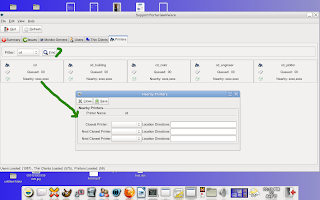
I have started to write some code for the handling of printers. You can now select a department and all of the printers in that department appear. Each printer offers three options/buttons: the first button launches Firefox and just goes to the IP of the printer. This connects with the HP web admin page found on all of their printers. The second button will display the number of print jobs currently in queue (over all servers), and when you click on the button it takes you to the UI for the viewing and halting of print jobs. The third button (marked in green) is an idea I had to make use of the under-utilized "lpmove" command. Yup, you can move print jobs to other printers...and no one ever uses it. When you have 60 printers, you can barely remember them all, let alone where they are located. So using lpmove on the command line would require digging out some kind of paper document to remember where each printer is located. So I have started to build a simple screen that will allow us to enter in the closest printers to each printer, along with directions from one to another. That will allow our support staff to take the stuck jobs, and fire them to a printer that might be located 50 feet away from the original. You might be wondering: Why not just cancel it and just have the user resend it? The real world answer is that many users tend to print (and expect it works 100% of the time) and delete and empty trash before they see that it really worked. What I envision then is the end user would get an email message alerting them the print jobs were moved to a new printer, with directions on where it's located. It'll be interesting to see how this all works. Printers really continue to be a nightmare, anything I can do to reduce our time on them seems worthwhile.
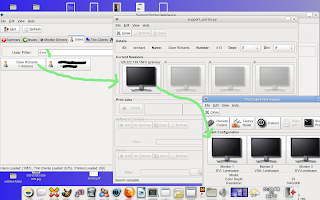
I also wrote some of the initial code to allow for searches of our users by first, last or account name. All matching users appear in the form of buttons. Hovering your mouse over the buttons gives you further details. This continues my pet peeve about making people open a detail screen to see information that should be easily found on the primary UI. If you do click on the user button, a detail screen appears with much of the same information found in the tooltip. It then also scans the servers and looks for their logins and lights up a monitor when found. We allow users to log in multiple times, so it's possible they have 1-4 active logins at a time. Other detail information that will appear on this screen (not yet written) includes information about their print jobs, and then a listing of software applications they are allowed to run. Linux software is deployed to nearly everyone because it's mostly free, Windows software has licenses and must be checked prior to launching. We also are looking at tracking how often all software is used, so that we can review it periodically and remove those packages that are no longer needed. If you click on a user login monitor, it takes you to the thin client detail screen and gives you greater detail about the physical device they are using. This allows us to check software versions, color depth, type of connection and the like.
Happy Friday!
OpenSuse 11.4 Kernel Problem
I got a lot of nice ideas to try and get our OpenSuse 11.4 server running better, and sadly none of them have made major improvements. I finally feel like we have ruled out everything except the kernel and have opened a bug report with the kernel guys. None of the admin tools are showing why the machine is running poorly, but it feels as if the whole server is running from the swap device. Copies of this server moved to VM suffer the same results. Unless I can get some kind of movement in this area soon, I am going to have to consider other Linux distributions. A few well placed tarballs and a VM copy will allow me to do that quickly, but it's still not pleasant. Everything is in place and working, we just cannot scale over 35-40 users. This hardware should run 150+ easily.
Evolution Issues Continue
Still communicating with some of the Evolution developers in the hopes of nailing down some nagging issues. Email and calendar events flow and things are working, but it's not yet to a milestone that gives me comfort. Everyone suffers from low resources in the IT field these days it seems.
Firefox 6
It's out already and I have been testing it heavily with various pages and technologies. Another Flash release came out in early August and that is being given the Youtube stress test over remote display with PULSE. While it never will be as robust as a local video card, playback is not terrible and more and more users are playing this type of content. I have some ideas to improve how this works, and will blog about it in the future. Just not enough hours in the day.
NX Testing and Ideas
I was able to connect finally with a thin client to NX 4 and started testing it in preparation of it going live in the coming months. I also had a few product feature ideas that I emailed to them. While we are using NX right now only at remote sites with low bandwidth, we are watching the marketplace and the whole "cloud" thing. If we move anything off site, we'll need NX for compression.
Support Portal Project
One of the best parts about writing software is when people actually use it, and we recoup the time invested in coding. Merging lots of little functions into one UI is saving time for our support staff, and also I feel allows us to provide better service. When there are problems with printers for instance, we know about it within just a few minutes.
Once again I will mention, please no HIG comments. :) I have kind of come to the mindset that projects should not be over-engineered up front. I'm talking about the types of projects where you spend so much time in design and building it "correctly" that the end users don't see any code for months and months. I'm building ideas and testing them with real people. Some of the data is still stored in flat files which is clunky of course; but the end users never see that stuff. Why make them wait for you you to build and optimize a database when just experimenting? If I abandon an idea, only a short period of time was used. I'll clean as I progress and like the results.
I have started to write some code for the handling of printers. You can now select a department and all of the printers in that department appear. Each printer offers three options/buttons: the first button launches Firefox and just goes to the IP of the printer. This connects with the HP web admin page found on all of their printers. The second button will display the number of print jobs currently in queue (over all servers), and when you click on the button it takes you to the UI for the viewing and halting of print jobs. The third button (marked in green) is an idea I had to make use of the under-utilized "lpmove" command. Yup, you can move print jobs to other printers...and no one ever uses it. When you have 60 printers, you can barely remember them all, let alone where they are located. So using lpmove on the command line would require digging out some kind of paper document to remember where each printer is located. So I have started to build a simple screen that will allow us to enter in the closest printers to each printer, along with directions from one to another. That will allow our support staff to take the stuck jobs, and fire them to a printer that might be located 50 feet away from the original. You might be wondering: Why not just cancel it and just have the user resend it? The real world answer is that many users tend to print (and expect it works 100% of the time) and delete and empty trash before they see that it really worked. What I envision then is the end user would get an email message alerting them the print jobs were moved to a new printer, with directions on where it's located. It'll be interesting to see how this all works. Printers really continue to be a nightmare, anything I can do to reduce our time on them seems worthwhile.
I also wrote some of the initial code to allow for searches of our users by first, last or account name. All matching users appear in the form of buttons. Hovering your mouse over the buttons gives you further details. This continues my pet peeve about making people open a detail screen to see information that should be easily found on the primary UI. If you do click on the user button, a detail screen appears with much of the same information found in the tooltip. It then also scans the servers and looks for their logins and lights up a monitor when found. We allow users to log in multiple times, so it's possible they have 1-4 active logins at a time. Other detail information that will appear on this screen (not yet written) includes information about their print jobs, and then a listing of software applications they are allowed to run. Linux software is deployed to nearly everyone because it's mostly free, Windows software has licenses and must be checked prior to launching. We also are looking at tracking how often all software is used, so that we can review it periodically and remove those packages that are no longer needed. If you click on a user login monitor, it takes you to the thin client detail screen and gives you greater detail about the physical device they are using. This allows us to check software versions, color depth, type of connection and the like.
Happy Friday!
Subscribe to:
Posts (Atom)
