
Thursday, August 19, 2010
Photo Taking Hardware
In a previous blog I had described the security camera that we selected for taking pictures of our citizens for recreation cards. We found a low sitting tripod for around $15, which pivots the camera at a 90 degree angle. The pictures are taken sideways and then corrected via the 'convert' command line utility in scripts to rotate back 90 degrees and appear correct on the IDs. These cameras are completely self reliant and don't need any attached hardware or PCs to run them. Total cost including tripod + camera should come in less than $150.


Recreation System, Milestone 1
Our IT/Integration division was able to go live with the first milestone of changes to the recreation system on a new server. I haven't been working on the coding on this project, but have been helping with some technical aspects including cameras, mockups, printing and ideas.
The old recreation system used older Motif widgets and was first built in the mid-1990s. We already had thin clients at that point. In the mid 90s the remote sites were in 8 bit color, 800x600 and only had limited bandwidth. The screens were built with those limitations in mind.
(shot below)

For the first milestone the front page was changed to a 'portal' which displays a lot more information. Motif was upgrade to 2.3 which gave us anti-aliased font. The theming system was upgraded as best as possible to allow GNOME colors to alter the look and feel of the software and match the rest of the applications. All of the code from the old system came over without modification; the screens just had to be touched in order to accommodate the new font metrics.
(shot below, no GUI nazis please :) )

The developers are now starting to alter the code of the screens and add functionality. The biggest new features being implemented are membership cards with photos and bar codes, and better accounting integration. If you are a citizen of Largo, these milestones will slowly increase the quality of your experience at our recreation sites. Be assured that all of this technology is being developed with costs and long term impact in mind.
The old recreation system used older Motif widgets and was first built in the mid-1990s. We already had thin clients at that point. In the mid 90s the remote sites were in 8 bit color, 800x600 and only had limited bandwidth. The screens were built with those limitations in mind.
(shot below)

For the first milestone the front page was changed to a 'portal' which displays a lot more information. Motif was upgrade to 2.3 which gave us anti-aliased font. The theming system was upgraded as best as possible to allow GNOME colors to alter the look and feel of the software and match the rest of the applications. All of the code from the old system came over without modification; the screens just had to be touched in order to accommodate the new font metrics.
(shot below, no GUI nazis please :) )

The developers are now starting to alter the code of the screens and add functionality. The biggest new features being implemented are membership cards with photos and bar codes, and better accounting integration. If you are a citizen of Largo, these milestones will slowly increase the quality of your experience at our recreation sites. Be assured that all of this technology is being developed with costs and long term impact in mind.
Tuesday, August 03, 2010
Java & Sun/Oracle Blaze The Way :)
I never thought that I would such high marks to anything related to Java, but as it stands right now this is the only piece of the puzzle working natively and well on 64bit Firefox 4.0. I wanted to draw myself a picture of the pieces (below) so that I could work out in my head how this will all work. There are 4 main areas where I need to run embedded plugins based on our users requirements. 4 of the 5 plugins have caveats and are not deployed in the clean manner that I would like. Some of them are still only 32 bit, some of them don't natively use PULSE and some of them are missing features when built natively 64bit.
Green indicates satisfactory techniques, red indicates problems.

I guess for now we tell our parents and grandma to keep installing the 32bit flavors.
Green indicates satisfactory techniques, red indicates problems.

I guess for now we tell our parents and grandma to keep installing the 32bit flavors.
Monday, August 02, 2010
64bit Browser Work Continues
I was pulled off of doing Admin work for a few days to help with some technical projects and assisting in getting some pieces together for our Integration Division. I had previously noted that a system was developed for taking citizens pictures for our recreation cards. I wrote a small ksh and perl script to create the new cards. (shot below). Integration staff will make final changes and add some colors and move the boxes around slightly to fit the perforated paper; but it's all essentially working. The Panther development toolkit we use has no runtime licenses at all on Linux. So that along with the inexpensive cameras and using perl to print the cards has kept the costs to a minimum.

So now I'm back working on the 64bit 'browser' server which will run our Citywide Firefox sessions. I got mplayer compiled natively and it's playing all of our media files correctly. Nice. Now I'll work on getting the multimedia plugins loaded into Firefox. We use the RealPlayer (Helix) to play our commission meetings, but sadly this too seems to be missing 64bit support. Will check for source code, maybe I can build it myself. I guess I have come to the realization that in the short term, I certainly won't have a nice clean 64bit implementation; I'll load as much as I can and upgrade as more packages are released in the future. It's all super fast, the users won't see much of a difference.
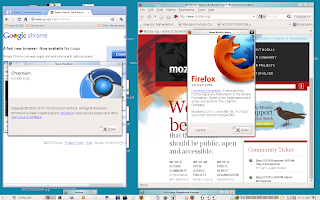
I tried loading Chrome as downloaded from Google and there were some dependency problems. I found a release from OpenSuse (11.3) and was able to get it installed natively. What is interesting is that I have found it to be very SLOOOOW. Firefox is very responsive on this server; cold starts in about 2-3 seconds and pages load quickly and spinning the mouse to scroll a page is crisp and works as expected...even over remote display. Chrome feels like page rendering is fighting mouse movement, and spinning the mouse wheel is slow and not very smooth. When you grab the scroll bars, they seem to be jerky and slow. Possibly no one is testing Chrome over remote display, but as it stands right now it's not even close to be usable in our environment.
Work will continue over the next few days with plugin testing and loading more software. I should be able to put on some beta testers in the coming week or so and begin testing printing and printers.

So now I'm back working on the 64bit 'browser' server which will run our Citywide Firefox sessions. I got mplayer compiled natively and it's playing all of our media files correctly. Nice. Now I'll work on getting the multimedia plugins loaded into Firefox. We use the RealPlayer (Helix) to play our commission meetings, but sadly this too seems to be missing 64bit support. Will check for source code, maybe I can build it myself. I guess I have come to the realization that in the short term, I certainly won't have a nice clean 64bit implementation; I'll load as much as I can and upgrade as more packages are released in the future. It's all super fast, the users won't see much of a difference.
I tried loading Chrome as downloaded from Google and there were some dependency problems. I found a release from OpenSuse (11.3) and was able to get it installed natively. What is interesting is that I have found it to be very SLOOOOW. Firefox is very responsive on this server; cold starts in about 2-3 seconds and pages load quickly and spinning the mouse to scroll a page is crisp and works as expected...even over remote display. Chrome feels like page rendering is fighting mouse movement, and spinning the mouse wheel is slow and not very smooth. When you grab the scroll bars, they seem to be jerky and slow. Possibly no one is testing Chrome over remote display, but as it stands right now it's not even close to be usable in our environment.

Work will continue over the next few days with plugin testing and loading more software. I should be able to put on some beta testers in the coming week or so and begin testing printing and printers.
Friday, July 23, 2010
Friday Afternoon Adobe Rant
I have to join the voices today that are complaining about Adobe. I'm building a multi-year 64 bit server to run our Firefox sessions for hundreds of people. It should take me 5 minutes to install the PDF and Flash plugins. But guess what, it's 2010 and they still don't support 64bit platforms. So now I have to try and wrap them to run in 32bit mode which is uncovering bugs when used with Firefox 4. The beta 64bit Flash player seemed to show some promise, but I can't deploy it because it's too old in terms of security exploits.
So Adobe, you have a big market share with Internet content. You need to step up to the plate and make this content easier to deliver. If you can't, the world is going to move past you quickly.
Note: Yup I know about the open source projects to replace these products. They aren't a fit for us at this time.
So Adobe, you have a big market share with Internet content. You need to step up to the plate and make this content easier to deliver. If you can't, the world is going to move past you quickly.
Note: Yup I know about the open source projects to replace these products. They aren't a fit for us at this time.
Thursday, July 22, 2010
Accessing Remote Devices From Centralized Hosts
What is interesting to me whenever we look at software and hardware to solve problems is the needless level of complexity and cost. Let me explain. When you meet with vendors, their first inclination is to add lots of hardware to your infrastructure....and other Cities must just buy lots of it because they seem shocked that we question their solutions and want to keep it simple.
In this particular case, we are adding the ability for our Recreation department to put photos of citizens on their recreation cards. When you review cameras, you begin to hear, "Well you will just add a PC at each remote site to connect to the camera and process the photos". What?!? Huh?? It's very clear that this is unneeded and adds support and upgrade costs. I think sometimes these vendors fail to understand that if you deployed in their design, you would have 100 extra PCs on your network in no time.
So how do we fit in something like a remote camera into a thin client environment? I'm a strong proponent of centralized software and only having very minimal hardware in the field. I didn't want to get a usb webcam that needed drivers and software on the thin clients. Too many problems, and keeping up with ever changing hardware is very difficult. Very often we buy a few devices, and within a few months that same model isn't available anymore. Touching and QAing thin clients and updating them with drivers is not a good idea. I also didn't want the hosts to communicate via USB to remote sites. We always use stateless connections to keep things simple and stable.
So I honed in on the Cisco/Linksys WVC80N Internet camera. Ok, so some problems were solved. We can use the motion sensors, and our employees at the remote sites won't have to push any buttons. All they have to do is sit down the citizen and the photos are taken automatically. Very cool. The camera snaps the photos on motion, and then uploads them via FTP. Because some sites are on lower bandwidth lines, I decided not to send the photos back to our servers. Otherwise anytime there was movement photos would be uploading constantly and possibly slowing their performance. Ever see how many kids run around at recreation sites? :) I wanted to only send the photos when they are really needed by our host software.
It was a logical progression of thought then to house the photos at the remote site until they are used. But where? It turned out that we could store them on the thin clients very easily. We already use FTP to transfer files back and forth from USB sticks to the server to ensure that all file transfers and connections are stateless. So what I did was create a "fake" USB stick in /media that is really a RAMfs (tmpfs) with 20MB of space. This was to avoid having to have a USB stick plugged into the thin client to house the pictures. It was not desirable to store the photos on the flash drive of the thin client itself, these drives have a fixed amount of writes.
When someone moves in front of the camera, it shoots the pictures and puts them on the thin client located at that site via FTP. When we then need those photos from our host based software, we FTP then off the thin clients and back to the server. Clean, solid state and hardware independent. When this camera is discontinued, all we have to do is buy the newer model and drop it into the same location.
Total cost to take photos of our citizens, $110.

In this particular case, we are adding the ability for our Recreation department to put photos of citizens on their recreation cards. When you review cameras, you begin to hear, "Well you will just add a PC at each remote site to connect to the camera and process the photos". What?!? Huh?? It's very clear that this is unneeded and adds support and upgrade costs. I think sometimes these vendors fail to understand that if you deployed in their design, you would have 100 extra PCs on your network in no time.
So how do we fit in something like a remote camera into a thin client environment? I'm a strong proponent of centralized software and only having very minimal hardware in the field. I didn't want to get a usb webcam that needed drivers and software on the thin clients. Too many problems, and keeping up with ever changing hardware is very difficult. Very often we buy a few devices, and within a few months that same model isn't available anymore. Touching and QAing thin clients and updating them with drivers is not a good idea. I also didn't want the hosts to communicate via USB to remote sites. We always use stateless connections to keep things simple and stable.
So I honed in on the Cisco/Linksys WVC80N Internet camera. Ok, so some problems were solved. We can use the motion sensors, and our employees at the remote sites won't have to push any buttons. All they have to do is sit down the citizen and the photos are taken automatically. Very cool. The camera snaps the photos on motion, and then uploads them via FTP. Because some sites are on lower bandwidth lines, I decided not to send the photos back to our servers. Otherwise anytime there was movement photos would be uploading constantly and possibly slowing their performance. Ever see how many kids run around at recreation sites? :) I wanted to only send the photos when they are really needed by our host software.
It was a logical progression of thought then to house the photos at the remote site until they are used. But where? It turned out that we could store them on the thin clients very easily. We already use FTP to transfer files back and forth from USB sticks to the server to ensure that all file transfers and connections are stateless. So what I did was create a "fake" USB stick in /media that is really a RAMfs (tmpfs) with 20MB of space. This was to avoid having to have a USB stick plugged into the thin client to house the pictures. It was not desirable to store the photos on the flash drive of the thin client itself, these drives have a fixed amount of writes.
When someone moves in front of the camera, it shoots the pictures and puts them on the thin client located at that site via FTP. When we then need those photos from our host based software, we FTP then off the thin clients and back to the server. Clean, solid state and hardware independent. When this camera is discontinued, all we have to do is buy the newer model and drop it into the same location.
Total cost to take photos of our citizens, $110.

Thursday, July 15, 2010
Projects Keeping Me Busy
Life at Largo never slows down. When you push new technology live, there is always more waiting in the wings. Here is what is going on:
Evolution 64 bit: As I have reported everyone has been moved to release 2.28 on SLED 11 SP1. Still blazingly fast even with hundreds of people working. I moved the bug-buddy binary out of the way and inserted a custom script that dumps backtraces to flat files and into a common directory. I can see how many people, what people and why people are crashing in real time. Looks like we are hovering around 20 crashes a day that dump BTs and a few more that crash at startup. Around 400 unique people check email a day, so most people are having a stable experience. BTs are being shipped to Novell and we hope to start getting some patches soon. Those patches should also land upstream and help everyone else too.
OpenOffice 64 bit: 3.2.1 is working well and stable. It's still running so fast that even under a user load you don't see the splash screen at all. On a multi-user system you never really have a "cold start" but the UI opens in about 2-3 seconds at which point you can immediately start typing. Nice. We have identified that extensions are causing the memory leak, and hopefully Sun/Oracle will be able to work on it soon. In the meantime we just bought more memory (cheap) to keep everyone out of the swap device.
Firefox 64bit: Pavel Janik finished testing our new 48 processor (8 cpu x 6 core) server to try and set some new OpenOffice compilation records. I won't spoil the surprise and you can read his blog when it comes out. I'm downloading OpenSuse 11.3 right now and we will move that server back inside the DMZ and prepare it for our employees. I'm going to begin testing 64bit Firefox 4 and see how it works. Adobe seems to have pulled back 64bit flash, so I'll be experimenting with the various plugins and see how they work. I'll check on the state of the various media players and see which one works. We used mplayer last time and it works great, but I always keep an eye on other solutions.
Debian Lenny Xserver Crash On Thin Clients: I finally packed up a bug report on the crashing Xserver issue. It only happens about every 2-3 weeks, with compiz enabled and happens when you close a child window. Bug report is here
Verizon USB 760 EVDO Modems + Laptop Thin Client: Verizon released a nasty modem, the USB 760. They thought it would be a good idea to put software and a modem into one USB stick, nice. Linux sees it as /dev/sr0 and tries to automount what it thinks is a CD/DVD drive. The workarounds are not pleasant, you have to tell udev to then immediately eject the drive and then attempt to fire up your dialer. I'm poking around at some ideas to make it not so clunky. Note to Verizon: Please don't make hardware devices like this anymore!
GDM + XDMCP: Halfline and I are trying to get synced and have some time to experiment with newer versions of GDM and find out why it won't let thin clients connect with XDMCP anymore. Hopefully that will happen in the coming days.
Update: 2 second cold starts on Firefox on the 48way server. Obviously no user load, but promising. :)
Evolution 64 bit: As I have reported everyone has been moved to release 2.28 on SLED 11 SP1. Still blazingly fast even with hundreds of people working. I moved the bug-buddy binary out of the way and inserted a custom script that dumps backtraces to flat files and into a common directory. I can see how many people, what people and why people are crashing in real time. Looks like we are hovering around 20 crashes a day that dump BTs and a few more that crash at startup. Around 400 unique people check email a day, so most people are having a stable experience. BTs are being shipped to Novell and we hope to start getting some patches soon. Those patches should also land upstream and help everyone else too.
OpenOffice 64 bit: 3.2.1 is working well and stable. It's still running so fast that even under a user load you don't see the splash screen at all. On a multi-user system you never really have a "cold start" but the UI opens in about 2-3 seconds at which point you can immediately start typing. Nice. We have identified that extensions are causing the memory leak, and hopefully Sun/Oracle will be able to work on it soon. In the meantime we just bought more memory (cheap) to keep everyone out of the swap device.
Firefox 64bit: Pavel Janik finished testing our new 48 processor (8 cpu x 6 core) server to try and set some new OpenOffice compilation records. I won't spoil the surprise and you can read his blog when it comes out. I'm downloading OpenSuse 11.3 right now and we will move that server back inside the DMZ and prepare it for our employees. I'm going to begin testing 64bit Firefox 4 and see how it works. Adobe seems to have pulled back 64bit flash, so I'll be experimenting with the various plugins and see how they work. I'll check on the state of the various media players and see which one works. We used mplayer last time and it works great, but I always keep an eye on other solutions.
Debian Lenny Xserver Crash On Thin Clients: I finally packed up a bug report on the crashing Xserver issue. It only happens about every 2-3 weeks, with compiz enabled and happens when you close a child window. Bug report is here
Verizon USB 760 EVDO Modems + Laptop Thin Client: Verizon released a nasty modem, the USB 760. They thought it would be a good idea to put software and a modem into one USB stick, nice. Linux sees it as /dev/sr0 and tries to automount what it thinks is a CD/DVD drive. The workarounds are not pleasant, you have to tell udev to then immediately eject the drive and then attempt to fire up your dialer. I'm poking around at some ideas to make it not so clunky. Note to Verizon: Please don't make hardware devices like this anymore!
GDM + XDMCP: Halfline and I are trying to get synced and have some time to experiment with newer versions of GDM and find out why it won't let thin clients connect with XDMCP anymore. Hopefully that will happen in the coming days.
Update: 2 second cold starts on Firefox on the 48way server. Obviously no user load, but promising. :)
Wednesday, July 07, 2010
A Word About My Book

A few years ago I was asked to write a book and some of you have purchased it. Obviously one hopes that a book always meets the expectations of the reader, but there have been some negative reviews. Some of the goals while it was being written were not entirely matched to what people thought they were buying. Let me explain, and tell everyone what is in the book:
Obsolete Technology: When I was changing cubicles a few weeks ago all of the contents had to be packed and moved. I was shocked at the high number of books that were completely obsolete. I had a RedHat 6 book from 1999 and on inspection you find that nearly every technology has completely changed in 10 years. I wanted to create something that had a longer shelf life. In the time since the book was published, HP has already released two new thin client models. Had the book dug deeply into the internals of the model available at that time, it would have been just another technical book sitting around. So I wanted to include some topics that never change.
People Issues: The book deals a great bit about *people*. We as techies sometimes don't like to think about them or talk to them :) , but they are the biggest issue that you have to overcome when you move to thin clients and even more so when you move to Linux. Yeah, it saves lots of money, for sure...but if your administrative people aren't on board any project such as this is doomed. The book also deals with the fact that IT staff will have greatly changed duties post migration. You no longer have lots of people running around keeping client devices running and focus moves to R&D and centralized support. Instead of maintaining, you are improving and that sometimes requires different types of people.
Pictures And Pictures: All of you would be surprised at the number of people that think Linux is "character" and "command line". Many people think that if you move your email to Linux that you have an xterm window open with pine or something. During the editing process they asked me about including the screen shots, and I felt strongly that we needed to SHOW people applications like Firefox, Evolution, OpenOffice and Realplayer running graphically and similarly to how they look and work on Microsoft Windows. People also have this impression that if you have to get to Microsoft Windows applications from the Linux desktop that you have to log out in some manner and then connect to the various software packages. I felt it important to show that everything runs in a consolidated desktop, Windows and Linux apps right fine side by side.
Unique Site Requirements: Every deployment will be completely different, so it would be impossible to give exact instruction on how to setup and configure everything. So the book had to be about 'ideas'. I tried to describe exactly what was possible, and then leave it the reader to come up with a plan. I had no way of knowing the skills of the staff, the skills of the users, the money available and exactly what operating systems would be used. I also felt that more specific details would be available on my blog. I always try and blog about major milestones that we reach and hope that it's helpful.
There are good days and bad days on any computer system, but we have inched our way up to about 700 thin client workstations and things are still lightning fast. This design works, is stable and saves a lot of money.
Friday, July 02, 2010
Time Consuming Upgrades
Centralized computing makes it so difficult to upgrade hundreds of users to the latest release of the ever exploited Adobe Acrobat Reader. :)
browser:/u # ls -lad acro*
drwxr-xr-x 3 root root 4096 Jan 13 14:08 acrobat_9301
drwxr-xr-x 3 root root 4096 Feb 23 10:29 acrobat_9310
drwxr-xr-x 3 root root 4096 Apr 23 13:32 acrobat_9321
drwxr-xr-x 3 root root 4096 Jun 30 16:06 acrobat_9331
lrwxrwxrwx 1 root root 12 Apr 23 13:33 acrobat_9_live -> acrobat_9321
browser:/u # rm acrobat_9_live
browser:/u # ln -s acrobat_9331 acrobat_9_live
and then push the reader into Firefox
browser:/u/acrobat_9331/Adobe/Reader9/Browser/intellinux # cp nppdf.so /u/firefox3_sound/firefox/plugins/
browser:/u/acrobat_9331/Adobe/Reader9/Browser/intellinux # cp nppdf.so /u/firefox3_nosound/firefox/plugins/
browser:/u/acrobat_9331/Adobe/Reader9/Browser/intellinux # cp nppdf.so /u/firefox3_noflash/firefox/plugins/
All done. :)
browser:/u # ls -lad acro*
drwxr-xr-x 3 root root 4096 Jan 13 14:08 acrobat_9301
drwxr-xr-x 3 root root 4096 Feb 23 10:29 acrobat_9310
drwxr-xr-x 3 root root 4096 Apr 23 13:32 acrobat_9321
drwxr-xr-x 3 root root 4096 Jun 30 16:06 acrobat_9331
lrwxrwxrwx 1 root root 12 Apr 23 13:33 acrobat_9_live -> acrobat_9321
browser:/u # rm acrobat_9_live
browser:/u # ln -s acrobat_9331 acrobat_9_live
and then push the reader into Firefox
browser:/u/acrobat_9331/Adobe/Reader9/Browser/intellinux # cp nppdf.so /u/firefox3_sound/firefox/plugins/
browser:/u/acrobat_9331/Adobe/Reader9/Browser/intellinux # cp nppdf.so /u/firefox3_nosound/firefox/plugins/
browser:/u/acrobat_9331/Adobe/Reader9/Browser/intellinux # cp nppdf.so /u/firefox3_noflash/firefox/plugins/
All done. :)
Thursday, July 01, 2010
64bit Evolution Is Now Live
After that small hiccup with running Evolution on 32bit Linux and the memory limitations, we are now live on 64bit SLED 11 and the difference in speed is striking. The per user memory requirements have grown, but it's a small price to pay (and memory is cheap!). The top screen below is 220 concurrent Evolution sessions. CPU is barely used at all. Disks are configured RAID 1 which has proven to be the best for Evolution (RAID 5 is much slower). When using the Groupwise backend, hitting Send/Receive the dialog only appears for a split second. The server is has 4 CPUs, quad core and I think we could easily get 500 concurrent users on here with no performance penalty. I'll have a few days of tuning and minor issues. Next on deck for me: getting gdm fixed to allow XDMCP connections again, and starting to work on that new monster server to run Firefox.


Tuesday, June 29, 2010
OpenOffice, Evolution & Benchmarks
The week has been busy and it's only Tuesday. Here are updates on my current projects.
OpenOffice
Migration to 64bit Linux is complete and things are working pretty well. Even with 100 users, OOo opens in about 2-4 seconds, nice. I was able to confirm that indeed there is a nasty memory leak when using the Start Center and have submitted a bug report and valgrind information. The short term work around was just to install enough memory to cover the leak. Hopefully someone will be able to look at it soon.
Evolution
We migrated the rest of the users to SLED 11/SP1 and things appeared to be working well initially. We then started getting reports of Evolution crashing during peak loads. After some investigation it was determined that we are having the same problem that we did with OpenOffice -- having too many people to run the 32bit release. You basically run out of 'low' memory even though when viewing 'top' you perceive of no memory problem. When low memory is exhausted, it begins picking processes and zapping them with oom-killer. I have the servers configured to make them super easy to migrate, so we downloaded 64bit SLED 11 and it's already installed and working on another box. I'm testing Evolution and mime types, and all we have to do tomorrow is just backup /home for everyone and move it over and change IPs. Everyone then instantly is on a new server.
Benchmarks & New Server
The one area of our computing infrastructure that is growing the fastest is the use of Firefox/browsing. More than ever it's being used for data retrieval, videos and downloads. We also are purchasing some new software that might make heavy use of Java and we wanted to ensure the best possible performance; so using budgeted monies we ordered a new server.
The new server finally arrived this week. It's got 8 CPus each with 6 cores. I took a shot of 'top' below so you can see what it looks like. I had to pick 6 point font just to get the CPUs all to display. :)
One of the things that we do when these new servers arrive is hook up with our good friends working on OpenOffice and give them a chance to try and set a new compile world record. This is done before the server is placed into production and when they are finished we move it inside our firewalls and reload the operating system. So in the coming days, hopefully we will get some interesting information concerning just how fast this new server runs.

OpenOffice
Migration to 64bit Linux is complete and things are working pretty well. Even with 100 users, OOo opens in about 2-4 seconds, nice. I was able to confirm that indeed there is a nasty memory leak when using the Start Center and have submitted a bug report and valgrind information. The short term work around was just to install enough memory to cover the leak. Hopefully someone will be able to look at it soon.
Evolution
We migrated the rest of the users to SLED 11/SP1 and things appeared to be working well initially. We then started getting reports of Evolution crashing during peak loads. After some investigation it was determined that we are having the same problem that we did with OpenOffice -- having too many people to run the 32bit release. You basically run out of 'low' memory even though when viewing 'top' you perceive of no memory problem. When low memory is exhausted, it begins picking processes and zapping them with oom-killer. I have the servers configured to make them super easy to migrate, so we downloaded 64bit SLED 11 and it's already installed and working on another box. I'm testing Evolution and mime types, and all we have to do tomorrow is just backup /home for everyone and move it over and change IPs. Everyone then instantly is on a new server.
Benchmarks & New Server
The one area of our computing infrastructure that is growing the fastest is the use of Firefox/browsing. More than ever it's being used for data retrieval, videos and downloads. We also are purchasing some new software that might make heavy use of Java and we wanted to ensure the best possible performance; so using budgeted monies we ordered a new server.
The new server finally arrived this week. It's got 8 CPus each with 6 cores. I took a shot of 'top' below so you can see what it looks like. I had to pick 6 point font just to get the CPUs all to display. :)
One of the things that we do when these new servers arrive is hook up with our good friends working on OpenOffice and give them a chance to try and set a new compile world record. This is done before the server is placed into production and when they are finished we move it inside our firewalls and reload the operating system. So in the coming days, hopefully we will get some interesting information concerning just how fast this new server runs.

Friday, June 25, 2010
OpenOffice Gurus?
So this week we deployed OpenOffice on 64bit Linux for the first time. It's smoking fast and works great especially under user loads; however it's chewing up LOTS of memory. It seems to be using easily 3 times more memory. I have been using lsof to check the documents that the users have open and they are nothing out of the ordinary and some of them are just a few pages with no images.
Anyone have any thoughts on this matter? Could it be leaking this badly? This type of memory usage is not sustainable; so I guess that means I'll have to start looking for it by process of elimination. Possibly it's user settings of some type. Very odd.
(top shot below shows memory usage).

Anyone have any thoughts on this matter? Could it be leaking this badly? This type of memory usage is not sustainable; so I guess that means I'll have to start looking for it by process of elimination. Possibly it's user settings of some type. Very odd.
(top shot below shows memory usage).

Monday, June 21, 2010
Evolution 2.28 & 64 Bit OpenOffice Going Live Starting Today
Evolution 2.28
Those of you that have met me and communicate with me know that I'm pretty fair in describing good & bad experiences in working with technology. The road upgrading from Evolution 2.6 on SLED 10 to something newer has not been very fun and took 1.5 years, which is WAY too long. There were a few times in recent months where we had meetings and discussed moving to completely new solutions. We are using the Groupwise backend with very heavy calendaring and had a minimum level of features that we wanted to get included and working. Sometimes I still get the feeling that Linux vendors are somewhat caught off guard when you *REALLY* run desktop software not on MS Windows. Evolution is by far the best solution to deploy on Linux over the Groupwise Java client (which is absolutely horrid), and the web interface. I just wish that more resources were allocated to its advancement.
With SP1 of SLED 11 enough upstream patches have been merged that our features are working well enough to deploy. It's not perfect and some bugs remain, but users can perform their calendaring functions including meeting resends and retracts. I will be moving over the users to the new server and then doing a bit of QA testing on their accounts to ensure that everything is working.

OpenOffice 3.2.1 On 64 Bit Linux
We had an issue last week whereby hardware is failing on our production OpenOffice server. As luck would have it, the replacement computer had already arrived and was sitting on the loading dock. I did a review of all of the packages that we needed and determined that everything was available in 64 bit versions. The server was quickly built and will be put into production this week. Openoffice on this server is FAST. The composer UI of Writer is appearing fully rendered in about 2-3 seconds, and running so quickly that the splash page doesn't even appear at all. Very nice, and thank you to everyone involved with making my job easier. :)
Those of you that have met me and communicate with me know that I'm pretty fair in describing good & bad experiences in working with technology. The road upgrading from Evolution 2.6 on SLED 10 to something newer has not been very fun and took 1.5 years, which is WAY too long. There were a few times in recent months where we had meetings and discussed moving to completely new solutions. We are using the Groupwise backend with very heavy calendaring and had a minimum level of features that we wanted to get included and working. Sometimes I still get the feeling that Linux vendors are somewhat caught off guard when you *REALLY* run desktop software not on MS Windows. Evolution is by far the best solution to deploy on Linux over the Groupwise Java client (which is absolutely horrid), and the web interface. I just wish that more resources were allocated to its advancement.
With SP1 of SLED 11 enough upstream patches have been merged that our features are working well enough to deploy. It's not perfect and some bugs remain, but users can perform their calendaring functions including meeting resends and retracts. I will be moving over the users to the new server and then doing a bit of QA testing on their accounts to ensure that everything is working.

OpenOffice 3.2.1 On 64 Bit Linux
We had an issue last week whereby hardware is failing on our production OpenOffice server. As luck would have it, the replacement computer had already arrived and was sitting on the loading dock. I did a review of all of the packages that we needed and determined that everything was available in 64 bit versions. The server was quickly built and will be put into production this week. Openoffice on this server is FAST. The composer UI of Writer is appearing fully rendered in about 2-3 seconds, and running so quickly that the splash page doesn't even appear at all. Very nice, and thank you to everyone involved with making my job easier. :)
Friday, May 28, 2010
XDMCP & OpenSuse 11.3 Anyone?
I have been poking at getting indirect XDMCP working on OpenSuse 11.3 with gdm with no success. Has anyone gotten this working? I did see that recently gdm was rewritten and there were some complaints that not all features were brought over to the new version.
Firewall is off on the inside network, gdm.schemas was edited..which looks like it replaced the custom.conf file. I put the lines into custom.conf anyway just to be safe. Xaccess looks good for indirect connections (*), yast2 security has remote connections allowed.
If anyone got it working, step by step instructions are appreciated.
I hate to think that 1975 xdm is going to be greeting our users on shiny new OpenSuse 11.3. :)
Firewall is off on the inside network, gdm.schemas was edited..which looks like it replaced the custom.conf file. I put the lines into custom.conf anyway just to be safe. Xaccess looks good for indirect connections (*), yast2 security has remote connections allowed.
If anyone got it working, step by step instructions are appreciated.
I hate to think that 1975 xdm is going to be greeting our users on shiny new OpenSuse 11.3. :)
Wednesday, May 19, 2010
Ideas Welcome, Low Level Mouse Events
My current project is related to Accessibility. Certain parts of the accessibility modules will help me and are being tested.
One requested idea is to make use of a 5 button mouse. By default the 5 button mouse works per the defaults: Thumb1 does a Back, and Thumb2 does a Forward.
The special need that we have is to eliminate the need to use the keyboard in combination with the Left mouse button. I'm trying to map it like this:
Thumb1 = Hold_Shift_L + Regular_Left_Mouse_Button + Release_Shift_L
Thumb2 = Hold_Control_L + Regular_Left_Mouse_Button + Release_Control_L
This would let them make non-continuous selections and shifted selections without the keyboard. It seems like imwheel is the closest software package for this purpose, but it seems incapable of sending a physical mouse click after another mouse click. Can anyone confirm this is true?
What I tried in the .imwheelrc file is this:
".*"
#,Thumb1,H|E|L|L|O
,Thumb1, Shift_L|Left|-Shift_L
The commented line works great, click Thumb1 and the string appears in the current window. You also can issue a Control-A to select all, works great. But when you attempt to simulate a mouse click, it doesn't seem to understand how to do that. The line below the commented line above to me should work, but doesn't work. I also tried Button8 instead of Left and that also does not work.
Anyone know of another program or technique that could provide this functionality?
Thanks!
One requested idea is to make use of a 5 button mouse. By default the 5 button mouse works per the defaults: Thumb1 does a Back, and Thumb2 does a Forward.
The special need that we have is to eliminate the need to use the keyboard in combination with the Left mouse button. I'm trying to map it like this:
Thumb1 = Hold_Shift_L + Regular_Left_Mouse_Button + Release_Shift_L
Thumb2 = Hold_Control_L + Regular_Left_Mouse_Button + Release_Control_L
This would let them make non-continuous selections and shifted selections without the keyboard. It seems like imwheel is the closest software package for this purpose, but it seems incapable of sending a physical mouse click after another mouse click. Can anyone confirm this is true?
What I tried in the .imwheelrc file is this:
".*"
#,Thumb1,H|E|L|L|O
,Thumb1, Shift_L|Left|-Shift_L
The commented line works great, click Thumb1 and the string appears in the current window. You also can issue a Control-A to select all, works great. But when you attempt to simulate a mouse click, it doesn't seem to understand how to do that. The line below the commented line above to me should work, but doesn't work. I also tried Button8 instead of Left and that also does not work.
Anyone know of another program or technique that could provide this functionality?
Thanks!
Friday, May 14, 2010
Client Based RDP & GNOME Icon Launching
RDP Architecture Change
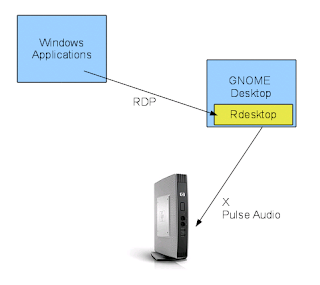
For many years we have integrated MS Windows applications into our GNOME desktop and delivered them to our thin clients. Various techniques have been used to do so, at first we used UIS (Unix Integration Services) which was wonderful but is no longer available. We used Citrix to deliver applications as well. Because the RDP protocol added high color support a few years ago, this now is becoming our primary delivery technique. It's always been our goal to run as little as possible on physical thin client hardware and keep as much on the server as possible. The more that you run at desktops, the greater the chance that you will have to touch them with updates. It also is harder to troubleshoot and resolve problems when it's offloaded from a server. So what we have done is run rdesktop on the server and this has worked great. Rdesktop talks with Windows and then the presentation is delivered to the thin clients with X. For most applications to date performance has been appropriate. But there are some things that are now making this design not work as well as we would like:
Rdesktop runs on the HP Thin clients fine, but obviously when you do so that then creates a more client/server environment and condition where if you want to make a change to that software package you are going to have to touch desktops. While rdesktop isn't changing heavily, an example of what might happen is the users finding a keysym problem after deployment that requires a change to the configuration files. When rdesktop is on the server, such a change takes 2 minutes.
The other problem is how to make an icon launched from the GNOME server initiate rdesktop running locally on the thin clients. The user account doesn't exist on the thin client and is simply running an X server and then using XDMCP to connect to the server.
What has been devised is a technique that seems like it will work well. The thin clients basically have 2 user accounts, 'root' and an account of 'user' with an ID of 1000. I set up an account called 'user' with ID of 1000 on both of the GNOME desktops and then have granted sudo permissions for all other users to have access to the rsh command as 'user'. When they click on the icon, it will sudo the rsh command and pass to the thin client instructions on all of the command line arguments to run and then initiate a local copy of rdesktop to display :0.
Performance is much faster running in this manner; X and PULSE are completely removed from the loop and the Windows servers now have a straight RDP hop right to the thin client as seen in the diagram below:

Full screen video works well with this design,sound is much less prone to breakups and applications are much faster. We continue to test this design, but it's showing promise.
GNOME Icon Launching
During the debugging stage of Evolution I have noticed certain user techniques which have been unknown to me and I have taken steps to improve the user experience. When a user clicks on an Evolution icon our launch script automatically kills any running sessions of that software and starts a new one. The reason it's designed this way is:
Users Click On Icons Multiple Times To "Speed It Up".
I guess the theory is that an icon is like a water pump. The harder you pump, the faster and more likely you are to get water? Users have been double and triple clicking on the icon. Each click was then halting and restarting Evolution. Nice. So what they see is Evolution blinking multiple times until they stop clicking and then finally it opens.
I installed a small script that I called 'gun slinger' that counts the number of seconds since the last click of certain icons and ignores repeated and quick clicking. Here is the popup they see :)

Users Use The Shortcut Icon To Replace The Window List GUI
Instead of finding an already running process in their window list, they just click on the shortcut icon again. If they have something maximized over the top of Evolution, they have no idea how to bring it to the front and have just been clicking on the shortcut again.
I installed a bit of code in the launch script for Evolution that if it detects an already running session, it uses wmctrl to give it a window manager hint. It comes to the front, un-minimizes and flips the cube to the right side to try and get them to run the already running session. They then get this dialog:

All of these techniques are being logged to a file and I'm seeing how many people have been doing this all along. I'm hoping these two steps will eliminate abnormally shutting down Evolution and also reduce the likelyhood of damaged files and perception of instability.
For many years we have integrated MS Windows applications into our GNOME desktop and delivered them to our thin clients. Various techniques have been used to do so, at first we used UIS (Unix Integration Services) which was wonderful but is no longer available. We used Citrix to deliver applications as well. Because the RDP protocol added high color support a few years ago, this now is becoming our primary delivery technique. It's always been our goal to run as little as possible on physical thin client hardware and keep as much on the server as possible. The more that you run at desktops, the greater the chance that you will have to touch them with updates. It also is harder to troubleshoot and resolve problems when it's offloaded from a server. So what we have done is run rdesktop on the server and this has worked great. Rdesktop talks with Windows and then the presentation is delivered to the thin clients with X. For most applications to date performance has been appropriate. But there are some things that are now making this design not work as well as we would like:
- More and more users are getting dual and triple screens to do wide screen work with lots of real estate. This is a lot of data to push over X.
- Certain CAD applications are becoming more sophisticated and are doing lots of movements and zoom that should deliver reasonable response times.
- More applications are starting to deliver sound and video from Windows.
- Products such as Aqua Connect allow you to deliver Mac OS X applications from servers which also require faster response times.

Rdesktop runs on the HP Thin clients fine, but obviously when you do so that then creates a more client/server environment and condition where if you want to make a change to that software package you are going to have to touch desktops. While rdesktop isn't changing heavily, an example of what might happen is the users finding a keysym problem after deployment that requires a change to the configuration files. When rdesktop is on the server, such a change takes 2 minutes.
The other problem is how to make an icon launched from the GNOME server initiate rdesktop running locally on the thin clients. The user account doesn't exist on the thin client and is simply running an X server and then using XDMCP to connect to the server.
What has been devised is a technique that seems like it will work well. The thin clients basically have 2 user accounts, 'root' and an account of 'user' with an ID of 1000. I set up an account called 'user' with ID of 1000 on both of the GNOME desktops and then have granted sudo permissions for all other users to have access to the rsh command as 'user'. When they click on the icon, it will sudo the rsh command and pass to the thin client instructions on all of the command line arguments to run and then initiate a local copy of rdesktop to display :0.
Performance is much faster running in this manner; X and PULSE are completely removed from the loop and the Windows servers now have a straight RDP hop right to the thin client as seen in the diagram below:

Full screen video works well with this design,sound is much less prone to breakups and applications are much faster. We continue to test this design, but it's showing promise.
GNOME Icon Launching
During the debugging stage of Evolution I have noticed certain user techniques which have been unknown to me and I have taken steps to improve the user experience. When a user clicks on an Evolution icon our launch script automatically kills any running sessions of that software and starts a new one. The reason it's designed this way is:
- Regular users cannot be expected to understand how to kill applications with a GUI or to look at process lists. People have no idea what this means or how to do it.
- Users understand reboots, and if they had a local computer would just reboot it. Obviously, they can't reboot the servers. Hundreds of other people would not be pleased. :)
- There are 15 hours of the day and weekends when someone from IT is not here to kill processes that are stuck or not responding.
- The regular GNOME dialog that comes up when an application is not responding very often does not halt all related processes. Yeah it might get evolution.bin, but it very likely will leave the data-server and alarm processes happy churning away.
- Very often users log off without closing Evolution correctly and sometimes just turn off their thin clients. This leaves processes behind on the server.
Users Click On Icons Multiple Times To "Speed It Up".
I guess the theory is that an icon is like a water pump. The harder you pump, the faster and more likely you are to get water? Users have been double and triple clicking on the icon. Each click was then halting and restarting Evolution. Nice. So what they see is Evolution blinking multiple times until they stop clicking and then finally it opens.
I installed a small script that I called 'gun slinger' that counts the number of seconds since the last click of certain icons and ignores repeated and quick clicking. Here is the popup they see :)

Users Use The Shortcut Icon To Replace The Window List GUI
Instead of finding an already running process in their window list, they just click on the shortcut icon again. If they have something maximized over the top of Evolution, they have no idea how to bring it to the front and have just been clicking on the shortcut again.
I installed a bit of code in the launch script for Evolution that if it detects an already running session, it uses wmctrl to give it a window manager hint. It comes to the front, un-minimizes and flips the cube to the right side to try and get them to run the already running session. They then get this dialog:

All of these techniques are being logged to a file and I'm seeing how many people have been doing this all along. I'm hoping these two steps will eliminate abnormally shutting down Evolution and also reduce the likelyhood of damaged files and perception of instability.
Tuesday, April 27, 2010
User Presentation Available
Today I'm having a quick meeting with interested users as I begin to look at using OpenSuse 11.3 to replace 10.2 as our desktop server. I built some quick glade mockups to kick around some ideas. The MIME bars that you get when you double-click have worked well for us, so I'm looking at ways to make improvements. I also am going to write a simple application to allow them to make Compiz changes which falls in between ccsm and simple-ccsm. The slides are cryptic, but might be interesting reading.
The presentation is here
The presentation is here
Thursday, April 22, 2010
What I'm Working On...
I haven't posted in a while, guess it's time. The days seem to go quickly and blend together. I sit in a cubicle listening to XM Radio with headsets most of the time, but am making steady progress on some projects.
Evolution Deployment
Still not live yet on SLED 11 :( , but in the last 3 weeks have made some progress. Our beta testers have been patient so far, and I really hope we are nearing the end of this process. All features that we need are now merged. We had a nasty performance problem that took a while to resolve. It turned out that a user had birthdays entered on a blackberry, and Groupwise gladly synced and uploaded them. The problem is that it uploaded them for 100 years. Our version of evolution-data-server doesn't play nicely with a calendar that goes out that far into the future. We found it, cleaned the users data and things are better. Now are awaiting the code to make bug-buddy launch so that I can get some backtraces from the users.
Thin Client Updates
All for of our thin client devices are synced and work with the same code and provide identical features. Our support group has started updating the thin clients around the City with the new code and for the most part is a nice upgrade. The one issue that I am tracking is that there seems to be an X crasher when using 3D effects in Debian Lenny on the ATI driver. It happens to me about once every 2 weeks and you lose all of your work. I need to get a bug report packed and hope that someone is interested in working on a fix. It doesn't seem to happen to 2D users.
Firefox Server Upgrade
With the explosion of Internet and Firefox usage we are going to be building a new server to hold us for the next few years. We also got word that we are buying a major new application that uses Java in the browser. Java has always proven not pleasant to deploy, so hopefully this server will meet our needs and provide adequate performance. It's an eight processor, six core machine. 'top' is going to report 48 CPUs, that's going to be interesting for sure. :)
Next Generation Desktop
I brought down OpenSuse 11.3 beta and have started poking at it and am going to be building a server for alpha testing it as part of a plan to upgrade our desktop (login) servers. These servers provide GNOME and 3D. XDMCP seems kind of broken and untested in the current betas. I'm going to see if updates exist. Gnome-shell was a no-go over remote display, so looks like we will be using Compiz for another upgrade cycle. I did some testing of compiz and performance was excellent. I'm doing a kickoff presentation for our users next week and will be showing them screen shots and mockups of ideas that I have to improve our current design. Of course, as things are deployed I'll post them here too.
Evolution Deployment
Still not live yet on SLED 11 :( , but in the last 3 weeks have made some progress. Our beta testers have been patient so far, and I really hope we are nearing the end of this process. All features that we need are now merged. We had a nasty performance problem that took a while to resolve. It turned out that a user had birthdays entered on a blackberry, and Groupwise gladly synced and uploaded them. The problem is that it uploaded them for 100 years. Our version of evolution-data-server doesn't play nicely with a calendar that goes out that far into the future. We found it, cleaned the users data and things are better. Now are awaiting the code to make bug-buddy launch so that I can get some backtraces from the users.
Thin Client Updates
All for of our thin client devices are synced and work with the same code and provide identical features. Our support group has started updating the thin clients around the City with the new code and for the most part is a nice upgrade. The one issue that I am tracking is that there seems to be an X crasher when using 3D effects in Debian Lenny on the ATI driver. It happens to me about once every 2 weeks and you lose all of your work. I need to get a bug report packed and hope that someone is interested in working on a fix. It doesn't seem to happen to 2D users.
Firefox Server Upgrade
With the explosion of Internet and Firefox usage we are going to be building a new server to hold us for the next few years. We also got word that we are buying a major new application that uses Java in the browser. Java has always proven not pleasant to deploy, so hopefully this server will meet our needs and provide adequate performance. It's an eight processor, six core machine. 'top' is going to report 48 CPUs, that's going to be interesting for sure. :)
Next Generation Desktop
I brought down OpenSuse 11.3 beta and have started poking at it and am going to be building a server for alpha testing it as part of a plan to upgrade our desktop (login) servers. These servers provide GNOME and 3D. XDMCP seems kind of broken and untested in the current betas. I'm going to see if updates exist. Gnome-shell was a no-go over remote display, so looks like we will be using Compiz for another upgrade cycle. I did some testing of compiz and performance was excellent. I'm doing a kickoff presentation for our users next week and will be showing them screen shots and mockups of ideas that I have to improve our current design. Of course, as things are deployed I'll post them here too.
Thursday, April 01, 2010
Thanks Pepp!
When you have an idea for a feature and do a bounty and finally get it back it's a wonderful thing.
Today we finally received just such a feature; Drop and drag from Evolution into PDF format. Being a Governmental agency, our users have to keep copies of hundreds of emails a day in project folders. Previously in order to keep them in PDF format, they would have to do them one at a time by "printing to PDF".
This feature will save us countless hours. Once it's been tested fully, I'll work with the Evo guys and get it merged into the community build too.
It's a good day.
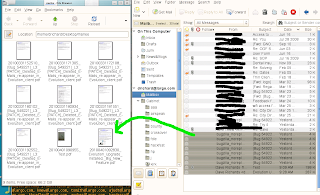
Today we finally received just such a feature; Drop and drag from Evolution into PDF format. Being a Governmental agency, our users have to keep copies of hundreds of emails a day in project folders. Previously in order to keep them in PDF format, they would have to do them one at a time by "printing to PDF".
This feature will save us countless hours. Once it's been tested fully, I'll work with the Evo guys and get it merged into the community build too.
It's a good day.

Friday, March 26, 2010
Calling OpenSuse 10.3 Gurus
Yup, I now it's old. We have NFS server running on OpenSuse 10.3 and everything is working great. We now have a circumstance where we need detailed logging to this machine for a short period of time and the command line arguments for rpc.mountd don't seem to work as I expect them.
By appending --debug all (and optionally --foreground to run on the foreground) I was expecting to see lots of spewage and be able to monitor all NFS activity including reads, writes and deletes in realtime. But the only thing that is bring reported is when the initial mount comes from the client. All interaction with files creates no logging at all.
I thought maybe this was a syslog problem, and thus ran it in the foreground and expected to see this information displayed; yet I'm getting no logging at all.
Drop me a line in the comments area if I'm having a conceptual failure in this area. :) I also have been looking for a description of the debug levels (all, auth, call, general and parse)...yet no man pages seem to tell you exactly what they mean. I guess this might fall under 'read the source code'?
Happy weekend all.
By appending --debug all (and optionally --foreground to run on the foreground) I was expecting to see lots of spewage and be able to monitor all NFS activity including reads, writes and deletes in realtime. But the only thing that is bring reported is when the initial mount comes from the client. All interaction with files creates no logging at all.
I thought maybe this was a syslog problem, and thus ran it in the foreground and expected to see this information displayed; yet I'm getting no logging at all.
Drop me a line in the comments area if I'm having a conceptual failure in this area. :) I also have been looking for a description of the debug levels (all, auth, call, general and parse)...yet no man pages seem to tell you exactly what they mean. I guess this might fall under 'read the source code'?
Happy weekend all.
Subscribe to:
Posts (Atom)