Wednesday, November 28, 2007

3D Desktop Release And Testing

The replacement desktop server for our thin clients is nearly ready, but unfortunately vacations and Christmas have pushed the go live date into January. That gives us time to finalize, test and do some training for volunteers.

The new desktop server is running OpenSuse 10.2. Users can pick running regular 2D GNOME or they can enable 3D (Compiz-Fusion) if they so wish. The login scripts check hardware at login and if a user is configured for 3D and logs in with an Xserver that doesn't support Compiz, it automatically drops back into regular metacity.

I created the following cheat sheet which I will be handing out in the class tomorrow. I always gain more respect for technical documentation writers when I try and create content for 'regular users'. Let's see what the users say tomorrow :)


I also have experimentally added avant-window-manager to the desktop which is enabled via icon for those that like to try new things. This provides a 3D panel. Because users like to delete things, the startup script automatically adds an icon to the far left of avant that looks like our City seal; this icon when clicked opens the application-browser. That way they never get themselves in a position that they cannot reach software applications. Further testing is ongoing, but seems like it's deployable and runs well over remote display.

Friday, November 02, 2007

Bug-Buddy-Largo

I know there have been some blogs about the future design of bug-buddy. The current design has not been effective: When a program crashes it's very likely that users have lost work or time and they usually aren't very happy. They normally never go through the process of submitting bug reports and just want to get back to the software. So lots of useful information by hundreds of people is being lost and not getting back to the developers.

Bug-buddy needs a way for Admins to dump the information to a directory and hide the GUI from the users completely. It's my job to review them and get them submitted. I was happy to find that the hooks into bug-buddy from a crashing application are not deep, and that I could slip in my own script called bug-buddy to perform a fully automated dump.

If you want to get dumps from your users, the following simple script might be useful:

more /opt/gnome/bin/bug-buddy
#!/bin/ksh
#
# $1: Program that crashed
# $2: Process ID
# $3: Version Number

/opt/gnome/bin/zenity --info --text "Currently dumping crash information, Evolution will restart when finished" &

pid=`echo $2 | awk -F "=" ' {print $2}'`
prg=`echo $1 | awk -F "=" ' {print $2}'`

stamp=`date +%Y%m%d%H%M%S%N`
outfile="$prg.$stamp.$USER.txt"

/usr/bin/gdb -p $pid --eval-command="thread apply all bt" --batch --nw > /home/largo/tmp/evolution_crashes/$outfile

Monday, October 29, 2007

Trust Your Business

I live very close to downtown Safety Harbor Florida. It has a very small town feel, and lots of people walk around at night and window shop and sit in the gazebo. One business had the idea of running electronic slides in their store front. Too bad they didn't know they could run Linux. :) (pics below).


Wednesday, October 24, 2007

The Desktop Hexagon Cubed?

I'm prepping the Compiz-Fusion machine for city wide deployment and working on feature requests that we had on the older GNOME desktop. Previously, our support staff would use x11vnc and vncviewer to support users that are having problems. We have had requests to allow anyone in the City to use this capability. I wrote a small zenity and python front end and now employees can grant access for viewing, and also remote control other users desktops. Months ago when I did testing, Beryl didn't work well over VNC. I brought down the latest version of x11vnc and it's working much better. One can remote control another 3D desktop while using your own. (Shot below). Now, does this give you a headache or what? :)

Friday, October 19, 2007

Evolution, Compiz, Thumbnails And Mplayer

I was on vacation last week, and got right back into my projects this week. I had movement on many fronts, most of it good.

Evolution: Now that all of the users are live, we have been shaking out some bugs/issues and possible regressions. We don't use the keyring, and the dropback code code seems buggy. It's asking users for passwords in a manner that is not repeatable. We are also getting some EDS crashers for those with heavy calendars and those that proxy often. SR's entered and working on reaching a better milestone.

Compiz: Interestingly, I'm finding the 3D desktop is really increasing my requests for beta testing accounts. Normally, users are very slow in moving to new technology and this seems to be exactly the opposite. Cool stuff. I experimented this week with the widgets layer and video plugins. When the widgets layer is enabled and you press F9, applications that you have configured to sit in that layer display. I wrote a very simple python/Glade UI to display our current local weather. I configured all Compiz sessions to put that new UI and a clock into the widgets layer. So now all users can press F9 and see the local weather. (shot below). It would be great if someone wrote something a little more polished :) These images are statically named on weather.com.


Thumbnails: Kevin DeKorte wrote some great programs that work with mplayer and has been a big help in making some changes. I am using his nailer program to generate thumbs for video clips in Nautilus. I had 2 real world issues that most thumbnailers forget: 1) Sometimes files that users have downloaded or saved are incomplete or damaged, the thumbnailers have to account for that fact. 2) Sometimes a thumbnailer will get a file and lock/spin and not be able to generate an image. They need to have a timeout and give up after a few seconds. I had to turn off the evince thumbnailer for this very reason. You can't have hundreds of stuck processes on a server.

Mplayer: A patch had been posted on the list to use pulseaudio with mplayer. The current SVN version is still looking for the older polyp libraries. This meant it failed to find the libraries and fell back and used ESD. While ESD works with our pulseaudio daemon, this is definitely cleaner and works great. I also found a patch to have mplayer work with the video Compiz plugin. However it seems not to work with remote display, and will require more investigation. The video plays all blue, similar to how XV looks when you move focus away from the window. I put back the XV build and will continue using that until I figure out the problem. I moved mplayer into production today and we shipped forms to the users for signatures to gain access.

Friday, September 21, 2007

Pulse Audio, mplayer and gnome-mplayer Moved To Beta Group

After doing some R&D on a laptop, I got pulse audio working as desired and sent it to HP. Their engineer built from source and compiled it for their thin clients and returned it to us a working build. This build has been moved out to about 20 people and up to this point the only sound they have gotten is standard GNOME login and logout clips.

After testing a few ideas, I have settled on using the mplayer engine, and the gnome-mplayer UI for our deployment. Many of the players have the controls running in a UI separate from the display canvas, which is just not deployable for 'regular users'. Users lose windows in their stack, and often don't know how to find them again. gnome-mplayer is wrapped around the display canvas. It's got only the most basic of controls and should be an excellent fit.

In the beginning of testing, I was concerned that remote display and Compiz would make playback too slow for deployment. However, it turns out that the business use content (quicktime, windows media, real) works just fine. Below I am attaching two shots. The second is the IronMan quicktime (way cool btw!)


Tuesday, September 18, 2007

Evolution Update And OpenOffice 2.3

I finished moving over the 750 users to Evolution on SLED and last week was spent tuning the server. We have been using the GroupWise backend for about 18 months, and many users had built up massive calendars which were being pushed down each morning and slowing down the server. We have decided against retaining calendar cache from session to session because it's proven impossible to explain to people that they are seeing calendar events that might not be accurate during the period that the post office syncs all of the new events. It's better to just delete cache and push down a fresh set of data; once they see events it's 100% known to be current. Using the environmental variable GETQM_TIME_INTERVAL I tuned their calendars to only reload every 15 minutes to reduce open SOAP connections. We also activated auto-purging of old calendar events in the post office. Things are running much better this week as we continue to tune, here is a 'top' with 210 concurrent users running Evolution; I think we could get another 100-200 concurrent on this machine if required.


OpenOffice 2.3 came out yesterday and I put it live for the whole City. So far we haven't had any support calls related to the new release. The biggest features I have noticed so far are the new icon artwork, centered composer window and brand new chart module. Thank you to all of the QA people that make these upgrades so painless for me. As I have mentioned before all I have to do is install the RPM and change 2 lines in the OpenOffice launch script to point to the new release in /opt. I keep the old versions and a rollback is just as easy should major problems be discovered.

Wednesday, September 12, 2007

Humble Book Announcement

A year ago I was approached to write a book about Thin Clients, and it's finally been released. I received my physical books yesterday and it's very rewarding to see a project like this come to completion.

I spent many hours thinking about ways to present this material. The problem is that every single reader will have completely different requirements, user counts, staff, software and money. It would have been easy to write 400 pages describing in great detail our exact thin clients, our exact distributions and software packages. But that wouldn't have been useful for most readers. There is also the issue of technology churn; thin client models change all the time, and operating systems are in a state of constant change. So I decided the book should be designed to offer *ideas*. So often we get phone calls from people that are thinking of moving to Linux and/or Thin Clients and they don't even know how to get started or what options are available. It also covers what is often the biggest challenge: the user community and those in charge of the company or organization.

I'm hopeful that I have found the right balance to help be the middle person to allow many more people to deploy the wonderful things that all of you have written.

The link for the book is here.

Thursday, August 30, 2007

Mid-Week Vacation Day

I took a day off yesterday to avoid the weekend crowds and visit Busch Gardens Tampa. It's about a 30 minute drive from my house. The park wasn't crowded and I was able to get on most of the rides. I was most looking forward to riding Sheikra again since it got upgraded to having cars with no floors. Sheikra is one of only 4 Dive Coasters in the world. You are seated 8 across and 3 deep in stadium seating, cranked to the top of the hill and then for a few seconds are halted at the top looking straight down 200 feet.

Photos don't do justice to the size of this drop when you are standing next to it; or looking down from the top :)

Thursday, August 23, 2007

Pulse Audio On HP Thin Clients

Yesterday we had a conference call with HP and worked out a plan to have Pulseaudio built and installed on our HP t5725 thin clients. This was always a phase 2 goal, and now that the thin clients are installed, this is my primary project. I have been impressed with Pulse so far. Sound on Linux is horribly inconsistent (Alsa, OSS, ESD and NAS anyone?) and difficult to deploy. Various applications support different sound libraries, and what Pulse does is support enough of them to allow most things to just work. We hope to deploy this sometime in October or November.

Here is the only change I had to make so far:
protocol-esound.c
74c74
< #define MAX_CACHE_SAMPLE_SIZE (1024000) ---
> #define MAX_CACHE_SAMPLE_SIZE (2048000)

Increasing this cache allowed the standard login.wav GNOME sound file to play over Esound. Some of these probably should be environmental variables or settings, so that they do not require a recompile.

Our biggest sound requirements have been resolved:
Esound handles GNOME login sounds and other Linux applications
OSS is handled with the padsp binary, this allows Citrix clients to play all of the sounds from Microsoft Windows apps.
PulseAudio is handling the shockwave plugin in Firefox, and also works natively with Xine to allow playback of Windows Media, Quicktime and Real content. For grins I'm also testing remote display of TV tuners and DVD playback.

Here is a simplified diagram of multiple servers and applications all redirecting sound to the thin client and it coming out the attached speakers.

Finally An Evolution Upgrade For Us

As of today I have checked in and approved the Evolution build that we will used to upgrade the whole City on September 4th. We have been running Suse 9.3 for several years on a build that I would give a letter grade of a "B". That was the first release that we used with the GroupWise postoffice. It had some threading problems and not all of the GroupWise features were enabled.

We entered the beta program for Evolution on SLED 10 in the fall of 2006, which then continued into the SLED SP1 beta. Focus on this release has been interaction with the GroupWise calendar system, proxy, free/busy, meetings and appointments. I was a bit disappointed that it took one year to complete, but that isn't the fault of the developers. My view is that Novell should add additional people to the project; there simply are not enough human resources. This is a huge piece of software for use by corporate and enterprise customers, and needs more love.

The new release is labeled 2.6, but contains a lot of code from later releases. The mail view supports the triple panes (shot below):


The calendar view contains the most amount of changes. The mini-calendar has moved to the left and memos are now listed on the right side. The proxy feature was picked by our users as the most important feature to get working, so I focused on debugging and testing that functionality.

You might notice all of the "On The Web" calendars. We have developed some scripts that automatically generate .ics files each night with information useful to our users. For instance, in our financial system we can enter leave requests. We generate departmental Ical files which show which employees are off which days and can be checked easily at a glance. Very cool. (Shot below).


If your organization has GroupWise and you are thinking of moving to Evolution, I would highly recommend testing this release on SLED 10 SP1. It's been tested and QA'd greatly with that backend.

Thanks to Harish, Chen, Varadhan, Srag, Flex, Sankar and everyone else for working on this project with me.

Monday, August 20, 2007

Compiz-Fusion Looking Great

Once again I synced with the latest version of Compiz-Fusion and things have never looked or worked better. My notes:
- Previously the transparent hexagon was too slow to deploy over remote display, especially when you had software packages on the 6 sides. It's much faster now. Spinning the hexagon barely shows up as a blip on the server, seems like it would scale just fine.
- It's so much faster now in fact that I was able to enable the new spinning gears plugin for testing. Eye candy for sure, but the user community loves that kind of stuff.
- The new cubecap plugin is awesome. It gives you a lot more control over the image, and correctly supports transparent PNGs. It also works correctly if you have more than 4 sides.

To everyone that is working on this project, Thank You.

Friday, August 03, 2007

Vacation In New York & New Jersey

I took off a week and used the time to do some traveling. There were a few things that I wanted to do in the New York and New Jersey area.

I went and saw a ballgame at Yankee Stadium before the new one opens. Lots of history, and it was nice to sit and have a dog and watch some baseball


I then made my way down to Atlantic City and pulled some slots and walked the boardwalk. I left with a few less dollars in my pocket. :)


The grand daddy part of the trip was riding Kingda Ka at Six Flags in Jackson New Jersey. It's the worlds tallest and fastest roller coaster. You go 0 to128MPH (206 kph) in 3.5 seconds and then are launched up 456 feet (139 meters). It's quite something and I rode it 3 times. The picture below does not do justice to the size of this coaster.


I also loved El Toro, a wooden roller coaster with a 76 degree drop. It goes over 70MPH (113 kph) and is excellent.

Tuesday, July 24, 2007

Re-Sync With Compiz Fusion

With a few tips from the IRC guys and some general poking, I was able to get Compiz-Fusion to run concurrently with Beryl on the same server, to our thin clients. Now that they have "un-forked", I need to jump in and help test. I have about 20 people using Beryl, and they will continue to do so until I have had a chance to do some tuning and QA work on Fusion. Some new plugins have been added since my last build in April (ages ago in Internet time!) and they are very welcomed. Expo is very slick, and allows you to move applications between viewports via thumbnails.

[ Shot: 1680x1050 x 16bit color giving me around 100FPS over our network. 1440x900 x 16bit is giving about 120FPS ]


[ Shot: Spinning hexagon, cool new reflection plugin underneath. ]

Wednesday, July 18, 2007

Changing libgnomecups For Multiple Evolution Users

A quad processor server with 16GB of memory is able to run 200-300 Evolution sessions very easily. No tuning or changes are required to Linux or Evolution, it just works. However, one has to modify libgnomecups to scale over about 20 concurrent users. We are prepping a SLED server for deployment, and I had to make this change once again. I've made it twice before on various older versions of libgnomecups.

If you have over 20 concurrent Evolution users and people print their email (which they do!), cupsd gets hammered and consumes a lot of resources. It appears that if you print once from Evolution, you continue to always request status information from cupsd repeatedly until you close the current session. Cupsd is unable to keep up with the requests fast enough and what happens is that the Evolution composer window gets horribly unresponsive. The letters appear in the text widget at about 1/5 the speed of what you can type.

Before the patch, here is what cupds looks like with around 40 concurrent users. Notice cupds consuming CPU time. At the time of the shot, no print jobs were in the queue.


I make the following change to the code and recompile:

diff gnome-cups-printer.c.orig gnome-cups-printer.c
38c38
< #define UPDATE_TIMEOUT 5000 --- > #define UPDATE_TIMEOUT 500000

diff gnome-cups-queue.c.orig gnome-cups-queue.c
16c16
< #define UPDATE_TIMEOUT 3000 --- > #define UPDATE_TIMEOUT 300000

I then replace the stock libraries and reboot and today with identical user load, cupsd barely shows and the slow typing issue is fixed.


The server is now ready for 200-300 concurrent users. I'm not sure why Evolution keeps polling cupsd after a print job has been submitted. This change makes no apparent changes to the print process. libgnomecups should be altered in a manner that scales better, or at a minimum allow an environmental variable to be read. That would eliminate the requirement for a patch and recompile.

Friday, July 13, 2007

Install Going Well, Back To R&D

IT staff has been installing the new HP thin clients, and we haven't had any serious technical issues. Normally something happens during the install process that was completely missed, but I think our extensive beta period and testing resolved most of the issues beforehand. We are getting very positive feedback on the huge increase in performance. I guess going from 33Mhz to 1Ghz does that! :) It's my perception that the old thin clients will end up on E-bay, possibly in groups of 100. I'll alert everyone when they are available.

So with the thin clients moving out, I'm starting to work on some R&D again:

Evolution Printouts
Evolution really needs to have a plugin system for easily creating custom printouts. As I have mentioned in previous posts, printouts are the world to end users. A plugin system would allow end users to design and contribute xml files or something back to the project. Really all we would need is the ability to set column position, font, font size, fields, draw boxes, sort, assign colors and have a control-break. I have started to write my own custom printouts using ksh and the perl module PDF::CreateSimple to eliminate duplicate entry that was being done around the City. In this case I wanted to create a printout of all City employees, so I load them all into the Address Book view and then do a SelectAll and right-mouse and select "Saves as VCard...". All employees are then exported and placed into a single .vcf file. My ksh script then loops through and formats the information and creates a PDF file. I generate a regular listing, and wallet cards as seen in the shots below:


Sync With Fusion
I have about 20 users on Beryl with excellent results and today tried to sync with Fusion. Fusion is the future and I sure would love to help debug and test. However, compiz isn't running very well on ATI 9250s these days so I had to go back to Beryl. I entered a bug report. Something changed in Compiz after the Beryl fork, and I'll have to wait for patches. I'm on the IRC all the time as "dave_largo", if anyone wants me to try some fixes, hit me up anytime.

Saturday, June 30, 2007

550 More To Go

Trucks pulled up to Largo on Thursday and Friday with multiple pallets of HP 5725 thin clients. We pulled 10 out of the pile and tested them to ensure that nothing had changed since our beta units. Everything looks great. All city employees will soon have far better performance and the opportunity to run 3D applications and the 3D desktop.

BigSur of Tampa will be assembling them next week, and IT Support will be placing them around the City at the various facilities.

10 down, 550 more to go.

Monday, June 18, 2007

Printers And Printing

Everyone that knows me, knows that when I mention improvement areas I do so only to alert people about the things that make my job more difficult as an Administrator. It's always my goal for these projects to improve and market share to increase.

Last week I blogged about Cairo not working on 8 and 16 bit Xservers. We are still struggling with this issue as I do my best to implement new versions of software.

This has felt like a Monday as I struggle with printing. Techie people hate printers, and I am in that camp. We sometimes have a very hard time understanding why people won't just look at things on their computer screen. 99.9% of people have the opposite viewpoint. Unless software prints well, it's a failure. I cannot stress how much users love their printers and holding paper. Unfortunately, this important feature to users is the least developed and mature on Linux. We (and I group myself with all of you) just don't get it.

I have a brand new OpenSuse 10.2 server that I am trying to fully implement. Here is the current user experience with printing on this OS. I'm not picking on OpenSuse, because all of the flavors have the same basic problems:

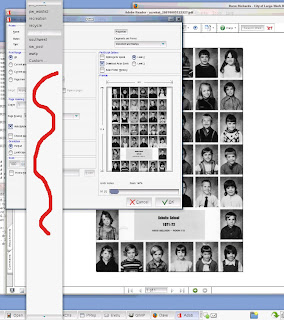
1) I have blogged about this before. Here is how Acrobat looks to the users when selecting a printer. Note the white space in the widgets. Someone told me this was being fixed, but apparently that hasn't been built into new OS's. (shot of printer selection below) We have 60 printers and they have to scroll up through the widget to find their printer.

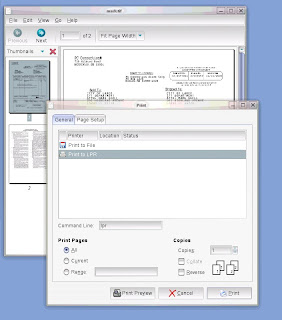
2) Sometimes people ask why I don't use Evince instead of Acrobat. Well, it's even worse. My bug report today indicates this is the new printer dialog, and now the report was pushed over to gtk+. First of all the printers don't display, and require users to enter their own printer commands (ack!). And then even if they enter the right command, it still doesn't work. The print job is stuck until evince is closed. (shot of new dialog below). And because of "internet time", even if a fix is made in the most recent library versions, I'm stuck with no fix for OpenSuse 10.2 because it's too 'old'.


3) So why not use eog for these tiff images right? Well firstly it won't load multi-page images and on OpenSuse 10.2 and SLED 10 it prints the first page as a solid black box. (shot of output of tiff black output). This is how images print from Evolution as well, it's not just a eog problem.


4) And the user experience is made worse by the fact that some operating systems make the default printer the default for all users. The printers don't "stick" and have to be reset each time they print...making them go through all of the bad dialogs mentioned above. (shot of yast2 setting a system wide printer for *all* users).


5) When you print a calendar from Evolution, it doesn't print the "Location" which is the second most useful piece of information. Many power users print their daily calendars and walk from meeting to meeting...but have hand write the location information on the printout.


I have been having some conversations with the Tomboy and Evolution developers about adding additional printer options and hope that all of the projects consider this in the design. If you want to earn the love of users, make them print well and with many options.

[ Update ] The evince developers showed me how to build evince using the old style printer dialog, and now that's working. Turns out that the cups backend is not enabled on the new printer dialog on OpenSuse 10.2. It's a compile time option and is set to file,lpr instead of file,cups.

Tuesday, June 12, 2007

When Major Problems Are Left Open

There are a lot of developers out there, and I certainly understand that everyone is busy. I'm sure that everyone perceives that their bugs are important, but in some cases certain issues should be blockers and resolved. It's always fun to work on new features, but I sure would trade those features for stability.

At some point GNOME started using Cairo...which fails to support 8 and 16 bit color depth on Citrix Metaframe for Unix Xservers:

Error: Cairo does not yet support the requested image format:
Depth: 16
Alpha mask: 0x00000000
Red mask: 0x00007c00
Green mask: 0x000003e0
Blue mask: 0x0000001f

Error: Cairo does not yet support the requested image format:
Depth: 8
Alpha mask: 0x00000000
Red mask: 0x00000000
Green mask: 0x00000000
Blue mask: 0x00000000

I entered bug reports April of 2006 and then again February of 2007 and here we sit. We are finally at a point where I can't keep older versions of operating systems running and *have* to upgrade. I have to check color depths when users launch applications in GNOME and for these 2 depths I have to use xmessage for the dialog because zenity too won't work. Not cool. Support is having to alter settings in devices and take support calls and in some cases we will have users that have a few applications that are down until our new thin clients arrive.

Can we get some love in these areas so that we get back to what worked fine 5 years ago?

[Update] Research and checking the bug reports have indicated a lot of people having these types of problems. This library should not have been pushed into GNOME until it was ready. These aren't minor issues!

Friday, June 08, 2007

It Doesn't Matter If I Can Use It

My blogs over the last year have been mostly technical, and *my* thoughts and usage of technology. But in a way, it doesn't matter if I can use it. Without users, there is no need to have System Administrators. It's my job to act as a buffer for the users, and try and monitor changes in technology that are fits for a business environment.

We have about 10 people using our new thin clients on a 3D desktop, and they are having success and enjoy the experience. So I wanted allocate one blog to talking about *real* people. These are users that do not care about technical issues, and just want to get their work done on a modern computer network.

The picture below is of Linda. The Executive Secretary for Management Services. When I walked up she was testing the new Chart2 module in OpenOffice and learning how it works. She is a heavy Evolution and OpenOffice user.


The picture below is Sandy, the Executive Secretary for the Fire Department. She heavily uses Evolution and OpenOffice. She is in the process of merging multiple documents into a massive Master Document so that an automatic table of contents can be generated. She also gains access to a few Microsoft Windows applications via Citrix.


The picture below is Jo-Ann, the Executive Secretary from Human Resources. She uses Evolution and OpenOffice very heavily as well.


These 3 people, along with the other testers have provided me with invaluable information and suggestions about little things that can be done to improve the desktop experience. So today, my hat is off to them.